📌 Planning to Replace Your Phone? Don’t Lose Your Data!
Before upgrading or replacing your smartphone, the most crucial step is creating a backup of your important files. Whether it’s personal photos, work documents, or app data, having a secure backup ensures a smooth transition to your new device without losing any information.
🔹 1. Use Cloud Storage Services
Cloud storage offers a secure and convenient way to store and restore your data anytime. Popular options include:
✔ Google Drive – Ideal for Android users to back up photos, videos, and files.
✔ iCloud – Best for iPhone users to sync photos, contacts, and notes.
✔ OneDrive / Dropbox – Additional options for cross-platform file storage.
🔹 2. Back Up Photos & Videos
📷 Android Users: Enable Google Photos for automatic cloud backup.
📷 iPhone Users: Activate iCloud Photos or use Google Photos for backup.
📷 Alternative: Transfer media files manually to a PC or external hard drive.
🔹 3. Save Contacts & Messages
📞 Sync Contacts: Ensure your contacts are backed up with Google (Android) or iCloud (iPhone).
💬 WhatsApp Chats: Go to Settings > Chats > Chat Backup and store them on Google Drive or iCloud.
📩 SMS Backup: Use apps like SMS Backup & Restore to save text messages.
🔹 4. Back Up Apps & App Data
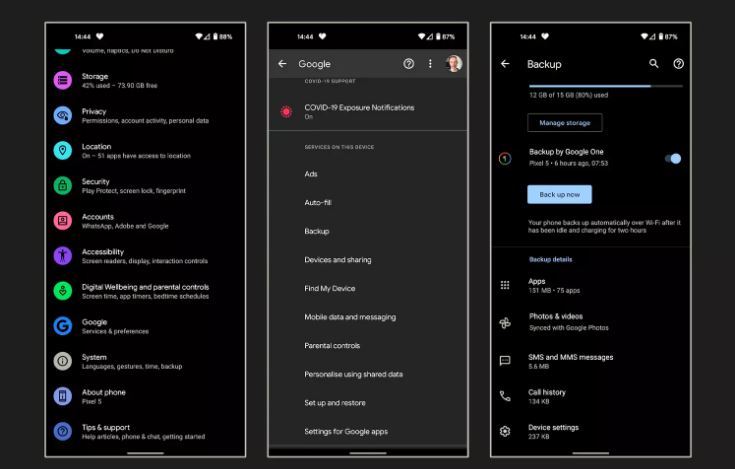
📲 For Android: Use Google Backup via Settings > Google > Backup.
📲 For iPhone: Go to Settings > iCloud > Backup Now.
📲 Manual Backup: Some apps require separate manual backups—check app settings.
🔹 5. Transfer Files to a PC or External Storage
💾 If you don’t want to use cloud storage, manually back up files by:
✔ Connecting your phone to a PC via USB and copying essential files.
✔ Using an SD Card or external hard drive for additional storage.
🔹 6. Verify Your Backup Before Switching Phones
✅ Before erasing your old phone, test the backup by restoring a few files or logging into your cloud accounts.
🔒 Conclusion
🚀 Backing up your data is essential before changing phones!
🚀 By following these steps, you’ll ensure a smooth and secure transition to your new device.
🔹 Read More: Matrix219.Net – Secure Mobile Backup