Smartphones have become an essential part of everyday life, serving as primary tools for communication, banking, work, and personal data storage. As their importance grows, so does their attractiveness to hackers, cybercriminals, and unauthorized surveillance attempts. Mobile devices can be targeted through malicious apps, phishing attacks, insecure networks, or hidden system vulnerabilities. For this reason, understanding how to detect potential security breaches is critical to protecting personal information and maintaining device integrity. This article explores important security codes and effective preventive measures that can help users identify suspicious activity and strengthen their smartphone security against modern threats.
Essential Security Codes to Check for Hacking
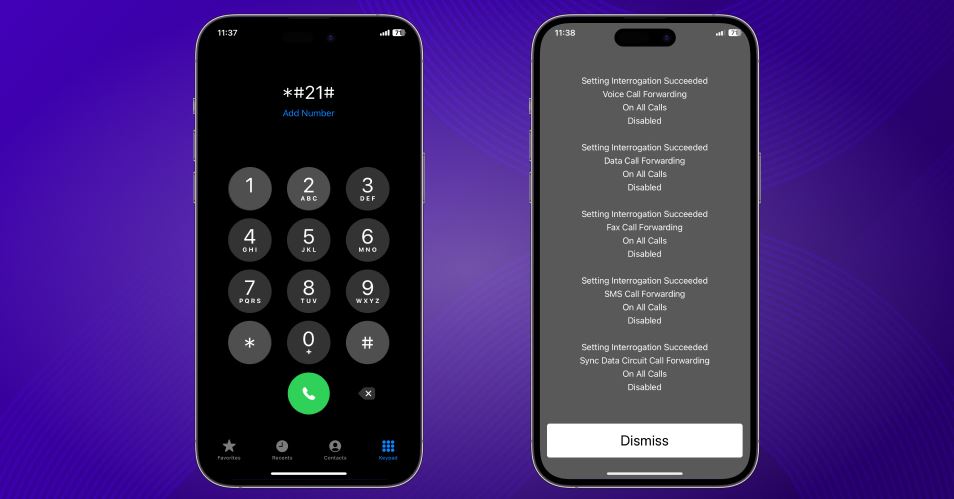
*1. Code: #21#
This code helps you check if your calls and messages are being forwarded to an unknown number. If you notice any unexpected call redirections, your phone may be compromised.
*2. Code: #62#
Use this code to verify whether calls that go unanswered or when your phone is out of network are being diverted to another number. Any suspicious redirection could indicate unauthorized access.
3. Code: ##002#
If you suspect any unauthorized call forwarding, dial this code to disable all call diversions immediately.
*4. Code: #06#
This code displays your phone’s IMEI number, which serves as a unique identifier for your device. If the IMEI displayed doesn’t match the one on your phone’s box, your device may have been tampered with.
Additional Security Measures
1. Check Installed Apps
Spyware apps often operate in the background without being easily visible. Regularly review your installed apps and uninstall any suspicious or unknown applications.
2. Monitor Battery Consumption
If your battery drains faster than usual, it could indicate the presence of spyware running in the background. Check your phone’s battery usage statistics for unusual activity.
3. Track Data Usage
A sudden increase in mobile data usage may signal a malicious app transmitting your data to third parties. Monitor data consumption to identify any anomalies.
4. Factory Reset as a Last Resort
If you believe your phone has been severely compromised, performing a factory reset is a reliable solution. This will erase all data and potential spyware, but ensure you back up your important files beforehand.
Conclusion
Using security codes alongside regular monitoring of your phone’s activity provides an effective way to detect and prevent unauthorized access. Identifying unusual behavior early allows users to take immediate corrective action, reducing the risk of data loss or privacy violations. In addition, keeping the device’s software up to date, installing applications only from trusted sources, and following basic security best practices significantly strengthens overall protection. Together, these measures help maintain device integrity and ensure a higher level of smartphone security in an increasingly threat-driven digital environment.
For further details, visit the original source:
Check If Your Mobile Has Been Hacked – Matrix219.Net