Knowing how to report a phishing attack properly is a critical step in reducing damage and preventing future victims. Many users delete phishing messages or ignore suspicious activity without reporting it, allowing attackers to continue operating unnoticed.
Reporting phishing attacks helps organizations, service providers, and security teams respond faster, block malicious infrastructure, and protect others. This article explains when and how to report phishing attacks correctly, who to report them to, and what information actually matters.
Quick Navigation
Why Reporting Phishing Attacks Matters
Phishing attacks rarely target a single victim. Reporting helps to:
-
Disrupt active attack campaigns
-
Protect other users
-
Improve detection systems
-
Support investigations and takedowns
Unreported phishing attacks often remain active longer and cause wider damage.
When You Should Report a Phishing Attempt
Not every suspicious message requires deep analysis, but phishing should be reported when:
-
A message impersonates a real organization
-
Credentials or payments are requested
-
Links or attachments appear deceptive
-
The message creates urgency or fear
These indicators align with patterns discussed in Common Social Engineering Red Flags Most Users Miss
How to Report a Phishing Email Properly
Email phishing is the most common attack type and the easiest to report.
Best practices include:
-
Do not click links or open attachments
-
Use the email client’s “Report Phishing” option
-
Forward the message to the organization being impersonated
-
Notify internal IT or security teams if applicable
This process is especially important for attacks similar to Email Phishing Examples and How to Spot Them
How to Report Phishing Links and Websites
When phishing involves malicious websites:
-
Do not log in or submit information
-
Copy the suspicious URL without visiting it
-
Report the site to the affected service provider
-
Alert internal security teams if accessed at work
This helps disrupt attacks based on techniques described in How Attackers Clone Legitimate Websites for Phishing
How to Report SMS and Voice-Based Phishing
Phishing is not limited to email.
For SMS phishing:
-
Do not reply
-
Report the message to your mobile carrier
-
Block the sender
For voice phishing:
-
Hang up immediately
-
Do not share information
-
Report the call if reporting channels exist
These steps are relevant for attacks such as Smishing Attacks: SMS-Based Phishing Explained and Vishing Attacks: Voice Phishing Scams on the Rise
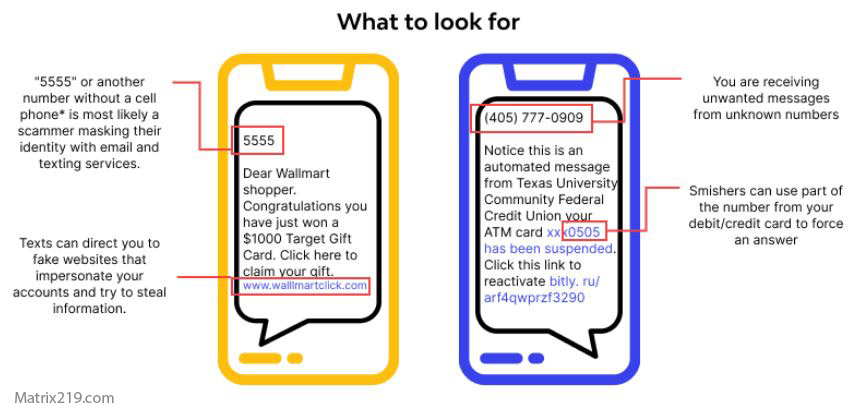
Smishing Attacks SMS-Based Phishing Explained
What to Do If You Already Interacted With Phishing
If you clicked a link or shared information:
-
Change affected passwords immediately
-
Revoke app permissions if applicable
-
Enable or reset multi-factor authentication
-
Notify security or support teams
Quick action limits damage and reduces long-term risk.
Common Reporting Mistakes Users Make
Reporting often fails due to:
-
Deleting messages without reporting
-
Reporting without context or evidence
-
Waiting too long after interaction
-
Assuming “someone else will report it”
These delays allow attackers to operate longer.
How Organizations Should Handle Phishing Reports
Organizations should:
-
Make reporting simple and visible
-
Respond quickly to reports
-
Communicate outcomes to employees
-
Use reports to improve training and controls
Effective reporting closes the loop between detection and prevention.
External Guidance on Reporting Phishing
Cybersecurity authorities consistently stress that reporting phishing is as important as avoiding it, as reflected in CISA Phishing Reporting Guidance
Frequently Asked Questions (FAQ)
Should I report phishing even if I didn’t click anything?
Yes. Reporting helps stop the attack for others.
Is reporting phishing safe?
Yes. Reporting does not expose you to additional risk.
Who should I report phishing to at work?
Your IT or security team using the approved reporting method.
What if I’m not sure it’s phishing?
Report it anyway. Security teams prefer false positives over missed attacks.
Does reporting phishing really make a difference?
Yes. Many takedowns and blocks start with user reports.
Conclusion
Learning how to report a phishing attack properly turns individual awareness into collective defense. Avoiding phishing protects you, but reporting phishing protects everyone else.
Effective phishing defense depends on fast reporting, clear processes, and shared responsibility. When users report attacks early, attackers lose speed, reach, and impact.