
App permissions security is one of the most powerful—and most ignored—defenses on modern phones. Most real-world compromises don’t break the operating system; they abuse permissions users grant willingly. Once an app gets the wrong permission, it can read screens, capture verification codes, monitor activity, or persist quietly without triggering alarms.
This article explains which permissions matter most, how attackers misuse them, how to audit permissions safely, and how to set long-term rules that reduce risk without breaking everyday apps. The goal is control, not paranoia.
Quick Navigation
Why Permissions Matter More Than Antivirus
Permissions define capability.
What permissions actually do
-
Decide what an app can see and control
-
Allow background behavior without alerts
-
Enable persistence across reboots
If an app has the right permission, it doesn’t need malware tricks.
For the bigger context, review: If Your Phone Is Hacked: How to Know, What to Do, and How to Stay Safe
The High-Risk Permissions You Must Audit
Not all permissions are equal.
Permissions attackers abuse most
-
Accessibility services (screen reading, input control)
-
Notification access (reading OTPs and messages)
-
Device administrator (preventing removal)
-
VPN / network control (traffic interception)
-
Screen overlay / display over apps (fake logins)
Any app holding these without a clear, necessary reason is a red flag.
Deep explanation: Unknown apps & permissions explained
How Permission Abuse Leads to Full Compromise
Permissions are usually the entry point.
Typical escalation path
-
App requests a “harmless” permission
-
User grants it to proceed
-
App reads notifications or screens
-
Verification codes and logins are captured
-
Accounts and backups restore access
This is why problems return after cleanup.
For the full sequence, see: If Your Phone Is Hacked: Step-by-Step Recovery Guide (Android & iPhone)
Android vs iPhone: Permission Reality
Platforms expose permissions differently.
Android permission behavior
-
More granular—but easier to abuse
-
Accessibility is the highest-risk area
-
Sideloading increases exposure
Context: If your Android phone is hacked
iPhone permission behavior
-
Strong sandboxing by default
-
Configuration profiles change the game
-
Notification access still matters
Context: If your iPhone is hacked
How to Audit Permissions Safely
Order matters to avoid retaliation.
Safe audit sequence
-
Review permissions by type, not app name
-
Identify apps with high-risk permissions
-
Revoke permissions first
-
Observe behavior
-
Uninstall only after access is removed
If settings revert or permissions re-enable themselves, stop and reassess.
Safe removal guidance: Remove hacker access safely
Common Permission Traps People Miss
These look normal—but aren’t.
Subtle red flags
-
Apps requesting accessibility “for convenience”
-
Utilities needing notification access
-
VPNs with no clear provider
-
Apps without icons or generic names
Legitimate apps explain why they need access—clearly.
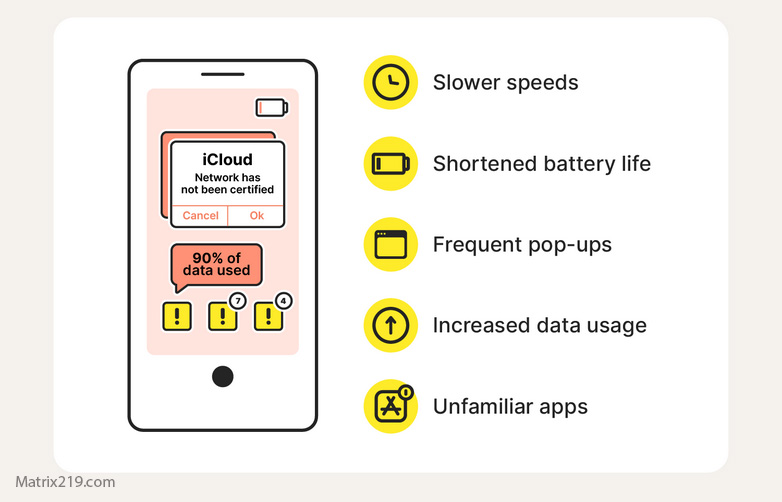
red flags hacked phone
Long-Term Permission Rules That Actually Work
Habits beat tools.
Practical permission rules
-
Deny by default, allow temporarily
-
Revoke permissions after tasks complete
-
Review high-risk permissions monthly
-
Avoid “all-in-one” utility apps
-
Be suspicious of apps that won’t function without broad access
These rules prevent most permission-based attacks.
Permissions and Backups: The Hidden Risk
Permissions can survive restoration.
Why backups are dangerous
-
App data may restore permission state
-
Settings re-enable silently
-
Cleanup appears to “fail”
Backup safely or not at all after compromise.
Guidance: How to backup safely from a hacked phone
When Permission Control Is Not Enough
Know when to escalate.
Escalate if:
-
Permissions re-enable after reboot
-
Apps reinstall themselves
-
Root or jailbreak is suspected
At that point, reset or replacement may be safer.
Reset limits: Factory reset: when it works & when it doesn’t
The Real Permission Mindset
Permissions are contracts.
If an app doesn’t need a permission to do its core job, don’t grant it. Convenience is not a security requirement.
Security research consistently shows that permission abuse—especially accessibility and notification access—is the most common persistence mechanism in mobile spyware and account takeover campaigns Mobile app permission abuse and persistence analysis
Frequently Asked Questions
Are all apps with many permissions dangerous?
No. Some legitimate apps need multiple permissions. Risk depends on which permissions and whether the need is clear and proportional to the app’s function.
Is accessibility permission always unsafe?
It’s not always unsafe, but it’s high-risk. Only assistive apps from trusted developers should have it, and it should be reviewed regularly.
Should I deny permissions until an app breaks?
Yes, that’s a safe approach. Grant permissions only when a feature clearly requires it, then reconsider after use.
Do permissions reset after factory reset?
Yes—but restoring app data or backups can reintroduce them. That’s why selective restore matters after hacking.
How often should I review permissions?
At least monthly, and immediately after installing new apps or after any security incident.