Spyware removal becomes urgent when you have credible reasons to believe that your phone or accounts may be compromised. At this stage, the goal is not simply to delete an unfamiliar app. The priority is to protect your safety, contain the compromise, secure your accounts, and determine whether the problem is actually device spyware, account access, or another security issue.
Removing spyware is not always as simple as deleting an application. Depending on the situation, unauthorized monitoring may involve malicious apps, excessive permissions, compromised accounts, device management settings, configuration profiles, or access that has already been established outside the phone itself.
This guide explains what to do step by step when spyware is suspected or confirmed, while avoiding actions that could accidentally preserve the compromise, destroy useful evidence, or alert someone who may be monitoring the device.
Quick Navigation
First Rule: Protect Your Safety Before Removing Anything
If you suspect that a partner, former partner, family member, coworker, or another person with physical access to your phone may be monitoring you, do not assume that immediate removal is always the safest first step.
Changing settings, removing an application, resetting the phone, or researching the problem from the monitored device could alert the person responsible. In situations involving stalking, domestic abuse, or personal safety concerns, consider using a different trusted device to seek help or change important account credentials.
The FTC specifically warns that actions taken on a monitored phone can tip off an abuser and recommends considering a separate device when seeking help. Preserving evidence before making major changes may also be important.
If personal safety is involved, treat spyware removal as a safety and incident-response process rather than a routine technical cleanup.
Step 1: Secure Your Important Accounts From a Trusted Device
Before making major changes to a potentially compromised phone, secure the accounts that could provide continued access to your information.
If possible, use a separate trusted device that the suspected attacker cannot access.
- Change passwords for your primary email and important online accounts.
- Use strong, unique passwords that are not reused elsewhere.
- Enable multi-factor authentication where available.
- Review signed-in devices and active sessions.
- Remove devices or sessions that you do not recognize.
- Review account recovery methods and contact information.
This distinction is critical because a phone can be cleaned while an attacker still has access to an online account. In that situation, the attacker may regain access even after a factory reset.
For broader account recovery guidance, see How to Remove Hacker Access Safely.
Step 2: Determine What You Are Actually Dealing With
Not every unusual phone behavior means spyware is installed.
Battery drain, overheating, unexpected data usage, crashes, or unusual notifications can have many ordinary causes. A more meaningful investigation considers multiple indicators together, including unfamiliar applications, unexplained account activity, unexpected configuration changes, unauthorized device sessions, or another person knowing information they should not have access to.
The FTC lists several possible warning signs of stalkerware, including unexpected battery or data usage, overheating, unexpected restarts, and another person knowing private information or having had unsupervised access to the phone. These signs are indicators, not proof by themselves.
- If you want to investigate before removing anything, see How to Check a Phone for Spyware.
Step 3: Review Installed Apps
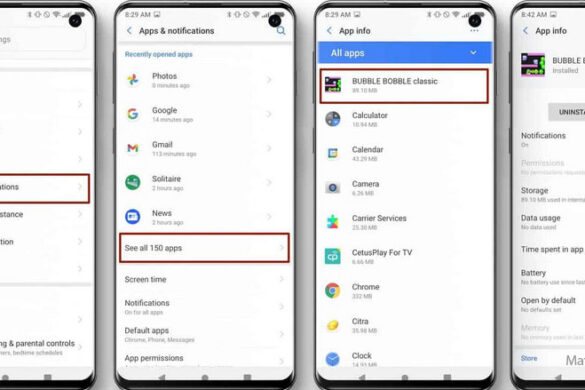
Review the applications installed on the device and look for anything you do not recognize, did not intentionally install, or cannot verify.
Do not assume that an unfamiliar application is automatically spyware. Some legitimate system components, device-management tools, accessibility services, and manufacturer applications may not be immediately recognizable.
If an application appears suspicious, check what permissions and special access it has before removing it.
On Android devices, Google Play Protect can scan installed applications for potentially harmful software and may warn about or remove malicious applications. Google recommends keeping Play Protect enabled and installing available security updates.
- For a deeper explanation of the permissions that can become relevant, see Spyware Permissions Explained.
Step 4: Review High-Risk Permissions and Special Access
Some forms of mobile surveillance depend on permissions or special access rather than a conventional application that openly identifies itself as spyware.
Depending on the operating system and device, review areas such as:
- Accessibility access
- Device administrator or device-management access
- Notification access
- Location permissions
- Microphone and camera permissions
- SMS or call-related permissions
- VPN or network-related settings
- Other special application access
The exact names and locations of these controls vary between Android versions and manufacturers, so avoid following instructions written for a different device without checking what the setting actually controls.
Removing an application’s permission can reduce its ability to access certain information, but it does not necessarily prove that the device or account is completely clean.
Step 5: Check Configuration Profiles and Device Management
On supported devices, configuration profiles and device-management enrollment can change how a phone is configured or controlled.
On an iPhone, for example, unfamiliar configuration or management settings deserve investigation, especially if you did not intentionally install or authorize them.
Apple’s Lockdown Mode also restricts the installation of new configuration profiles and enrollment in Mobile Device Management while the mode is active, although existing managed devices remain managed. This is one example of why device-management settings should be treated as a distinct security layer rather than simply another application permission.
Do not remove a legitimate employer, school, or organization-managed profile without understanding what it controls.
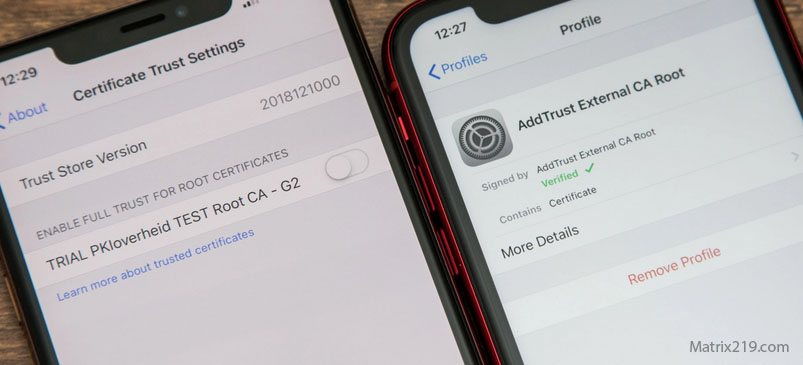
Remove Configuration Profiles and Enterprise Certificates
Step 6: Remove Suspicious Software Only When It Is Safe to Do So
If you have identified a suspicious application and there is no safety reason to delay removal, uninstall it using the normal controls provided by the operating system.
If the application cannot be removed normally, check whether it has special permissions or device-management access that must be revoked first.
Do not install several third-party “spyware remover” applications simply because they claim to detect surveillance. More software can create additional uncertainty and does not guarantee that account-based or configuration-based access has been removed.
- For a more detailed manual approach, see How to Remove Spyware Manually.
Step 7: Update the Phone and Its Security Software
Install the latest available operating system and security updates for your device.
Security updates can address known vulnerabilities and reduce the chance that an attacker can exploit an outdated component.
Google recommends checking Android and security updates when responding to suspected malware, while Apple recommends keeping devices updated as part of its general protection guidance against both ordinary and highly sophisticated threats.
Updating does not prove that spyware has been removed, but running an outdated operating system unnecessarily increases exposure to known security weaknesses.
Step 8: Decide Whether a Factory Reset Is Necessary
A factory reset can be an effective way to remove many forms of application-level malware and stalkerware, but it should not be treated as a universal solution.
A reset does not automatically secure a compromised online account, reverse information that has already been stolen, or prevent an attacker from accessing an account again with valid credentials.
If you decide to reset the phone:
- Secure important accounts first, preferably from a separate trusted device.
- Preserve important evidence if the situation requires it.
- Perform the official factory-reset procedure for your device.
- Install the latest operating system updates.
- Reinstall applications selectively rather than restoring everything blindly.
- Review account sessions and security settings again after setup.
The FTC specifically advises people dealing with stalkerware not to automatically reinstall applications from an old backup after a reset because doing so could reinstall the stalkerware.
For more detail, see When a Factory Reset Works and When It Doesn’t.
Step 9: Be Careful With Backups and Restored Data
Backups are useful for recovering personal data, but restoring everything automatically can recreate some of the conditions that caused the original problem.
When there is a credible spyware or stalkerware concern, reinstall applications manually from trusted sources when practical. Review what you are restoring instead of assuming that every application and setting from the old device is safe.
The FTC specifically recommends downloading applications again rather than restoring them from a backup when dealing with stalkerware.
If you need to preserve data from a potentially compromised phone before resetting it, see How to Back Up Safely From a Hacked Phone.
Step 10: Rebuild the Device Slowly
After cleanup or a reset, avoid immediately reinstalling every application and reconnecting every account.
Instead, rebuild the device gradually:
- Install only applications you actually need.
- Use official application stores whenever possible.
- Review permissions during setup.
- Enable multi-factor authentication for important accounts.
- Use unique passwords and secure recovery methods.
- Keep the operating system and applications updated.
- Review active sessions and connected devices.
A slower rebuild makes it easier to identify whether a particular application, account, or setting is responsible if the original symptoms return.
When Spyware Removal May Not Be Enough
Some situations require more than ordinary troubleshooting.
Consider professional assistance when you have strong evidence of a sophisticated targeted attack, persistent compromise after a properly performed reset, unusual device-management behavior that you cannot explain, or a situation involving significant personal or professional risk.
Apple describes mercenary spyware attacks as extremely rare and highly sophisticated, and recommends additional protections such as Lockdown Mode for the small number of people who may face these threats. Most users will never be targeted by attacks of this type.
If the phone is involved in a legal dispute, stalking situation, or other incident where evidence matters, consider preserving evidence and obtaining appropriate professional advice before wiping the device.
What Not to Do
- Do not panic and immediately delete everything without considering safety or evidence.
- Do not confront a suspected attacker using a potentially monitored device.
- Do not assume battery drain alone proves spyware.
- Do not assume a clean malware scan proves that all account access has been removed.
- Do not install multiple questionable “spyware remover” applications.
- Do not blindly restore every application and setting from an old backup after a suspected compromise.
- Do not ignore compromised email, cloud, or social-media accounts after cleaning the phone.
- Do not remove legitimate employer or school management profiles without understanding their purpose.
How to Know Whether the Situation Is Under Control
There is no single test that can prove a phone is completely free from every possible form of surveillance.
A stronger recovery assessment looks at several layers:
- No unexplained malicious or unauthorized applications remain.
- Important permissions and special access have been reviewed.
- Unknown device-management or configuration settings have been investigated.
- Important online accounts have been secured.
- Unknown account sessions and connected devices have been removed.
- The operating system and applications are up to date.
- The device has been rebuilt carefully if a factory reset was performed.
- No credible signs of the original compromise continue to appear.
The objective is not to achieve absolute certainty from one scan. It is to systematically remove the known access paths and reduce the likelihood of recurrence.
FAQ
Can deleting one app remove all spyware?
Sometimes, but not always. The problem may also involve account access, permissions, device-management settings, configuration profiles, or information that has already been stolen. Removing one application does not automatically secure the rest of the system.
Is a factory reset always necessary?
No. A reset is not automatically required for every suspected spyware case. However, it can be an effective cleanup option when there is credible evidence of application-level compromise and the device can be safely reset and rebuilt.
Can spyware come back after a factory reset?
A reset may remove spyware from the device, but the underlying risk can return if a compromised account remains accessible, malicious software is reinstalled, or an unsafe backup is restored. The device and the accounts must be secured together.
Should I get a new phone?
Not usually as the first step. A new phone may be appropriate in certain high-risk or persistent situations, particularly when there is concern about ongoing access to the old device or accounts. For stalkerware situations, the FTC notes that getting a new phone with an account the suspected abuser cannot access may be the safest option in some circumstances.
How do I know if spyware removal worked?
There is no universal single test. Confidence improves when suspicious applications and access paths have been removed, accounts have been secured, unknown sessions have been revoked, the device is updated, and the original unexplained behavior does not return.
Can a compromised account make it look like spyware is still on my phone?
Yes. An attacker with access to an email, cloud, social-media, or other account may continue seeing information even after the phone itself has been cleaned. That is why account security is a separate and essential part of spyware removal.