Protecting digital files is no longer a niche concern limited to cybersecurity professionals. In 2026, file encryption and decryption software has become a practical necessity for individuals, remote workers, developers, and organizations of all sizes. Files now move constantly between devices, cloud platforms, external drives, and shared environments—often without clear visibility into who can access them or how they are actually protected.
Many users assume that using any encryption tool automatically means their data is safe. In reality, weak implementations, poor key management, or misleading software can create a false sense of security that collapses the moment something goes wrong.
Understanding how file encryption actually works—and where it commonly breaks down—is far more important than simply choosing a popular or widely marketed solution.
Best File Encryption and Decryption Software in 2026 serves as a practical, non-marketing reference for understanding how modern file encryption tools protect data in real-world conditions. Instead of listing products, this guide explains the underlying principles, limitations, and trade-offs that determine whether encryption truly protects data or merely appears to do so.
You will learn how file encryption software operates in practice, what separates reliable solutions from misleading ones, how performance and usability directly influence security, and why choosing the wrong approach can quietly undermine data protection over time.
The goal is to help you make informed decisions that remain valid as threats, workflows, and technologies continue to evolve.
Quick Navigation
How File Encryption and Decryption Software Actually Works
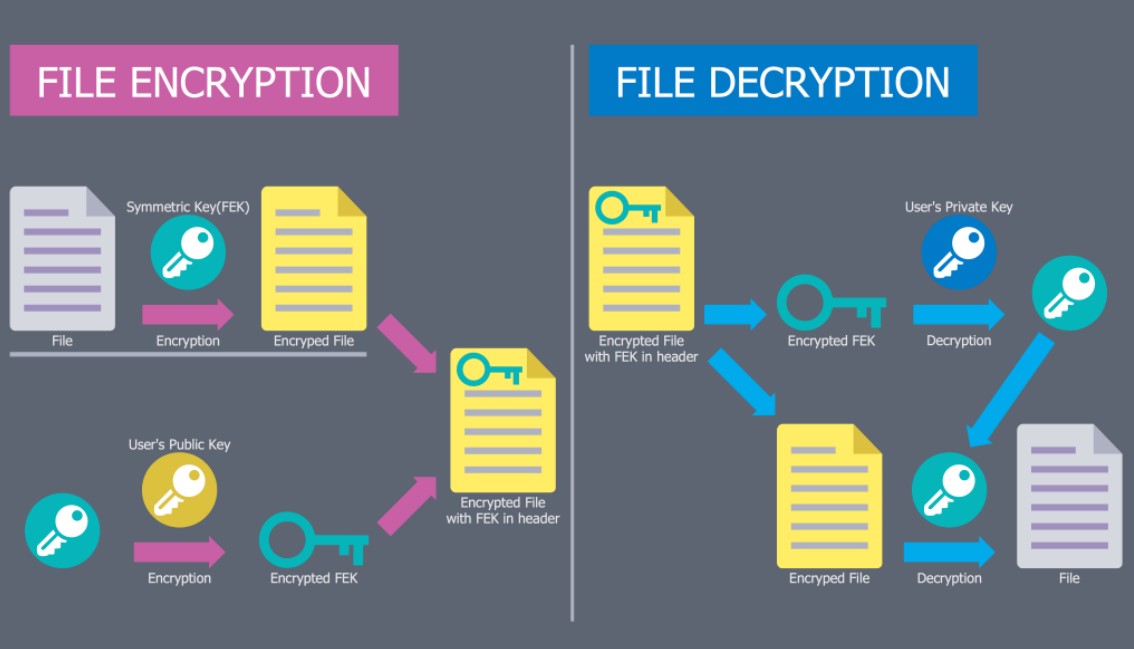
How File Encryption and Decryption Actually Work
Encryption as a Data Transformation Process
File encryption converts readable data into an unreadable format using mathematical algorithms and secret keys. This transformation ensures that the file cannot be interpreted or reconstructed without access to the correct encryption key.
Even if encrypted files are intercepted or copied, they remain unusable as long as the underlying encryption process and key management are properly implemented.
Decryption and Controlled Access
Decryption reverses the encryption process only when valid credentials or cryptographic keys are provided. This controlled access model ensures that only authorized users or systems can restore encrypted data to its original form.
Secure encryption tools are designed to minimize data exposure during decryption, preventing sensitive information from lingering in memory, temporary files, or system caches.
Why File-Level Encryption Matters
Why File-Level Encryption Matters
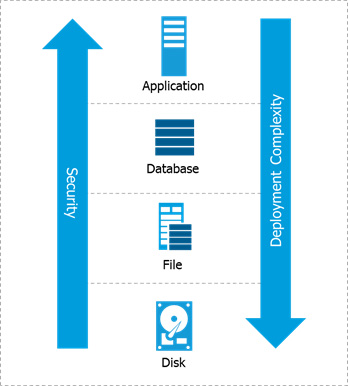
Unlike full-disk encryption, file-level encryption protects data independently of the device it resides on. This means files remain encrypted even after they are copied, shared, or moved to different systems or storage environments. This level of protection is especially important for cloud storage, file sharing, and collaborative workflows, where data frequently leaves the boundaries of a single trusted device.
For a detailed foundation, see What Is File Encryption and Decryption?
Symmetric, Asymmetric, and Hybrid Encryption Models
Symmetric Encryption for File Protection
Symmetric encryption uses a single secret key for both encryption and decryption, which makes it fast and efficient. This performance advantage makes it well suited for protecting large files and handling frequent encryption operations. However, the main challenge lies in securely storing and sharing the secret key, as anyone who gains access to it can decrypt the protected files.
Asymmetric Encryption for Secure Key Exchange
Asymmetric encryption relies on a pair of cryptographic keys: a public key for encryption and a private key for decryption. This separation allows encryption keys to be shared without exposing the underlying secret. While asymmetric encryption improves key distribution security, it is computationally heavier and typically used for exchanging keys rather than encrypting large files directly.
Hybrid Models in Modern Software
Hybrid encryption models combine symmetric and asymmetric methods to leverage the strengths of both approaches. Symmetric encryption handles bulk file protection, while asymmetric encryption secures the exchange of encryption keys. This hybrid design is widely used in modern file encryption software because it balances performance, security, and practical usability in real-world environments.
A technical comparison is covered in Symmetric vs Asymmetric File Encryption.
Common File Encryption Algorithms Used Today
AES and Modern Symmetric Standards
AES remains the dominant encryption standard due to its strong security properties, high performance, and broad adoption across operating systems and applications. It is widely used for encrypting files because it can handle large amounts of data efficiently.
When implemented correctly, AES provides a reliable balance between speed and protection, making it suitable for both personal and enterprise file encryption scenarios.
RSA and Elliptic Curve Cryptography
RSA and elliptic curve cryptography are primarily used for secure key exchange rather than encrypting entire files. These algorithms allow encryption keys to be shared safely without exposing private secrets. Because of their computational cost, they are typically combined with symmetric encryption instead of being used directly for bulk data protection.
Algorithm Choice vs Implementation Quality
Choosing a strong encryption algorithm is only one part of effective data protection. Even well-established algorithms can fail if they are poorly implemented or configured incorrectly. Weak randomness, flawed key handling, or insecure software design can undermine encryption, regardless of how strong the underlying algorithm appears on paper.
A deeper explanation is available in Common File Encryption Algorithms (AES, RSA, ChaCha20).
What Makes File Encryption Software Reliable in 2026
Security Architecture and Transparency
Reliable file encryption software clearly explains how files are encrypted, which algorithms are used, and how encryption keys are generated and stored. Transparency allows users and security professionals to evaluate whether protection is real or only claimed. Tools that hide technical details behind vague marketing language often rely on weak or incomplete protection, making it difficult to assess their actual security guarantees.
Key Management and Ownership
True file security depends more on key control than on the strength of encryption algorithms themselves. If users do not fully control their encryption keys, the protection can be bypassed or revoked without their knowledge. Reliable software allows users to create, store, back up, and rotate encryption keys independently, without relying on hidden third parties or opaque recovery mechanisms.
Resistance to Real-World Threats
Modern threats include stolen devices, malware infections, insider access, and accidental data exposure. Encryption software must be designed to limit damage even when parts of the system are compromised. Effective tools assume that failures will happen and focus on reducing the impact of breaches rather than relying on ideal operating conditions.
File Encryption for Personal and Professional Use Cases
Individual File Protection
Personal users typically prioritize simplicity, quick setup, and minimal performance impact when encrypting files. Encryption solutions must be easy to use without requiring deep technical knowledge. At the same time, even simple tools should provide strong defaults to prevent accidental misconfiguration or weak protection.
Business and Team-Based Environments
Organizations require more structured encryption controls, including role-based access, centralized key management, and detailed auditability. These features help enforce security policies across teams and departments. Without centralized oversight, encrypted data can become difficult to manage or recover in larger environments.
Remote Work and Distributed Teams
Remote and distributed teams rely heavily on file sharing across devices, networks, and geographic locations. Encryption ensures that files remain protected even when accessed outside traditional office environments. This is especially important when employees use personal devices or connect through untrusted networks.
Relevant guides include:
File Encryption and Cloud Storage Realities
Encrypting Before Uploading
Client-side encryption ensures that cloud providers never see plaintext data, as files are encrypted before leaving the user’s device. This approach gives users direct control over encryption keys and data confidentiality. By encrypting files locally, sensitive information remains protected even if the cloud storage service itself is compromised.
Risks of Cloud-Only Encryption
Relying solely on cloud-only encryption limits user control over encryption keys and security policies. In many cases, cloud providers manage the keys, which reduces transparency and user ownership. This model can expose data to internal access, legal requests, or configuration errors beyond the user’s direct control.
Balancing Convenience and Control
Effective file encryption solutions integrate smoothly with cloud workflows without adding unnecessary complexity. Users should not have to choose between usability and strong data protection. The best approaches balance convenience with meaningful key control and clear security boundaries.
For practical scenarios, see File Encryption for Cloud Storage.
Encrypting Files by Type and Format
Documents and PDFs
Some encryption tools preserve document structure, metadata, and formatting more reliably than others. This is important when protecting sensitive documents that need to remain fully usable after decryption. Choosing the right tool helps avoid data corruption or unexpected loss of document features.
Images, Videos, and Media Files
Encryption should protect media files without degrading quality or altering file integrity. Media encryption must ensure that files remain identical to their original state after decryption. This is especially important for large video files and high-resolution media used in professional environments.
Archives and Compressed Files
Encrypting archives can simplify file protection by securing multiple files with a single operation. However, this approach increases reliance on a single encryption key. If the key is lost or compromised, access to all files within the archive may be affected.
Learn more in:
External Drives and Portable Storage
USB Drives and External Hard Disks
Portable storage devices such as USB drives and external hard disks significantly increase exposure risk due to their small size and ease of loss or theft. Encrypting data on these devices helps protect sensitive files even if the hardware is physically compromised.
Strong encryption is especially important for portable media because these devices often move between systems and environments with varying security levels.
Cross-Platform Compatibility
Encrypted files stored on portable media should remain accessible across different operating systems and devices. Compatibility issues can prevent users from accessing critical data when they need it most. Reliable encryption software supports multiple platforms without requiring complex setup or proprietary dependencies.
A focused discussion is available in File Encryption for USB and External Drives.
Trust, Risks, and Common Encryption Mistakes
Misleading or Fake Encryption Software
Some tools claim to provide encryption but only apply superficial obfuscation that can be easily reversed. These solutions create a dangerous illusion of security without offering real protection.
Users should be cautious of fake encryption software that lacks clear documentation, technical transparency, or independent verification.
Human Errors That Break Encryption
Human mistakes such as losing encryption keys, using weak passwords, or storing backups insecurely remain among the most common causes of data exposure. Even strong encryption cannot compensate for poor operational practices. Clear procedures and user awareness are essential to prevent avoidable encryption failures.
Overconfidence in Tools Alone
Relying solely on encryption software without considering how it is used can lead to serious security gaps. Encryption is only effective when combined with disciplined habits and proper system management. Assuming that tools alone can solve security problems often results in overlooked risks.
Detailed risk analysis is covered in:
What Happens When Things Go Wrong
Losing an Encryption Key
In most encryption systems, losing the encryption key results in permanent loss of access to the protected data. Strong encryption is designed to prevent recovery without the correct key. This makes secure key storage and backup strategies critical components of any encryption setup.
Recovering Encrypted Files
Recovery options depend entirely on how encryption keys were managed and whether backups or recovery mechanisms were put in place beforehand. Without proper planning, recovery may be impossible. Users should understand recovery limitations before relying on encryption for critical data.
Planning for Failure
Secure encryption setups assume that mistakes and failures will eventually occur. Documented recovery procedures and regular key backups help minimize damage when things go wrong. Planning for failure transforms encryption from a single-point solution into a resilient data protection strategy.
See What Happens If You Lose an Encryption Key? and How to Recover Encrypted Files.
Free vs Paid File Encryption Software in Practice
Strengths of Free and Open-Source Tools
Many free and open-source encryption tools offer strong cryptographic protection and a high level of transparency. This makes them suitable for individual users or professionals who understand how to configure and manage encryption properly.
Open access to source code can also allow independent security reviews, increasing trust when the software is actively maintained.
Limitations That Affect Long-Term Use
Free tools often lack centralized management features, structured recovery options, or guaranteed long-term updates. These limitations can become problematic as data volumes or organizational complexity grow. Without consistent maintenance, even technically sound tools may become security risks over time.
When Paid Solutions Become Necessary
Paid encryption solutions are often required in business and team environments where policy enforcement, access logging, and compliance reporting are essential. These features help organizations maintain control and accountability. As operational requirements increase, paid tools can reduce risk by providing structured management and vendor support.
An objective comparison can be found in Free vs Paid File Encryption Software.
Performance Impact and System Resources
Why Encryption Can Slow Down Systems
Encryption introduces additional computational overhead, which can slow down systems when processing large files or performing real-time encryption. CPU limitations and storage performance also play a significant role. Older hardware or poorly optimized software may experience noticeable performance degradation during encryption tasks.
Optimizing Performance Without Sacrificing Security
Performance impact can often be minimized by selecting appropriate encryption algorithms and tuning software settings. Not all use cases require the same level of real-time protection. Balancing security requirements with system capabilities helps maintain usability without weakening protection.
Hardware Acceleration Support
Modern processors often include built-in hardware acceleration for encryption operations. When supported by encryption software, this can significantly improve performance. Leveraging hardware acceleration allows strong encryption to run efficiently even on resource-constrained systems.
Compliance, Regulations, and Legal Considerations
Encryption and Data Protection Laws
Many data protection regulations require encryption for storing or transmitting sensitive information. These requirements are designed to reduce the impact of data breaches and unauthorized access. Failure to apply encryption where required can result in legal penalties and regulatory consequences.
Choosing Tools That Support Compliance
Compliance-focused environments require encryption tools that provide audit logs, policy enforcement, and clear access controls. These features help demonstrate adherence to regulatory standards. Without proper visibility and documentation, organizations may struggle to prove compliance during audits.
Avoiding Compliance Pitfalls
Improper key handling, undocumented access, or weak operational controls can still violate regulations even when encryption is technically in place. Compliance depends on both technology and process. Organizations must ensure that encryption practices align with legal and regulatory expectations.
Guidance aligned with NIST encryption standards is commonly used to evaluate algorithm strength and implementation reliability.
How to Choose the Right File Encryption and Decryption Software
Define Your Threat Model
Choosing the right encryption software begins with understanding who you are protecting data from and what risks you are addressing. Different threat models require different levels of protection. Without a clear threat model, it is easy to overestimate or underestimate security needs.
Match Tools to Real Needs
Encryption solutions should align with actual use cases rather than hypothetical scenarios. Overengineering simple workflows can create unnecessary complexity and new risks. At the same time, underprotecting sensitive data can leave critical assets exposed.
Plan for Growth and Change
Data volumes, workflows, and regulatory requirements change over time. Encryption software should be able to adapt without forcing disruptive migrations. Planning for growth helps ensure that today’s security decisions remain effective in the future.
Frequently Asked Questions (FAQ)
Is file encryption enough to fully secure data?
File encryption is a critical layer of protection, but it does not secure data on its own. Weak passwords, poor key management, insecure backups, or compromised systems can still expose encrypted files despite strong algorithms. Effective data security requires combining encryption with proper operational practices, such as secure key storage, access controls, and regular system updates.
Can encrypted files be safely shared?
Encrypted files can be shared safely if encryption keys are exchanged through secure and separate channels. Sharing files and keys together significantly weakens the protection provided by encryption. The security of shared encrypted files ultimately depends on how well access permissions and key distribution are controlled throughout the sharing process.
What happens if I forget my encryption password?
In most modern encryption systems, forgetting the password or losing the encryption key results in permanent loss of access to the encrypted file. There is usually no technical method to bypass or recover strong encryption. This is why secure key backups and documented recovery strategies are essential parts of any encryption setup.
Are modern encryption algorithms future-proof?
Current encryption algorithms are considered secure against today’s known threats when properly implemented. However, no algorithm is permanently future-proof as computing power and attack techniques continue to evolve. Regular software updates and adherence to modern cryptographic standards are necessary to maintain long-term security.
Does file encryption affect backups?
Encrypted files remain encrypted when backed up, which helps protect data if backup storage is compromised. However, backups are only as secure as the encryption keys used to protect them. If encryption keys are lost or mishandled, all associated backups may become permanently inaccessible.
Is open-source encryption software safer?
Open-source encryption software benefits from transparency, allowing experts to review and audit the code for weaknesses. This can increase trust when the project is actively maintained and widely reviewed. However, security still depends on correct configuration, regular updates, and responsible usage, regardless of whether the software is open-source or proprietary.