Choosing file encryption software in 2026 is no longer about finding any tool that claims to secure files. The real challenge is understanding how different approaches compare in practice—security depth, usability, key management, performance, and long-term reliability. Best File Encryption Software Compared (2026) targets users who are ready to decide and want clarity, not marketing noise.
This article provides a practical comparison framework for file encryption software without relying on vendor hype or superficial feature lists. Instead of ranking brands, it compares encryption models, control mechanisms, and real-world behavior so you can determine which type of solution fits your needs. This is especially important because the “best” software varies widely depending on whether you are an individual, a developer, or a business handling regulated data.
Quick Navigation
How File Encryption Software Should Be Compared
Security Model, Not Brand Names
The core question is how files are encrypted, not how popular the software is.
Key Ownership and Control
Who controls the encryption keys determines who truly controls the data.
Behavior Under Failure
Lost keys, compromised devices, and revoked access reveal real strengths and weaknesses.
This evaluation approach is grounded in Best File Encryption and Decryption Software in 2026 (Complete Guide).
Comparison Category 1: File-Level Encryption Tools
How They Work
These tools encrypt individual files or folders directly, keeping protection attached to the file.
Strengths
-
Persistent protection across devices and platforms
-
High portability
-
Clear security boundaries
Limitations
-
Manual key management
-
Limited scalability for teams
Comparison Category 2: Encrypted Containers and Archives
How They Work
Multiple files are stored inside a single encrypted container or archive.
Strengths
-
Simple to manage multiple files
-
Efficient for backups and transfers
Limitations
-
Single key protects everything
-
Limited access control granularity
Archive-based risks are explored in File Encryption for ZIP and Archive Files.
Comparison Category 3: OS-Level and Integrated Encryption
How They Work
Encryption is integrated into the operating system or storage layer.
Strengths
-
Transparent user experience
-
Minimal manual effort
Limitations
-
Protection often stops at the device boundary
-
Limited portability
This distinction is explained in File Encryption vs Disk Encryption.
Comparison Category 4: Centralized and Enterprise Encryption Systems
How They Work
Encryption is enforced by policy with centralized key management and auditing.
Strengths
-
Organization-wide control
-
Strong compliance support
-
Access revocation and auditing
Limitations
-
Higher cost and complexity
-
Requires IT expertise
Enterprise models are explained in Centralized File Encryption Management Systems.
Security Depth Comparison
Algorithms and Standards
Most modern tools rely on strong algorithms, but implementation quality varies.
Key Lifecycle Management
Centralized systems handle rotation and revocation better than personal tools.
Resistance to User Error
Automation reduces mistakes, while manual tools depend on discipline.
Algorithm fundamentals are covered in Common File Encryption Algorithms (AES, RSA, ChaCha20).
Usability and Workflow Impact
Individual Users
File-level tools offer flexibility with minimal setup.
Teams and Collaboration
Centralized systems reduce friction and prevent insecure shortcuts.
Long-Term Use
Key storage and recovery planning become increasingly important over time.
Workflow risks are discussed in Is File Encryption Really Secure?
Performance and Scalability Comparison
Small File Sets
Most tools perform similarly with minimal overhead.
Large Files and Media
Efficient encryption and hardware acceleration matter.
Large Organizations
Scalability depends on architecture, not raw encryption speed.
Compliance and Legal Readiness
Personal Use
Compliance is rarely required, but good practices still matter.
Business and Regulated Data
Encryption must include auditing, access control, and documentation.
Key Custody
Regulators focus heavily on who controls the keys.
Compliance expectations are explained in File Encryption Compliance (GDPR, HIPAA Explained).
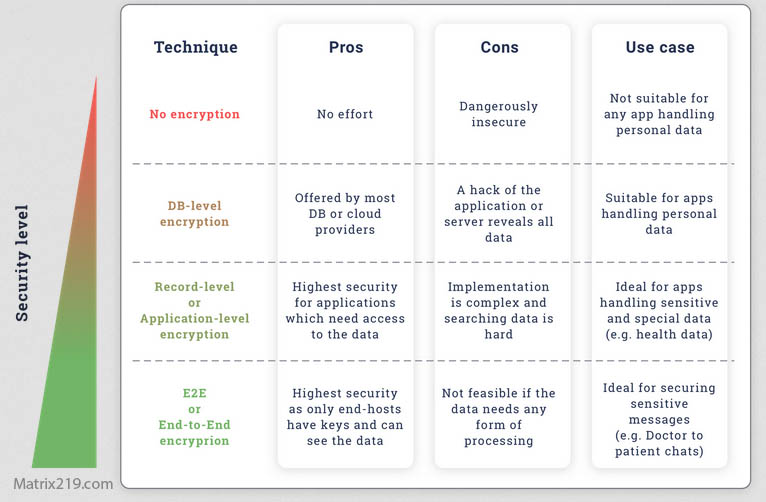
File Encryption Compliance (GDPR, HIPAA Explained)
Which Type of File Encryption Software Is Best for You?
If You Are an Individual User
File-level encryption tools are usually sufficient.
If You Share Files Frequently
Hybrid or asymmetric-based tools improve secure sharing.
If You Run a Business
Centralized encryption is often necessary.
If You Handle Regulated Data
Enterprise-grade systems are strongly recommended.
This decision framework is expanded in File Encryption Software for Business.
Common Comparison Mistakes
Choosing Based on Popularity
Well-known tools are not always the best fit.
Ignoring Key Management
Key loss is a more common failure than cryptographic attacks.
Overengineering Simple Needs
Complex systems can increase risk if mismanaged.
These mistakes are detailed in Common File Encryption Mistakes to Avoid.
Standards and Evaluation Benchmarks
Most serious evaluations of file encryption software reference cryptographic and operational guidance aligned with NIST encryption standards to validate algorithm strength, key handling, and system design.
Frequently Asked Questions (FAQ)
Is there one best file encryption software for everyone?
No. The best choice depends on usage, risk, and scale.
Are free tools competitive with paid ones?
Yes for individuals, but not for businesses or compliance-driven use.
Does stronger encryption always mean better security?
No. Key management and usage matter more.
Should encryption software be transparent to users?
Ideally yes, especially in team environments.
How often should encryption choices be reviewed?
Regularly, especially as data volume and risk change.