Choosing the best free antivirus for Android (low battery use) in 2026 is a balancing act. Android users want protection from malicious apps, phishing links, and spyware—but not at the cost of battery life. Many antivirus apps promise “full protection” while quietly running constant background processes that drain power and slow the phone.
Battery drain isn’t just annoying; it affects usability, performance, and long-term device health. On mid-range and older Android phones, poorly optimized security apps can reduce daily battery life significantly. That’s why low-power design matters just as much as detection quality.
This article explains how lightweight Android antivirus apps work, what features actually consume battery, and how to stay protected without sacrificing your phone’s endurance.
Quick Navigation
Why battery drain is a real issue on Android
Android security apps often:
-
Run background scans continuously
-
Monitor app behavior in real time
-
Perform frequent cloud checks
When poorly optimized, these activities translate directly into faster battery depletion. On phones with smaller batteries or aging cells, the impact is even more noticeable.
For the broader mobile security landscape: best free antivirus in 2026
How low-battery antivirus apps work in 2026
Modern lightweight antivirus apps reduce power usage by:
-
Relying on cloud-based analysis instead of local scanning
-
Activating scans only when apps are installed or updated
-
Monitoring behavior selectively rather than constantly
This event-driven approach keeps CPU wake-ups and background activity to a minimum.
Features that silently drain battery
Some antivirus features look helpful but cost power:
-
Continuous background monitoring
-
Real-time network traffic analysis
-
Aggressive ad delivery and tracking
Low-battery antivirus apps avoid these by design or allow users to disable them easily.
Key features to look for in low-power antivirus apps
When battery life matters, prioritize apps that offer:
-
On-demand or event-based scanning
-
Minimal background services
-
Clear battery usage statistics
-
No unnecessary add-ons or boosters
Avoid apps that bundle cleaners, VPNs, or “speed-up” tools—they often increase power consumption.
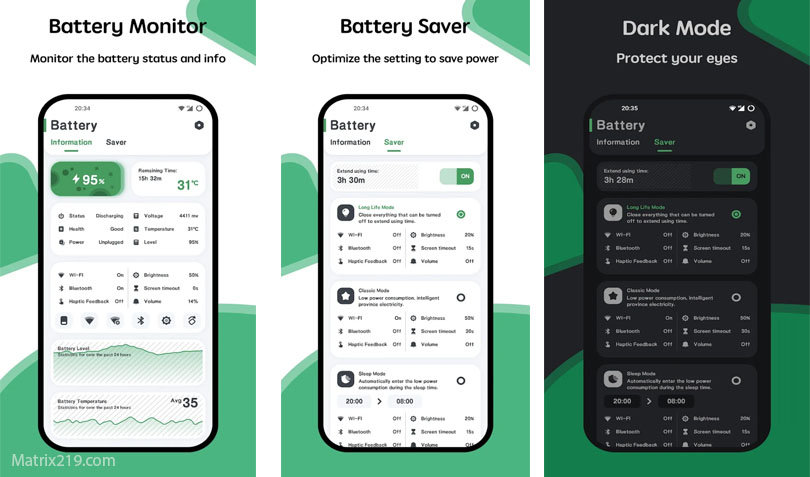
Android versions and battery optimization
Newer Android versions include:
-
Adaptive Battery and background limits
-
App standby buckets
-
Stricter background execution rules
Well-designed antivirus apps respect these limits instead of bypassing them, resulting in better battery performance.
For general Android protection context: Best Free Antivirus for Android Phones
Android versions and battery optimization
Privacy and battery usage overlap
Battery drain and privacy issues often go hand in hand:
-
Excessive tracking increases background activity
-
Aggressive analytics keep apps awake
-
Ad-heavy apps consume both data and power
Transparency about data collection usually correlates with better battery behavior.
For monetization insight: How Free Antivirus Makes Money
Realistic expectations for battery impact
Even lightweight antivirus apps consume some power. A good low-battery solution should:
-
Use negligible power during idle time
-
Trigger scans only when risk increases
-
Avoid noticeable drain during daily use
If an antivirus shows up consistently at the top of battery usage lists, it’s not optimized.
When low-battery antivirus is worth installing
These apps are especially useful if:
-
Your phone battery struggles to last a full day
-
You install apps frequently
-
You receive many links through messaging apps
In these cases, selective protection is better than none at all.
When antivirus apps may be unnecessary
You may not need antivirus if:
-
You install apps only from trusted developers
-
You review permissions carefully
-
Your phone receives regular security updates
For cautious users, built-in protections may already be sufficient.
Final thoughts
The best free antivirus for Android with low battery use in 2026 is one that knows when not to run. Event-based scanning, cloud intelligence, and respect for Android’s battery optimization features matter more than flashy dashboards. The goal is quiet protection—not constant activity.
For a complete framework covering all devices and platforms, revisit: best free antivirus in 2026
FAQ
Do antivirus apps always drain Android battery?
No. Well-optimized apps use minimal power and rely on event-based scanning.
Can I limit battery usage manually?
Yes. Android allows background restrictions, but poorly designed apps may still consume power.
Is Google Play Protect lighter on battery?
Generally yes, but it offers more limited protection compared to dedicated antivirus apps.
Should older phones use low-battery antivirus?
Yes. Older batteries benefit the most from lightweight, selective protection.
Are battery-saving antivirus apps less secure?
Not necessarily. Efficiency often comes from smarter design, not weaker protection.