Finding the best free antivirus for Android phones in 2026 is no longer just about avoiding obvious malware. Android has matured, but its open ecosystem still allows apps, permissions, and downloads that can quietly compromise privacy, drain batteries, or expose personal data. Most mobile threats today don’t look like classic viruses—they look like normal apps doing suspicious things in the background.
Many users rely solely on Google Play Protect and assume that’s enough. While it provides a useful baseline, it doesn’t catch every risky behavior, especially when apps abuse permissions or when links lead to phishing pages outside the Play Store. Free antivirus apps aim to close those gaps—but only some do it responsibly.
This article explains what Android phones actually need from free antivirus software in 2026, what features matter, and how to avoid apps that create more problems than they solve.
Quick Navigation
Why Android phones remain a major target
Android’s popularity makes it attractive to attackers:
-
Massive global user base
-
Ability to install apps from multiple sources
-
Frequent permission misuse by apps
Most modern Android threats focus on data collection, spyware behavior, and subscription fraud rather than destructive malware.
For the full desktop + mobile perspective: best free antivirus in 2026
What Android already protects you from
Modern Android versions include:
-
Google Play Protect scanning
-
App sandboxing and permission controls
-
Regular security updates (on supported devices)
These features block many known threats but rely heavily on app store reputation and user choices.
Where Android security falls short
Android protection struggles most with:
-
Permission abuse by legitimate-looking apps
-
Phishing links in SMS, email, and messaging apps
-
Apps installed from outside the Play Store
-
Adware that doesn’t technically violate store rules
Free antivirus apps often focus on these weak points.
What free antivirus apps actually do on Android
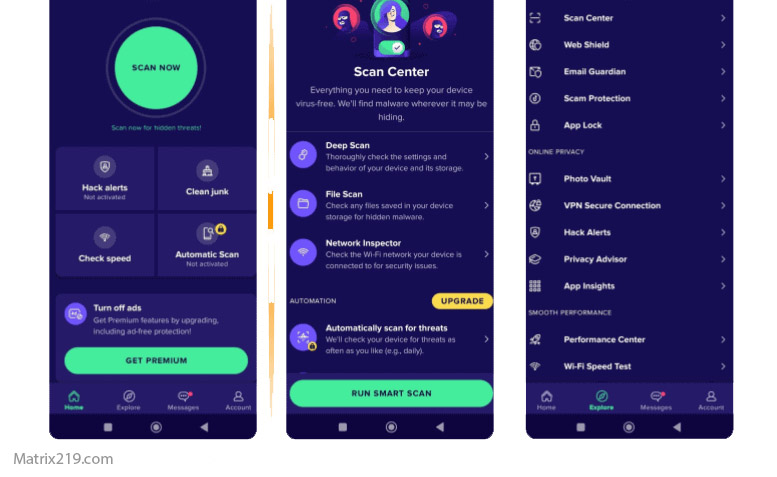
Reputable free antivirus apps typically provide:
-
Real-time app scanning
-
Phishing and malicious link detection
-
Warnings about risky permissions
-
Anti-theft or device-locate features (limited)
They work as monitoring tools, not deep system-level scanners.
Battery and performance considerations
Performance matters more on phones than PCs:
-
Lightweight antivirus apps rely on cloud scanning
-
Heavy background activity drains battery quickly
-
Poor optimization causes lag and overheating
A good free antivirus should be almost invisible during normal use.
Privacy risks with mobile antivirus apps
Ironically, some antivirus apps create privacy risks:
-
Excessive permission requests
-
Constant background tracking
-
Aggressive ad networks
Transparency and minimal permissions are critical trust indicators.
For monetization context: How Free Antivirus Makes Money
Android antivirus vs common sense
No app can fully protect against:
-
Granting dangerous permissions blindly
-
Installing cracked or modified apps
-
Clicking unknown links in messages
Antivirus software reduces risk, but user behavior still matters most.
When free antivirus is worth installing on Android
Free antivirus apps make sense if:
-
You install apps beyond the Play Store
-
You receive many links via messaging apps
-
You manage sensitive personal or work data
In these cases, extra warnings add real value.
When antivirus apps are unnecessary
You may not need antivirus if:
-
You install apps only from trusted developers
-
You review permissions carefully
-
Your device receives regular security updates
For cautious users, built-in protections may already be enough.
When antivirus apps are unnecessary
Final thoughts
Android phones in 2026 are safer than ever—but not immune. The biggest risks come from permission abuse, phishing, and user-driven installs. A lightweight, transparent free antivirus app can add meaningful protection, as long as it respects privacy and battery life. The wrong choice, however, can be worse than none at all.
For a platform-wide comparison and safe selection framework, return to: best free antivirus in 2026
FAQ
Do Android phones really need antivirus?
Not always, but many users benefit from extra protection against phishing and risky apps.
Is Google Play Protect enough?
It helps, but it doesn’t catch everything—especially behavior-based threats.
Can antivirus apps drain battery?
Poorly optimized ones can. Lightweight, cloud-based apps usually have minimal impact.
Are free antivirus apps safe for privacy?
Some are, some aren’t. Always check permissions and privacy policies.
Should older Android phones use antivirus?
Yes. Older devices often lack recent security updates, increasing risk.