
Choosing the best free antivirus for PC (low-end devices) is less about advanced features and more about survival. Older desktops, budget laptops, and entry-level PCs simply don’t have the CPU power or RAM to handle heavy security suites. In 2026, many users still rely on such devices for work, study, or daily browsing—and installing the wrong antivirus can make them nearly unusable.
The real problem isn’t malware alone. It’s the combination of limited hardware and poorly optimized antivirus software that runs constant background scans, injects ads, or consumes memory aggressively. On low-end PCs, that can feel worse than the threats you’re trying to avoid.
This article explains what low-spec systems actually need from free antivirus software, how modern lightweight tools work, and how to stay protected without turning your PC into a slow, frustrating machine.
Quick Navigation
Why low-end PCs need a different approach
Low-end PCs face a double challenge:
-
Limited CPU cores and lower clock speeds
-
Small amounts of RAM, often 4 GB or less
Heavy antivirus software competes directly with the operating system for resources. That’s why “best overall” antivirus tools aren’t always the right choice for older or weaker hardware.
For a complete high-level strategy, see the main guide: best free antivirus in 2026
Common mistakes users make on weak hardware
Many performance issues come from avoidable choices:
-
Installing feature-heavy antivirus suites
-
Running multiple security tools at once
-
Leaving scheduled full scans enabled
On low-end PCs, simplicity is a security feature. Fewer background processes usually mean better stability and usability.
How lightweight free antivirus works in 2026
Modern lightweight antivirus tools rely on:
-
Cloud-based scanning instead of local databases
-
Behavioral detection that activates only when needed
-
Minimal background services
This design reduces disk usage, CPU spikes, and memory consumption—making it ideal for older systems.
Key features to prioritize on low-end PCs
When choosing free antivirus for a low-spec PC, look for:
-
Real-time protection without constant full scans
-
Cloud-assisted detection
-
Low idle resource usage
-
Compatibility with older Windows versions
Avoid tools that advertise dozens of features. On weak hardware, fewer well-optimized features are better.
Performance impact you should realistically expect
A good lightweight antivirus should:
-
Add only a small delay during boot
-
Stay mostly idle during normal use
-
Scan files quickly without freezing the system
If an antivirus causes frequent slowdowns, the issue is usually the software—not your PC.
Windows versions and low-end hardware
Low-end PCs commonly run Windows 10 or even older builds. On these systems:
-
Compatibility matters more than cutting-edge features
-
Stable updates are more important than experimental protection
If you’re using Windows 10 specifically, this context helps: Best Free Antivirus for Windows 10 in 2026
Can built-in security be enough for weak PCs?
Built-in system protection is often lighter than third-party tools, but it has limits:
-
Less granular control
-
Slower response to emerging threats
-
Basic phishing protection
For many users, combining built-in security with a lightweight free antivirus provides better balance than relying on defaults alone.
Privacy and background activity concerns
On low-end devices, privacy and performance overlap:
-
Excessive data collection increases background activity
-
Aggressive ads consume resources
-
Poorly coded telemetry causes slowdowns
Transparent, minimal data policies usually correlate with better performance.
For a deeper look: How Free Antivirus Makes Money
Installation tips to avoid performance issues
To keep your PC usable:
-
Install only one antivirus program
-
Disable unnecessary startup items
-
Avoid optional add-ons during setup
-
Let scans run manually, not constantly
Most performance complaints come from installation choices, not from the antivirus engine itself.
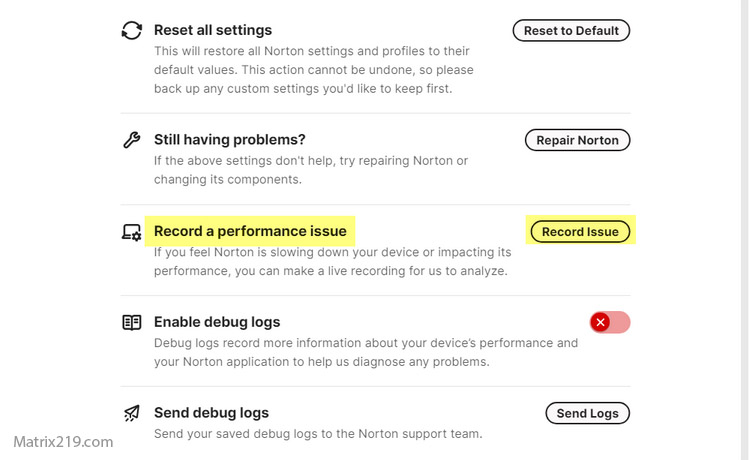
Installation tips to avoid performance issues Antivirus
When free antivirus is enough for low-end PCs
Free antivirus is usually sufficient if:
-
The PC is used for browsing, documents, and media
-
The system is kept updated
-
High-risk downloads are avoided
For business use or sensitive data, paid solutions may still be worth considering—even on weaker hardware.
Final thoughts
Low-end PCs don’t need heavy security—they need smart, efficient protection. The best free antivirus for weak hardware in 2026 is one that stays invisible during normal use while stepping in only when something suspicious happens. When chosen carefully, free antivirus software can protect older systems without sacrificing usability.
For a broader comparison across devices and platforms, revisit: best free antivirus in 2026
FAQ
Will antivirus software always slow a low-end PC?
No. Lightweight, cloud-based tools have minimal impact. Slowdowns usually come from poorly optimized or ad-heavy software.
Is it better to use no antivirus on a weak PC?
Not usually. A well-chosen lightweight antivirus often provides protection with little performance cost.
How much RAM should a PC have for free antivirus?
Many modern lightweight tools run acceptably on systems with 4 GB of RAM when configured properly.
Can I disable scans to improve performance?
Yes, scheduled full scans can often be disabled or reduced without losing real-time protection.
Are older PCs more vulnerable to malware?
Yes. Older systems often lack modern security features, making smart antivirus choices even more important.