
Finding the best free antivirus for Windows 10 in 2026 is still a priority for millions of users, even as newer operating systems take the spotlight. Windows 10 remains widely used across offices, homes, and low-end PCs—and that longevity makes it a favorite target for attackers. Malware campaigns don’t disappear when an OS gets older; they adapt to what people actually run.
Many Windows 10 users assume built-in protection is “good enough,” while others install any free tool they find without checking performance or privacy trade-offs. Both approaches can backfire. In 2026, the right free antivirus for Windows 10 is one that complements system security, stays lightweight, and avoids aggressive monetization tactics.
This guide explains what Windows 10 users realistically need from free antivirus software today, where native protections end, and how to avoid common mistakes that lead to slowdowns or false security.
Quick Navigation
Why Windows 10 remains a major target
Attackers focus on scale and predictability. Windows 10 offers both:
-
A massive installed user base
-
Long-term compatibility with older software
-
Common configurations shared across devices
That makes it attractive for phishing kits, trojans, and malware bundled with downloads. Free antivirus tools help by monitoring behavior patterns rather than relying only on known signatures.
For a complete overview of modern free protection strategies: best free antivirus in 2026
What Windows 10 security already handles well
Windows 10 includes built-in defenses that cover:
-
Basic malware detection
-
Real-time file scanning
-
System-level exploit mitigation
For everyday use, this baseline protection blocks many common threats. However, it doesn’t always respond quickly to new attack methods or deceptive social engineering tactics.
Gaps in native protection Windows 10 users should know
Despite improvements, there are areas where additional protection helps:
-
Delayed response to emerging malware campaigns
-
Limited visibility into suspicious app behavior
-
Basic phishing and malicious link detection
Free antivirus software often fills these gaps with cloud-based intelligence and faster behavioral analysis.
What matters most in a free antivirus for Windows 10
When evaluating free tools for Windows 10, focus on:
-
Ongoing updates and active development
-
Compatibility with Windows 10 system updates
-
Minimal background resource usage
-
Transparent data and privacy policies
Avoid tools that rely heavily on ads, browser injections, or bundled installers.
Performance on older and budget Windows 10 PCs
Many Windows 10 systems are older laptops or budget desktops. Performance matters more here than features:
-
Lightweight antivirus tools rely on cloud scanning
-
Heavy background services can slow boot and apps
-
Poor optimization is often worse than no antivirus
If performance is a concern, this matters even more: Best Free Antivirus for PC (Low-End Devices)
Windows 10 vs Windows 11 antivirus expectations
While Windows 11 adds hardware-backed protections, Windows 10 still benefits from:
-
Third-party behavioral detection
-
Faster vendor-side threat updates
-
More detailed alerts and logs
If you’re comparing both platforms: Best Free Antivirus for Windows 11 in 2026
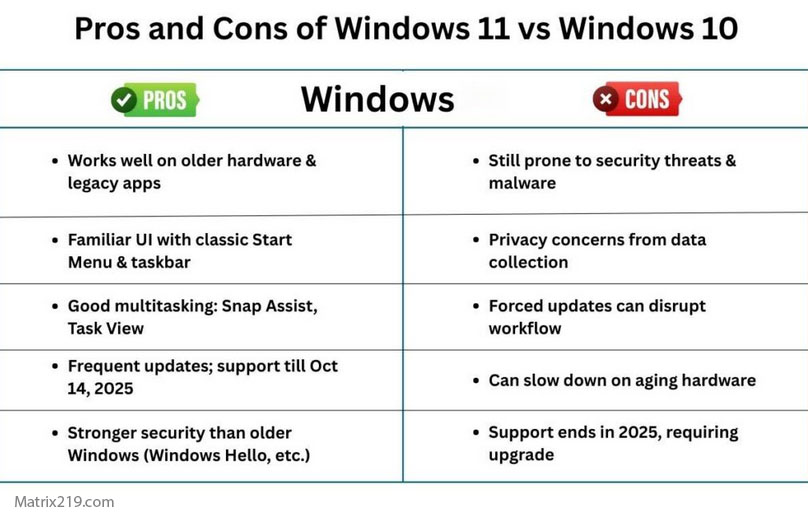
Windows 10 vs Windows 11 antivirus expectations
Common misconceptions among Windows 10 users
Some beliefs cause users to skip protection or choose poorly:
-
“Windows 10 is outdated, so antivirus won’t help”
-
“Free antivirus always slows my PC”
-
“All antivirus tools collect too much data”
In reality, modern free tools vary widely in quality and impact.
A broader myth check: Do You Still Need Antivirus on Windows in 2026?
Privacy and data collection on Windows 10
Free antivirus software typically collects:
-
Anonymous threat metadata
-
File behavior indicators
-
Basic usage statistics
Problems arise only when policies are unclear or data is used aggressively for advertising. Transparency is the real trust signal.
For a detailed breakdown: How Free Antivirus Makes Money
Safe installation and update practices
Windows 10 users should be especially careful during installation:
-
Download only from official vendor websites
-
Avoid third-party download portals
-
Decline optional add-ons during setup
Poor installation choices are a leading cause of adware and fake protection tools.
Practical safety guidance: Antivirus Free Download: What’s Safe in 2026?
When free antivirus is enough on Windows 10
Free antivirus is usually sufficient if:
-
The system is used for personal tasks
-
Windows updates are installed regularly
-
Risky downloads and email attachments are avoided
For sensitive data or business use, paid solutions may still be worth considering.
Final perspective
Windows 10 is still a viable and secure platform in 2026—but it benefits from the right additional protection. A carefully chosen free antivirus can improve detection, add visibility, and maintain performance without introducing new risks. The key is choosing tools that respect both your system and your data.
For independent testing insights, consult: AV-TEST independent antivirus evaluations And for the full strategic overview, revisit: best free antivirus in 2026
FAQ
Is Windows 10 still safe to use in 2026?
Yes, when properly updated and paired with sensible security practices. Free antivirus tools add an extra safety layer.
Can free antivirus slow down Windows 10?
Lightweight tools have minimal impact. Performance issues usually come from outdated or ad-heavy software.
Should Windows 10 users rely only on built-in protection?
Built-in security is helpful, but combining it with a reputable free antivirus improves coverage.
Is free antivirus risky for privacy?
Not inherently. Risk depends on the vendor’s transparency and data policies.
Can I use the same antivirus on Windows 10 and 11?
Many reputable tools support both platforms with similar protection levels.