Free file encryption tools are more popular than ever, but popularity does not always equal security. In 2026, users actively search for free solutions because they want strong protection without subscriptions, registrations, or complex licensing. Best Free File Encryption Software in 2026 reflects a practical need: protecting sensitive files while avoiding unnecessary cost and vendor lock-in.
This article explains what free file encryption software can realistically offer, where its limits appear, and how to evaluate tools beyond feature lists. Instead of ranking products blindly, the focus here is on security models, transparency, and real-world usability. You will learn which characteristics matter most in free tools, how open-source software differs from proprietary freeware, and when a free solution is sufficient—and when it becomes a risk. This context is essential before trusting any tool with important data.
Quick Navigation
What “Free” Really Means in File Encryption Software
Open Source vs Proprietary Freeware
Open-source tools allow public inspection of encryption logic, while proprietary freeware requires blind trust in the vendor.
Licensing and Hidden Restrictions
Some tools are free only for personal use, while others restrict features or future updates.
Why Transparency Matters More Than Price
Security depends on design and review, not cost.
A broader evaluation framework is covered in Best File Encryption and Decryption Software in 2026 (Complete Guide)
Core Security Features to Expect From Free Tools
Strong, Standard Encryption Algorithms
Reliable free tools use well-known algorithms rather than custom or undocumented methods.
Local Key Control
Keys should be generated and stored locally, not on vendor servers.
No Mandatory Registration
Requiring accounts for local file encryption introduces unnecessary risk.
Algorithm fundamentals are explained in Common File Encryption Algorithms (AES, RSA, ChaCha20)
Popular Categories of Free File Encryption Software
File-Based Encryption Tools
These tools encrypt individual files or folders directly.
Container and Archive-Based Tools
Encrypted containers simplify file management but concentrate risk around a single key.
Command-Line and Developer-Focused Tools
Preferred by advanced users who value control over convenience.
Understanding how these tools work starts with How File Encryption Works (Beginner Friendly)
Advantages of Free File Encryption Software
Cost-Effective Protection
Free tools eliminate subscription costs for personal or small-scale use.
Minimal Vendor Dependency
Open-source tools reduce reliance on single companies.
Offline-Friendly Operation
Most free tools work entirely offline, reducing exposure.
Limitations and Risks of Free Solutions
No Centralized Management
Free tools usually lack multi-user control and auditing.
Limited Recovery Options
Key loss often means permanent data loss.
Inconsistent Updates
Some free tools lag behind in maintenance and security fixes.
These risks are often underestimated and detailed in Common File Encryption Mistakes to Avoid
Are Free File Encryption Tools Safe?
When Free Tools Are a Good Choice
They are suitable for personal files, local backups, and low-scale sharing.
When Free Tools Become a Liability
Businesses, regulated data, and collaborative environments often require more controls.
A deeper risk analysis is available in Is File Encryption Really Secure?
Free File Encryption and Cloud Storage
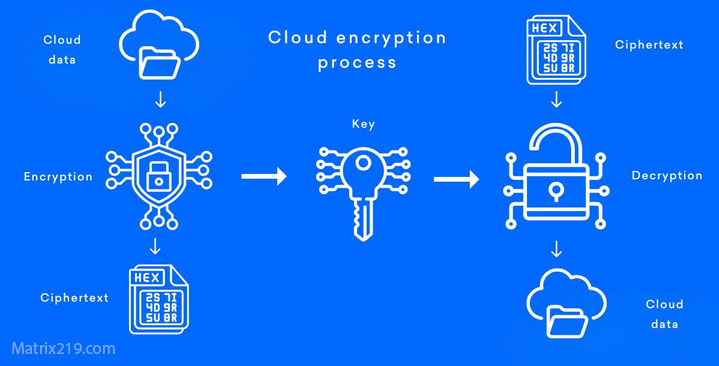
Encrypt Before Uploading
Free tools can secure files effectively before cloud transfer.
Key Management Remains the User’s Responsibility
Cloud platforms cannot recover encrypted data if keys are lost.
Cloud-specific scenarios are discussed in File Encryption for Cloud Storage
File Encryption for Cloud Storage
How to Evaluate a Free Encryption Tool
Check Documentation and Transparency
Clear explanations signal responsible design.
Look for Active Maintenance
Regular updates matter more than feature count.
Avoid “Magic” Security Claims
Real encryption is boring, documented, and conservative.
Evaluation criteria are expanded in Signs Your File Encryption Software Is Fake
When to Upgrade From Free to Paid Solutions
Growing Data Volume
Managing many encrypted files increases operational risk.
Team or Business Use
Access control and audit trails become essential.
Compliance Requirements
Free tools rarely meet regulatory obligations.
Professional options are covered in File Encryption Software for Business.
Standards and Trust Considerations
Many reputable free tools implement encryption according to NIST encryption standards , ensuring algorithms and key sizes meet accepted security baselines.
Frequently Asked Questions (FAQ)
Is free file encryption as secure as paid software?
It can be, but only if the tool is well-designed and properly maintained.
Are open-source encryption tools safer?
Transparency helps, but security still depends on correct usage and updates.
Can free tools encrypt large files?
Yes, though performance may vary by implementation.
What happens if I lose my encryption key?
The encrypted files usually become permanently inaccessible.
Should businesses rely on free encryption software?
Generally no. Business environments need management and compliance features.