Best security settings 2026 are less about adding new apps and more about configuring what your phone already has. Modern Android and iOS devices ship with strong protections by default—but most users weaken them through convenience, rushed setup, or outdated habits. In 2026, attackers rely on accounts, permissions, and persistence, not flashy exploits.
This article gives you a practical, platform-aware checklist of the settings that matter now. The goal is sustainable security: fewer alerts, fewer false fixes, and a phone that stays trustworthy over time.
Quick Navigation
The 2026 Security Reality: Settings Beat Tools
Security posture comes from configuration.
Why settings matter more than apps
-
OS-level protections are stronger than third-party tools
-
Misconfiguration creates silent gaps
-
Accounts and sync amplify mistakes across devices
If settings are right, many attacks simply fail.
For the full incident context, review: If Your Phone Is Hacked: How to Know, What to Do, and How to Stay Safe
Core Settings Everyone Should Enable (Android & iPhone)
These are non-negotiable in 2026.
Essential baseline settings
-
Automatic OS updates (security patches on)
-
Strong device lock (PIN/biometric; no swipe)
-
Auto-lock set to the shortest practical time
-
Find My Device / Find My iPhone enabled
-
Remote wipe capability active
These reduce damage even when something goes wrong.
Account Security Settings That Matter Most
Accounts are the real attack surface.
Critical account hardening
-
Unique passwords for email and cloud
-
Two-factor authentication with an authenticator app
-
Login alerts on new devices
-
Regular review of active sessions
If accounts are weak, device security won’t hold.
Full sequencing: If Your Phone Is Hacked: Step-by-Step Recovery Guide (Android & iPhone)
App Permissions: The 2026 Control Panel
Permissions are where attacks persist.
High-impact permission settings
-
Accessibility: allow only essential, trusted apps
-
Notification access: deny by default
-
Device admin / profiles: review monthly
-
Location: “While using the app” only
-
Camera & mic: disable background access
Deep guidance: App permissions security
Android-Specific Best Settings (2026)
Android’s power needs restraint.
Android hardening checklist
-
Disable sideloading unless necessary
-
Review Special App Access monthly
-
Turn off auto-restore for apps after incidents
-
Enable Google Play Protect
-
Avoid all-in-one “cleaner/booster” apps
Context: If your Android phone is hacked
iPhone-Specific Best Settings (2026)
iOS security hinges on Apple ID control.
iPhone hardening checklist
-
Enable Stolen Device Protection (where available)
-
Require Face ID/Touch ID for sensitive settings
-
Review Profiles & Device Management
-
Disable iCloud restore for apps after incidents
-
Turn on Safety Check when needed
Context: If your iPhone is hacked
Network & Connectivity Settings
Reduce exposure without killing usability.
Smart network settings
-
Disable auto-join for unknown Wi-Fi
-
Prefer mobile data for sensitive logins
-
Remove unused VPNs
-
Reset network settings after incidents
Wi-Fi myths clarified here: Public Wi-Fi myths
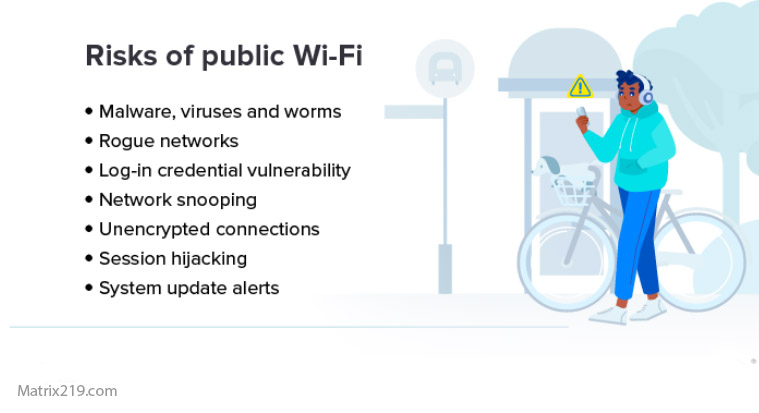
Public Wi-Fi myths
Backup & Restore Settings (The Silent Risk)
Backups can undo everything.
Safer backup configuration
-
Back up files, not full app states
-
Avoid auto-restore after security incidents
-
Review cloud sync scopes regularly
Backup discipline guide: How to backup safely from a hacked phone
What to Turn OFF (Yes, OFF)
More features ≠ more security.
Features to disable if unused
-
SMS-based account recovery where possible
-
Auto-login across browsers and apps
-
Legacy Bluetooth discoverability
-
Old or unused cloud integrations
Reducing attack surface is a win.
The Monthly Security Check (10 Minutes)
Consistency beats complexity.
Quick monthly routine
-
Review account sessions
-
Audit high-risk permissions
-
Check profiles/admin access
-
Confirm updates are current
-
Remove unused apps
This prevents slow drift into insecurity.
When Settings Aren’t Enough
Know when to escalate.
Escalate if:
-
Permissions re-enable themselves
-
Access returns after clean setup
-
Root/jailbreak is suspected
At that point, reset or replacement may be safer.
Limits explained: Factory reset: when it works & when it doesn’t
Independent platform security guidance emphasizes that secure-by-default configurations plus regular review prevent the majority of mobile compromises seen in the wild Mobile platform security baseline recommendations
Frequently Asked Questions
Are default phone settings secure enough in 2026?
Mostly yes—but only if you don’t weaken them. The biggest risks come from permissions, auto-restore, and account misconfiguration added later.
Do I need antivirus if settings are correct?
Not always. Antivirus can help, but correct OS settings and account security stop most real-world attacks first.
How often should I change these settings?
Review monthly and after any incident. Security degrades through drift, not sudden failure.
Is turning everything off the safest option?
No. Over-disabling leads to workarounds and risky behavior. Balanced, intentional settings are safer long-term.
What’s the single most important setting?
Account security (email/cloud) with strong 2FA. If accounts fall, device settings won’t save you.