When users evaluate file encryption software, they often focus on features and interfaces while overlooking the most critical component: the encryption algorithm itself. Common File Encryption Algorithms (AES, RSA, ChaCha20) represent the technical backbone behind almost every modern file encryption tool in 2026. Understanding what these algorithms do—and what they do not do—is essential for judging whether a tool is genuinely secure or simply well-marketed.
This article explains the most widely used file encryption algorithms in clear, practical terms. You will learn why some algorithms are designed for speed, others for secure key exchange, and why no single algorithm works alone in real-world file encryption software. The goal is not to turn you into a cryptographer, but to give you enough clarity to recognize strong implementations, avoid false assumptions, and make better security decisions.
Quick Navigation
Why Encryption Algorithms Matter
Algorithms Define the Security Ceiling
No matter how polished a tool looks, its security cannot exceed the strength of the algorithms it uses.
Public Algorithms vs Secret Methods
Trusted encryption relies on publicly reviewed algorithms, not hidden or proprietary “secret” methods.
Implementation Still Matters
Even strong algorithms can fail when implemented incorrectly or paired with weak key management.
A conceptual foundation is covered in How File Encryption Works (Beginner Friendly).
AES: The Standard for File Encryption
What AES Is
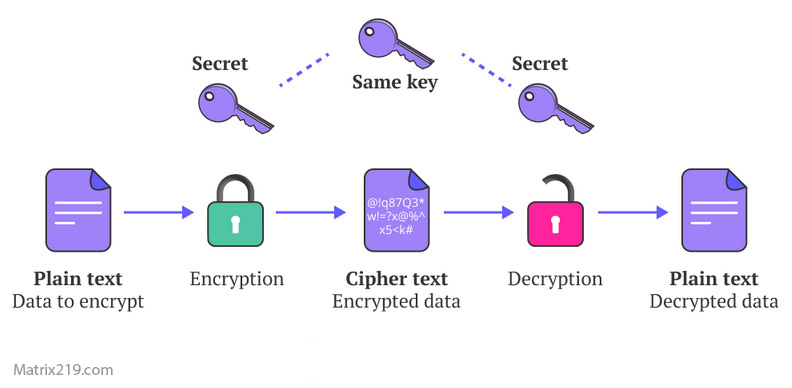
Advanced Encryption Standard (AES) is a symmetric encryption algorithm used globally for file protection.
Why AES Is So Widely Trusted
AES is fast, well-studied, and supported by hardware acceleration on modern devices.
AES Key Sizes and Practical Security
AES-128, AES-192, and AES-256 differ mainly in key length, not structure. All are considered secure when implemented correctly.
Where AES Is Commonly Used
AES is the default choice for encrypting files, backups, archives, and disk containers.
RSA: Secure Key Exchange, Not File Encryption
What RSA Is Designed For
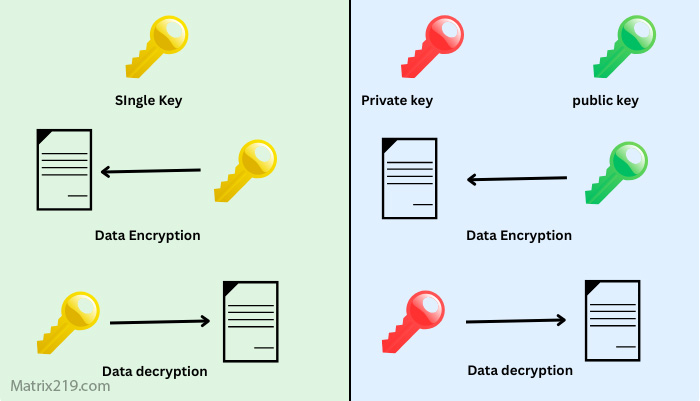
RSA is an asymmetric encryption algorithm primarily used to protect encryption keys, not large files.
Why RSA Is Not Used for Bulk File Encryption
RSA is computationally expensive and inefficient for encrypting large amounts of data.
How RSA Supports File Encryption
Most file encryption software uses RSA to encrypt AES keys, enabling secure sharing and access control.
RSA Key Length Considerations
Modern implementations typically rely on sufficiently long keys to remain resistant to current attacks.
RSA’s role is closely tied to concepts explained in Symmetric vs Asymmetric File Encryption.
Symmetric vs Asymmetric File Encryption
ChaCha20: A Modern Alternative
What Makes ChaCha20 Different
ChaCha20 is a symmetric stream cipher designed for speed and security on systems without hardware acceleration.
Performance Advantages on Mobile and Older Devices
Unlike AES, ChaCha20 performs consistently well even without specialized CPU support.
Security Profile of ChaCha20
ChaCha20 is considered highly secure when paired with proper authentication mechanisms.
Where ChaCha20 Is Commonly Used
It is often used in modern applications, secure messaging, and some file encryption tools focused on portability.
Comparing AES, RSA, and ChaCha20
Purpose and Role
AES and ChaCha20 encrypt file contents, while RSA protects encryption keys.
Performance Characteristics
AES excels on modern hardware, ChaCha20 shines on constrained systems, and RSA is used sparingly due to cost.
Security Longevity
All three remain secure today when used correctly, but none are immune to poor implementation.
This comparison helps explain why hybrid systems dominate modern tools.
How Modern File Encryption Software Combines Algorithms
Hybrid Encryption in Practice
Files are encrypted with AES or ChaCha20, while keys are protected using RSA or similar asymmetric algorithms.
Why This Design Is Necessary
It balances speed, security, and usability without forcing users to manage complexity manually.
What Users Should Look For
Clear documentation on which algorithms are used and how keys are handled.
A real-world application of this model is discussed in File Encryption Software for Business.
Common Misconceptions About Encryption Algorithms
“AES-256 Is Always Better”
Longer keys do not automatically mean better security if the rest of the system is weak.
“RSA Encrypts the Whole File”
In most tools, RSA never touches the file contents directly.
“Newer Algorithms Are Always Safer”
Maturity, review, and implementation matter more than novelty.
These misunderstandings often lead to poor tool selection and appear in Common File Encryption Mistakes to Avoid.
Algorithm Choice vs Real Security
Algorithms Do Not Work Alone
Key storage, access control, and software design matter just as much.
Human Factors Still Dominate Risk
Lost keys and weak passwords defeat even the strongest algorithms.
Evaluating Tools Beyond Buzzwords
Reliable software explains how algorithms are applied, not just which ones are listed.
This broader evaluation framework is outlined in Best File Encryption and Decryption Software in 2026 (Complete Guide).
Standards and Algorithm Validation
Most trusted encryption algorithms used in file encryption software are evaluated against guidelines such as NIST encryption standards, which define acceptable key sizes, usage models, and security assumptions for long-term protection.
Frequently Asked Questions (FAQ)
Is AES still safe in 2026?
Yes. AES remains secure and widely trusted when implemented correctly.
Why can’t RSA encrypt large files directly?
RSA is too slow and resource-intensive for bulk data encryption.
Is ChaCha20 better than AES?
Not universally. ChaCha20 excels on systems without hardware acceleration.
Do users need to choose algorithms manually?
No. Modern software selects and combines algorithms automatically.
Can weak software make strong algorithms unsafe?
Yes. Poor implementation undermines algorithm strength completely.