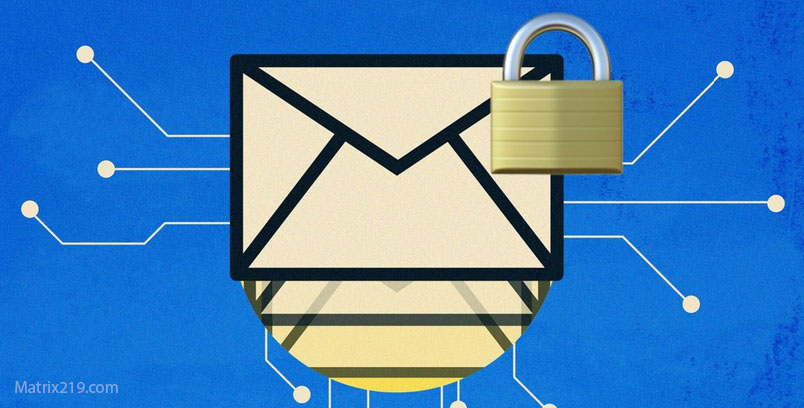
Email remains one of the most common ways to share files, yet it is also one of the least secure by default. Attachments often pass through multiple servers, are stored unencrypted in inboxes, and can be forwarded accidentally or intercepted if accounts are compromised. In 2026, Encrypting Files Before Emailing is a critical practice for anyone who sends sensitive documents, images, or archives via email.
This article explains why email attachments are inherently risky, how file encryption mitigates those risks, and how to encrypt files correctly before sending them—without breaking workflows or relying on false security measures. The focus is on practical protection that survives forwarding, storage, and account breaches.
Quick Navigation
Why Email Attachments Are a Security Risk
Emails Are Stored Long-Term
Attachments often remain in inboxes and backups indefinitely, increasing exposure.
Accounts Get Compromised
If an email account is taken over, all attachments become accessible.
Messages Are Easily Forwarded
Once sent, email attachments can be redistributed without control.
These risks make attachment-level protection essential.
Why File Encryption Is Better Than Email Security Features
TLS Protects Transport, Not Files
Email encryption in transit does not protect stored attachments.
Password-Protected Attachments Are Weak
Many attachment formats rely on weak or legacy password schemes.
File Encryption Travels With the File
Encrypted files remain protected regardless of where they are stored or forwarded.
A foundational comparison is explained in Encryption vs Password Protection.
How Encrypting Files Before Emailing Works
Encrypt the File Locally
Files are encrypted on your device before being attached to an email.
Send the Encrypted Attachment
The email contains only unreadable encrypted data.
Share the Key Separately
Decryption keys must be delivered via a different secure channel.
A step-by-step overview is covered in How File Encryption Works (Beginner Friendly).
Common Mistakes When Sending Encrypted Attachments
Sending the Password in the Same Email
Doing so defeats the purpose of encryption.
Using Weak or Reused Passwords
Short or reused passwords are easily guessed or cracked.
Leaving Plaintext Copies Behind
Unencrypted originals often remain in “Sent” folders or temp directories.
These mistakes are frequently detailed in Common File Encryption Mistakes to Avoid
Encrypting Different File Types Before Emailing
Documents and PDFs
Encrypt files directly rather than relying on viewer-level passwords.
Images and Media Files
Encrypt the entire file to prevent preview access.
Archives and Bundles
Encrypted archives simplify sending multiple files securely.
File-type considerations are discussed in:
Key Exchange Strategies for Email Encryption
Out-of-Band Key Sharing
Share keys via secure messaging or voice, not email.
Time-Limited Keys
Short-lived keys reduce long-term exposure.
Avoid Permanent Shared Passwords
Static passwords increase risk over time.
Key management concepts are grounded in Symmetric vs Asymmetric File Encryption.
Email Encryption for Business and Professional Use
Legal and Financial Attachments
Encryption reduces liability if emails are misdirected or breached.
Client Communications
Encrypted attachments protect confidentiality beyond inbox security.
Compliance Considerations
Encryption may affect breach notification obligations.
Professional workflows are discussed in File Encryption for Legal and Financial Documents
Email Attachments and Cloud-Based Email Systems
Cloud Mailbox Exposure
Attachments stored in cloud inboxes are accessible to account holders and attackers.
Client-Side Encryption Remains Effective
Encrypted attachments stay protected even in cloud mail systems.
Avoiding Inline Previews
Some email clients generate previews that expose unencrypted content.
Cloud-related risks are explained in File Encryption for Cloud Storage.
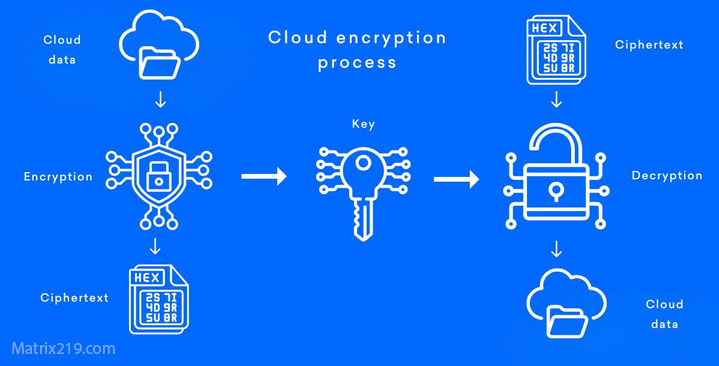
File Encryption for Cloud Storage
Performance and Usability Trade-Offs
Attachment Size Limits
Encrypted files may slightly increase size due to metadata.
Recipient Compatibility
Recipients must have compatible decryption tools.
Reducing Friction Without Reducing Security
Clear instructions help recipients decrypt files safely.
Performance considerations are discussed in Best File Encryption and Decryption Software in 2026 (Complete Guide)
When Encrypting Before Emailing Is Essential
Sensitive Personal Data
Identity, financial, and medical files require encryption.
Business and Client Files
Encryption protects against misdelivery and account compromise.
Cross-Border Communication
Encryption reduces jurisdictional exposure.
A broader security framework is outlined in Is File Encryption Really Secure?
Standards and Best Practices
Reliable file encryption used for email attachments relies on cryptography aligned with NIST encryption standards rather than email-only security features.
Frequently Asked Questions (FAQ)
Is encrypting email attachments necessary if email is encrypted?
Yes. Email encryption protects transport, not stored attachments.
Can encrypted attachments be forwarded safely?
Yes. They remain encrypted until decrypted with the correct key.
Should passwords be sent via email?
No. Keys must be shared via a separate secure channel.
Do encrypted attachments affect email deliverability?
Generally no, though large files may hit size limits.
Is this suitable for business communication?
Yes. It significantly reduces risk in professional workflows.