
Video files often carry far more sensitive information than documents or images. Training recordings, surveillance footage, client meetings, legal evidence, and proprietary media content can expose identities, conversations, and intellectual property if accessed without authorization. In 2026, Encrypting Video Files Without Quality Loss is a common concern because users want strong protection without damaging resolution, audio sync, or playback integrity.
This article explains how video file encryption actually works, why some tools break video usability, and how to encrypt videos properly while preserving quality. The focus is on file-level security, performance realities, and long-term access—not on editing tricks or format conversions that only appear secure.
Quick Navigation
Why Video Files Need Special Encryption Handling
Video Files Are Large and Complex
High-resolution video contains massive data streams that require efficient encryption.
Videos Are Frequently Shared and Archived
Videos are often transferred between teams, stored long-term, or uploaded to cloud platforms.
Content Sensitivity Is Often High
Video may include personal data, internal processes, or legally sensitive material.
This combination makes video encryption uniquely challenging.
Encryption vs Video Protection Myths
DRM Is Not File Encryption
Digital rights management controls playback but does not necessarily encrypt the file itself.
Password-Protected Players Are Not Secure
Restricting playback in a specific player does not protect the video file if copied.
True Video File Encryption
Encryption secures the entire video file binary, regardless of format or player.
A foundational comparison is explained in Encryption vs Password Protection.
How Video File Encryption Works
Encrypting the Entire Video File
Proper encryption transforms the full file—video, audio, and metadata—into unreadable data.
No Re-Encoding or Compression Changes
Encryption does not alter codecs, resolution, or bitrate.
Decryption Restores the Exact Original File
When decrypted, the video plays exactly as before.
A step-by-step overview is covered in How File Encryption Works (Beginner Friendly).
Common Problems When Encrypting Video Files
Using Format Conversion Instead of Encryption
Re-encoding videos can degrade quality and still leave data exposed.
Temporary Plaintext Files During Processing
Some tools create unencrypted copies while encrypting or previewing videos.
Incomplete Metadata Protection
Titles, timestamps, or thumbnails may remain visible if not encrypted fully.
These mistakes are frequently detailed in Common File Encryption Mistakes to Avoid
Encrypting Videos for Personal Use
Protecting Private Recordings
Encryption prevents unauthorized access if devices or backups are compromised.
Secure Video Backups
Encrypted archives reduce exposure during storage and transfer.
Sharing Videos Selectively
Encryption allows controlled access without permanent exposure.
Personal risk scenarios are discussed in Is File Encryption Really Secure?
Encrypting Videos for Professional and Business Use
Training and Internal Content
Videos containing internal processes must remain confidential.
Surveillance and Evidence Footage
Encryption preserves integrity and chain of custody.
Client and Financial Video Records
Sensitive meetings and presentations require strong protection.
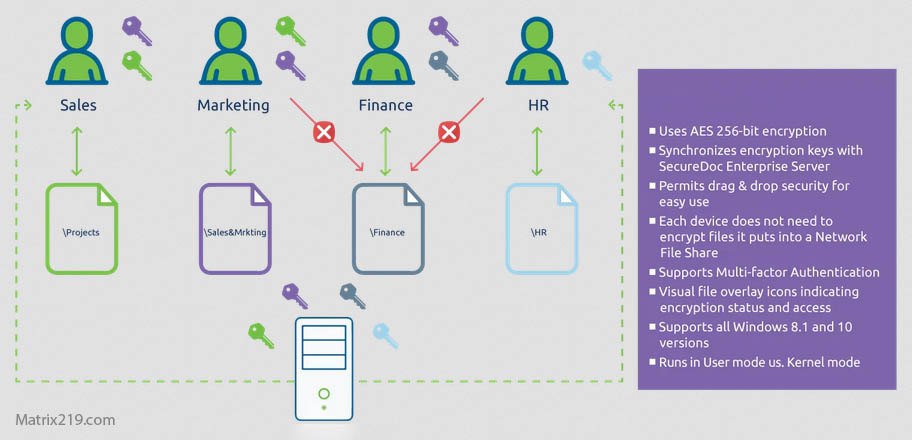
Professional workflows are covered in File Encryption Software for Business.
File Encryption Software for Business
Video Encryption and Cloud Storage
Encrypt Before Uploading
Client-side encryption ensures cloud platforms cannot access video content.
Handling Large File Syncing
Chunked encryption improves upload and sync performance.
Avoiding Cloud Previews
Cloud preview generation may expose decrypted video segments.
Cloud-related risks are discussed in File Encryption for Cloud Storage.
Performance Considerations for Large Video Files
Encryption Time and Hardware Support
Modern systems can encrypt large videos efficiently with hardware acceleration.
Storage Overhead
Encrypted videos remain the same size as originals.
Avoiding Workflow Bottlenecks
Batch encryption and automation reduce friction.
Performance trade-offs are often misunderstood and discussed in Best File Encryption and Decryption Software in 2026 (Complete Guide).
When Video-Specific Encryption Is Not Enough
Mixed Media Libraries
If videos are stored alongside other sensitive files, broader file encryption may be preferable.
Team-Based Access
Centralized access control may be required.
Long-Term Archival Needs
Key management becomes critical over extended retention periods.
Enterprise scenarios are discussed in Centralized File Encryption Management Systems.
Standards and Best Practices for Video Encryption
Reliable video file encryption relies on cryptographic methods aligned with NIST encryption standards rather than DRM-only or player-restricted approaches.
Frequently Asked Questions (FAQ)
Does encrypting a video reduce its quality?
No. Encryption does not change resolution, bitrate, or audio quality.
Can encrypted videos be streamed?
Not directly. Videos must be decrypted before standard playback.
Is DRM the same as video encryption?
No. DRM controls usage, while encryption protects file contents.
Should videos be encrypted before cloud upload?
Yes. Client-side encryption provides the strongest protection.
Are encrypted videos safe for long-term storage?
Yes, if encryption keys are stored and backed up securely.