Factory Reset and Spyware is often seen as the ultimate solution for phone surveillance. Many users assume that resetting a device automatically removes all spyware and restores full privacy. In practice, the answer is more nuanced.
A factory reset can remove most consumer-grade spyware—but only when done correctly and in the right context. In other cases, resets fail because underlying access paths remain intact.
This article explains when factory resets actually work, when they don’t, and how to use them effectively without restoring the same problem.
Why Factory Reset Is So Commonly Recommended
A factory reset wipes user-installed apps, clears local data, and restores default system settings. This removes most stalkerware, malicious apps, and permission abuse.
For many common spyware cases, especially those involving physical installation or sideloaded apps, a reset is an effective cleanup step.
However, effectiveness depends entirely on what kind of surveillance is involved.
To understand spyware categories that matter here, see: Common Types of Mobile Spyware
When a Factory Reset Works Well
A factory reset is usually effective when spyware:
-
Was installed as a regular app
-
Relied on accessibility or admin permissions
-
Did not modify system firmware
-
Was not linked to compromised backups
Consumer stalkerware and basic monitoring apps fall into this category.
When followed by clean setup practices, reset success rates are high.
When a Factory Reset Fails
Factory resets do not reliably remove:
-
Configuration profiles or device management certificates
-
Compromised cloud accounts and synced data
-
Spyware restored from infected backups
-
Advanced system-level or firmware-based spyware
In these cases, the phone may appear clean while surveillance continues through other channels.
Understanding installation methods clarifies this limitation, as explained in: How Mobile Spyware Gets Installed
How Mobile Spyware Gets Installed
The Backup Restoration Trap
One of the most common reset failures happens during backup restoration. Restoring full device backups can reinstall malicious apps, profiles, or settings automatically.
Cloud backups may also re-sync compromised configurations without user awareness.
Selective restoration is safer than full automatic recovery.
Account-Based Surveillance After Reset
Even with a clean device, compromised accounts can re-enable monitoring. Email access, cloud sync, location history, and backups may continue leaking data.
This often leads users to believe the reset “didn’t work,” when the issue is account-level access.
Account security must be addressed before or alongside device resets.
Platform Differences: Android vs iPhone
On Android, factory resets are generally effective against consumer spyware when combined with permission audits and cautious setup.
On iPhones, resets are also effective—but configuration profiles, enterprise management, or cloud compromise can undermine results.
Both platforms require careful post-reset verification.
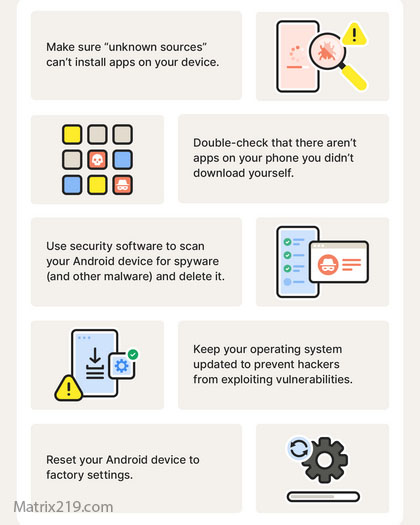
How to Perform a Reset Correctly
A successful reset requires preparation:
-
Secure accounts first from a separate device
-
Remove unknown profiles and admin access
-
Avoid restoring full backups
-
Reinstall apps manually and selectively
-
Update the OS immediately
Skipping these steps significantly reduces effectiveness.
For full cleanup context, see: Spyware Removal
When a New Device Is the Better Option
In high-risk cases involving advanced surveillance, repeated reset failures, or strong suspicion of system-level compromise, device replacement may be safer.
Continuing to troubleshoot an untrusted device increases stress and uncertainty. Sometimes, the safest move is starting fresh.
Reset as a Tool, Not a Guarantee
A factory reset is a powerful tool—but not a magic solution. Its success depends on understanding why surveillance happened and where access still exists.
Used correctly, resets eliminate most real-world threats. Used casually, they create false reassurance.
FAQ
Does factory reset remove all spyware?
No. It removes most app-based spyware, not all surveillance methods.
Can spyware survive a reset?
Yes, through backups, profiles, or account compromise.
Should I reset immediately if I suspect spyware?
Only after securing accounts and assessing risk.
Is reset safer than deleting apps manually?
Often yes, but only when done properly.
How do I know the reset worked?
No suspicious permissions, no abnormal behavior, and secured accounts.