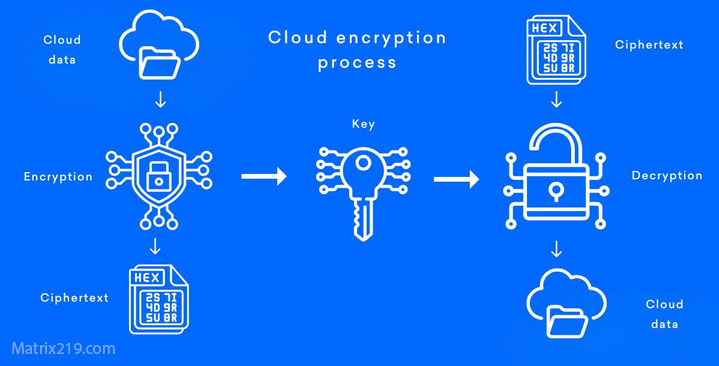
Cloud storage has become a default part of modern workflows, but convenience often hides critical security gaps. File Encryption for Cloud Storage (Google Drive, Dropbox) is a common search in 2026 because organizations and individuals want the benefits of cloud access without surrendering control over sensitive data. While major cloud providers apply their own security measures, these protections do not always guarantee user-owned encryption keys or prevent provider-side access.
This article explains how file encryption should be applied when using cloud storage services, what risks remain without client-side encryption, and how to design a practical approach that preserves usability. The focus is on real behavior—how files move, how keys are handled, and where misunderstandings commonly occur—so you can protect cloud-stored files without relying on assumptions.
Quick Navigation
Why Cloud Storage Changes the Encryption Equation
Provider Security vs User Control
Cloud platforms protect infrastructure, but users rarely control the encryption keys by default.
Files Are Constantly Synced and Shared
Automatic syncing multiplies exposure points across devices and collaborators.
Legal and Jurisdictional Risks
Cloud providers operate under multiple jurisdictions, which can affect data access policies.
This broader context is explained in Best File Encryption and Decryption Software in 2026 (Complete Guide).
How Cloud Providers Handle Encryption by Default
Encryption at Rest and in Transit
Most providers encrypt data on their servers and during transfer.
Provider-Managed Keys
Keys are typically controlled by the cloud service, not the user.
Why This Is Not Enough for Sensitive Data
Provider access, account compromise, or insider threats can still expose files.
Understanding the limits of default protection is critical.
Client-Side File Encryption Explained
Encrypting Files Before Upload
Client-side encryption ensures files are unreadable before they reach the cloud.
User-Owned Keys
Only the user controls decryption keys, not the provider.
Persistent Protection Across Platforms
Encrypted files remain protected regardless of where they are stored or synced.
A technical overview of this process is covered in How File Encryption Works (Beginner Friendly).
File Encryption Workflows for Cloud Storage
Encrypt → Upload → Sync
Files are encrypted locally, then uploaded and synced in encrypted form.
Decrypt Only When Needed
Decryption happens locally and temporarily, minimizing exposure.
Managing Multiple Devices
Keys must be securely available on each authorized device.
Key management concepts are grounded in Symmetric vs Asymmetric File Encryption.
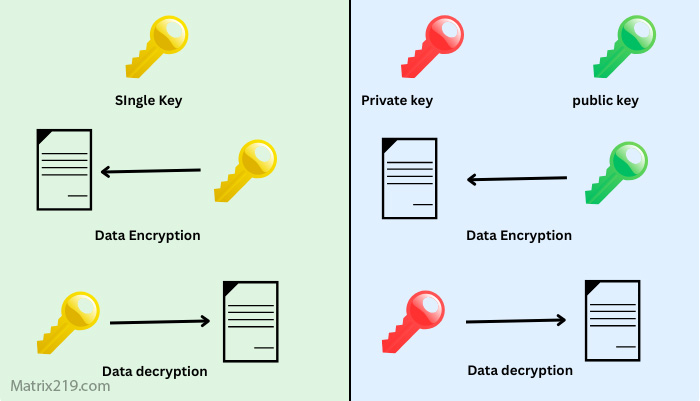
Symmetric vs Asymmetric File Encryption
Common Cloud Encryption Mistakes
Relying Solely on Provider Encryption
This leaves users dependent on external key control.
Storing Keys in the Same Cloud Account
Doing so negates the benefit of client-side encryption.
Ignoring Sync Conflicts and Temp Files
Some tools create temporary plaintext files during sync operations.
These errors are frequently detailed in Common File Encryption Mistakes to Avoid.
File Sharing in Encrypted Cloud Environments
Sharing Encrypted Files Safely
Files can be shared, but keys must be exchanged securely and separately.
Revoking Access
Access revocation requires key rotation or policy-based controls.
Collaboration Trade-Offs
Stronger security often reduces real-time collaboration features.
Business sharing scenarios are explored in File Encryption Software for Business.
Performance and Usability Considerations
Impact on Sync Speed
Encryption adds processing overhead, especially for large files.
Handling Large Media and Archives
Chunking and incremental encryption improve performance.
Avoiding User Workarounds
Excessive friction encourages insecure shortcuts.
Performance trade-offs are often misunderstood and discussed in Is File Encryption Really Secure?
Cloud Encryption for Compliance and Business Use
Regulatory Expectations
Many regulations require encryption with user-controlled keys.
Audit and Access Logging
Businesses must document access to encrypted files.
Key Custody and Legal Responsibility
Who controls the keys often determines compliance outcomes.
Evaluations commonly align with NIST encryption standards when assessing cloud encryption practices.
When Client-Side Cloud Encryption Is Essential
Sensitive Personal Data
Health, financial, or legal files require stronger control.
Business and Client Files
Protecting client confidentiality demands user-owned encryption.
Multi-Cloud or Vendor-Neutral Strategies
Client-side encryption prevents dependency on a single provider.
When Cloud-Native Encryption May Be Enough
Low-Risk Files
Public or non-sensitive documents may not require client-side encryption.
Convenience-First Collaboration
Real-time collaboration sometimes outweighs strict control.
Short-Term Storage
Temporary files with limited exposure may tolerate provider-managed keys.
Understanding risk tolerance is key to choosing the right approach.
Frequently Asked Questions (FAQ)
Does Google Drive or Dropbox encrypt files automatically?
Yes, but encryption keys are typically managed by the provider.
Is client-side encryption compatible with cloud syncing?
Yes, but it changes sharing and collaboration workflows.
Can encrypted cloud files be recovered if keys are lost?
No. Without keys, encrypted files remain inaccessible.
Does client-side encryption slow down cloud storage?
It can, depending on file size and implementation.
Is cloud encryption required for compliance?
Often yes, especially when user-controlled keys are mandated.