Developers handle sensitive data constantly—source code, configuration files, API keys, credentials, backups, and client data. In 2026, File Encryption Software for Developers is a high-intent topic because security failures in development environments often lead directly to production breaches. Unlike general users, developers need encryption tools that integrate cleanly with workflows, automation, and version control systems—without slowing development or breaking reproducibility.
This article explains how developers should approach file encryption, what technical requirements actually matter, and where common developer-specific mistakes occur. The focus is on practical integration, not GUI convenience, so encryption becomes part of the development process rather than an obstacle.
Quick Navigation
Why Developers Have Unique Encryption Needs
Source Code and Secrets Often Live Together
Configuration files frequently contain credentials alongside code.
Automation Multiplies Risk
Scripts, CI/CD pipelines, and backups can leak plaintext files at scale.
Development Environments Are Less Controlled
Local machines and test systems often lack enterprise-level protections.
These factors make encryption a developer responsibility—not just a security team issue.
File Encryption vs Secrets Management
Encryption Protects Files at Rest
It secures files regardless of where they are stored or copied.
Secrets Management Handles Runtime Access
Secrets managers control access during execution, not file storage.
Why Developers Need Both
Encryption protects repositories and backups; secrets management protects runtime usage.
This distinction is critical and often misunderstood.
Key Requirements for Developer-Friendly Encryption Tools
Scriptable and CLI-Based
Developers need tools that work reliably from the command line.
Deterministic and Predictable Behavior
Encryption must behave consistently across environments.
Clear Exit Codes and Logging
Automation depends on predictable success and failure states.
A technical foundation is covered in How File Encryption Works (Beginner Friendly)
Encrypting Configuration Files and Environment Data
Preventing Credential Leaks
Encrypt files that contain API keys, tokens, or connection strings.
Avoiding Plaintext in Repositories
Encrypted configs prevent accidental commits of secrets.
Supporting Multiple Environments
Keys and access can be separated per environment.
Key handling principles are grounded in Symmetric vs Asymmetric File Encryption
Encryption in CI/CD and Automation Pipelines
Encrypting Build Artifacts
Artifacts should remain encrypted until deployment.
Secure Key Injection
Keys should be provided securely at runtime, not stored in scripts.
Avoiding Logs and Debug Output
Encrypted workflows must prevent accidental plaintext logging.
Automation risks are frequently discussed in Common File Encryption Mistakes to Avoid
Encrypting Backups and Artifacts
Developer Machine Backups
Local backups often contain sensitive project history.
Artifact Storage
Build outputs may expose proprietary logic or client data.
Long-Term Retention Risks
Encryption keys must remain accessible as long as data is retained.
Key-loss consequences are detailed in What Happens If You Lose an Encryption Key?
Encryption and Version Control Systems
Never Commit Plaintext Secrets
Encryption prevents irreversible exposure in commit history.
Managing Encrypted Files in Repos
Encrypted files can safely exist in repositories if keys are managed separately.
Collaboration Without Key Leakage
Keys should be shared through secure channels, not repos.
This practice complements guidance in Encrypting Files Before Emailing .
Performance and Developer Experience
Fast Encryption for Small Files
Config files should encrypt and decrypt instantly.
Minimal Dependencies
Lightweight tools reduce environment setup friction.
Cross-Platform Consistency
Tools must behave identically across developer machines.
Performance trade-offs are discussed in Is File Encryption Really Secure?
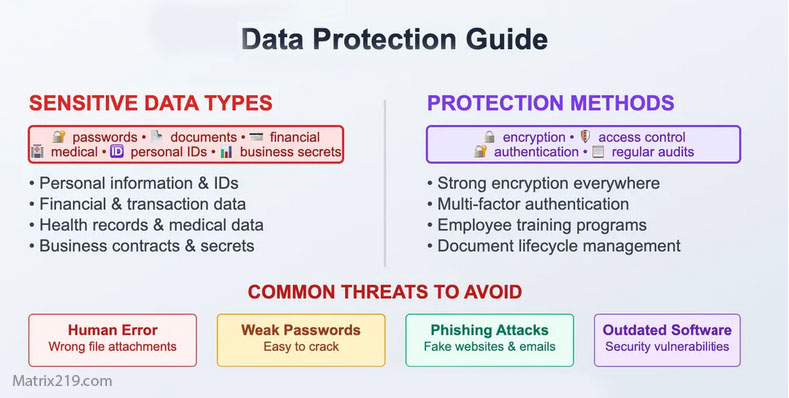
Common Encryption Mistakes Developers Make
Hardcoding Keys
Keys in code or scripts defeat encryption.
Reusing Keys Across Projects
Compromise in one repo exposes others.
Forgetting Backup and Recovery
Lost keys can break builds and deployments.
These mistakes appear repeatedly in Common File Encryption Mistakes to Avoid.
Common File Encryption Mistakes to Avoid
When Developers Need More Than File Encryption
Team and Organization Scale
Larger teams require centralized key control.
Regulated or Client Data
Compliance often demands auditing and access controls.
Production Secrets
File encryption must integrate with secrets management systems.
Enterprise needs are discussed in Centralized File Encryption Management Systems.
Practical Encryption Strategy for Developers
Encrypt What Gets Stored
Repos, backups, artifacts, and configs.
Decrypt Only When Needed
Minimize plaintext lifetime.
Separate Code, Data, and Keys
Never store all three together.
A broader strategy is outlined in Best File Encryption Software Compared (2026).
Standards and Security Expectations
Developer-grade encryption tools should rely on cryptographic implementations aligned with NIST encryption standards to ensure automation-friendly security without weak shortcuts.
Frequently Asked Questions (FAQ)
Should developers encrypt source code?
Usually not, but configuration and sensitive assets should be encrypted.
Is file encryption enough for secrets?
No. Use encryption plus proper secrets management.
Can encrypted files live in Git repositories?
Yes, if keys are never committed.
Does encryption slow down development?
Not when tools are lightweight and script-friendly.
Should encryption be part of CI/CD?
Yes. Automation increases both risk and responsibility.