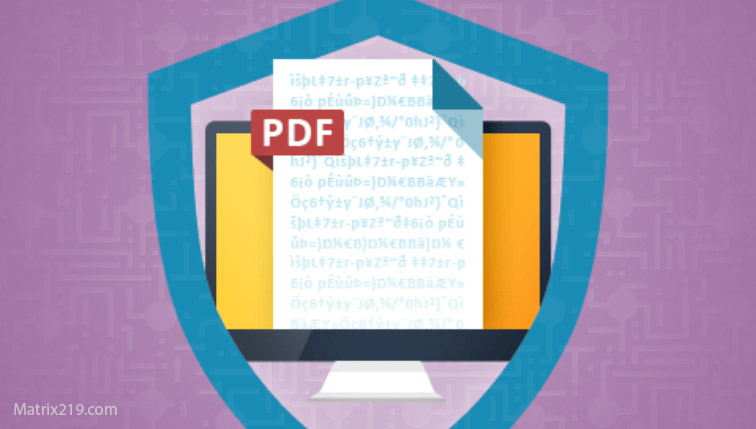
PDF files are one of the most widely used formats for contracts, reports, invoices, legal documents, and confidential records. Their popularity also makes them a frequent target for unauthorized access and accidental exposure. In 2026, File Encryption Software for PDF Files is searched by users who realize that simple password protection or built-in viewer options are not enough for serious security.
This article explains how PDF file encryption actually works, what risks are unique to the PDF format, and how to encrypt PDFs properly without breaking usability or long-term access. Instead of focusing on specific tools, the emphasis is on security behavior, encryption depth, and common mistakes that silently weaken protection. Understanding these factors is essential before trusting any PDF encryption feature with sensitive documents.
Quick Navigation
Why PDF Files Need Special Encryption Attention
PDFs Are Often Shared and Archived
PDFs are frequently emailed, uploaded, and stored for long periods, increasing exposure risk.
Viewer-Level Protection Is Often Misunderstood
Many PDF security features only restrict actions inside a viewer, not the file itself.
PDFs Contain High-Value Information
Legal, financial, and identity-related data commonly reside in PDF documents.
This risk profile differs significantly from casual file formats.
Password Protection vs True PDF Encryption
Viewer Passwords vs File Encryption
Some PDFs only require a password to open but remain weakly protected at the file level.
Why Password-Only PDFs Are Risky
Weak or legacy PDF encryption can be bypassed with modern tools.
What True PDF Encryption Does
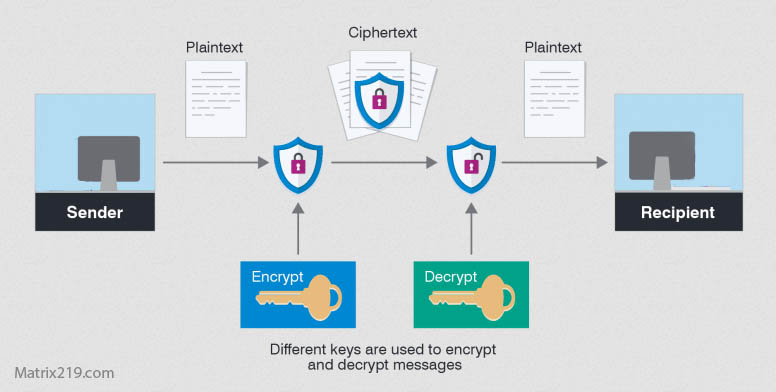
Proper encryption transforms the entire file content into unreadable data.
A foundational comparison is explained in Encryption vs Password Protection.
How PDF File Encryption Actually Works
Encrypting the Entire Document Structure
True encryption protects text, images, metadata, and embedded objects.
Encryption Algorithms Used for PDFs
Modern tools apply strong, standardized encryption rather than legacy PDF schemes.
Decryption and Controlled Access
Only authorized users with valid keys can reconstruct the original document.
A process overview is covered in How File Encryption Works (Beginner Friendly)
Common Risks When Encrypting PDF Files
Legacy PDF Encryption Standards
Older PDFs may rely on outdated encryption that is no longer secure.
Metadata Leakage
Titles, authors, and revision history may remain visible if not encrypted properly.
Temporary Plaintext Files
Some tools create unencrypted temporary copies during processing.
These issues are frequently discussed in Common File Encryption Mistakes to Avoid.
Encrypting PDFs for Professional and Business Use
Legal and Financial Documents
PDF encryption must support long-term access, audits, and integrity.
Client and Third-Party Sharing
Encryption should allow secure sharing without exposing raw passwords.
Compliance and Confidentiality
PDF encryption often plays a role in regulatory and legal protection.
Professional workflows are discussed in File Encryption for Legal and Financial Documents.
PDF Encryption and Cloud Storage
Encrypt Before Uploading PDFs
Client-side encryption ensures cloud providers cannot access document contents.
Avoid Relying on Cloud PDF Viewers
Web-based viewers may bypass or weaken local protections.
Managing Access Across Devices
Keys must be securely available only to authorized users.
Cloud-specific risks are explained in File Encryption for Cloud Storage.
Why Some Encryption Tools Feel Slower Than Others
Performance and Usability Considerations
File Size and Embedded Media
Large PDFs with images or scans require efficient encryption.
Search and Indexing Limitations
Encrypted PDFs cannot be indexed without decryption.
Avoiding Workflow Disruption
Encryption should not encourage users to store unprotected copies.
Performance trade-offs are discussed in Is File Encryption Really Secure?
When PDF-Specific Encryption Is Not Enough
PDFs Stored With Other Sensitive Files
File-level encryption may be more effective than format-specific protection.
Multi-Format Document Sets
Encrypting PDFs alone leaves other files exposed.
Long-Term Archival Risks
Key management becomes more critical over time.
A broader strategy is outlined in Best File Encryption and Decryption Software in 2026 (Complete Guide)
Standards and Security Expectations for PDF Encryption
Reliable PDF encryption tools use cryptography aligned with NIST encryption standards rather than relying on legacy or proprietary PDF-only methods.
Frequently Asked Questions (FAQ)
Is PDF password protection the same as encryption?
No. Many PDF passwords only restrict viewing, not file-level access.
Can encrypted PDFs be opened on any device?
Only if compatible software and correct keys are available.
Does PDF encryption affect document integrity?
No, if implemented correctly, the content remains unchanged.
Are encrypted PDFs safe for legal documents?
Yes, when strong encryption and proper key management are used.
Should PDFs be encrypted before cloud upload?
Yes. Client-side encryption provides the strongest protection.