USB flash drives and external hard drives remain some of the most common causes of data leaks. They are portable, easy to lose, and frequently shared between systems that may not be equally secure. In 2026, File Encryption for USB and External Drives is essential for anyone who stores or transports sensitive data outside a fixed environment.
This article explains how file encryption should be applied to removable storage, why relying on physical control alone is dangerous, and how to protect data on USB and external drives without breaking compatibility or usability. The focus is on real-world behavior—loss, theft, cross-platform use, and long-term access—rather than theoretical security.
Quick Navigation
Why USB and External Drives Are High-Risk
Easy to Lose or Steal
Small size and portability make removable drives frequent targets of accidental loss.
Used Across Multiple Systems
Drives often move between personal, work, and public computers.
Lack of Built-In Protection
Most removable drives offer no default encryption or access control.
These factors make encryption non-negotiable for sensitive data.
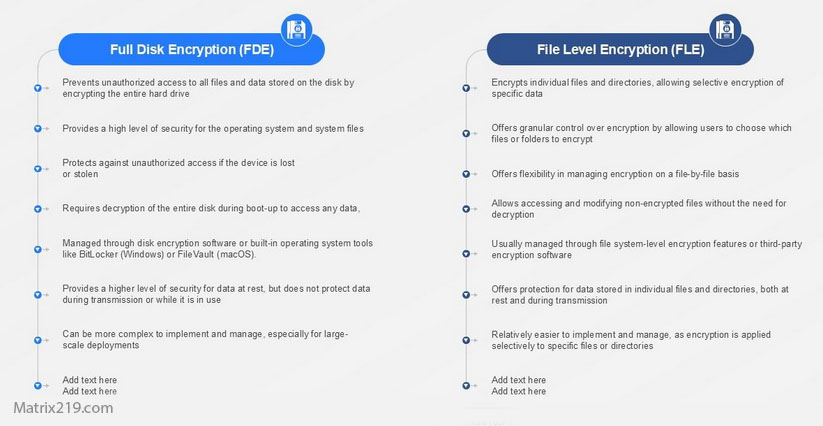
File Encryption vs Full-Drive Encryption on Removable Media
File-Level Encryption
Encrypting individual files ensures protection even if the drive is accessed on another system.
Container-Based Encryption
Encrypted containers protect multiple files but concentrate risk around one key.
Full-Drive Encryption
Encrypting the entire drive simplifies use but may reduce cross-platform compatibility.
A foundational comparison is explained in File Encryption vs Disk Encryption.
File Encryption vs Disk Encryption
How File Encryption Works on USB and External Drives
Encrypting Files Before Copying
Files should be encrypted on a trusted system before being moved to removable media.
Keeping Keys Off the Drive
Encryption keys must never be stored on the same drive.
Accessing Encrypted Files Safely
Files remain unreadable until decrypted with the correct key on an authorized system.
A step-by-step overview is covered in How File Encryption Works (Beginner Friendly).
Common Mistakes With Encrypted Removable Drives
Relying on Drive Passwords Alone
Many hardware or software passwords do not provide strong encryption.
Leaving Plaintext Copies on the Host System
Unencrypted originals often remain on the source computer.
Mixing Sensitive and Non-Sensitive Files
This increases exposure if the drive is shared.
These mistakes are frequently detailed in Common File Encryption Mistakes to Avoid.
Encrypting USB Drives for Personal Use
Protecting Personal Documents
Encryption prevents exposure if a drive is lost or borrowed.
Secure Backups on External Drives
Encrypted backups reduce risk during storage and transport.
Traveling With Sensitive Data
Encryption protects data during travel and border inspections.
Personal risk scenarios are discussed in Is File Encryption Really Secure?
Encrypting External Drives for Business Use
Data Transport Between Offices
Encryption protects files during physical transfer.
Contractor and Third-Party Access
Encrypted files limit exposure when drives are shared externally.
Incident Response Readiness
Lost encrypted drives reduce breach impact and reporting obligations.
Professional workflows are covered in File Encryption Software for Business.
Cross-Platform Compatibility Considerations
Using Encrypted Files Across Operating Systems
File-level encryption offers better compatibility than full-drive encryption.
Avoiding Platform-Locked Solutions
Some encryption methods only work on specific systems.
Testing Decryption in Advance
Always verify access on intended systems before relying on encrypted drives.
Compatibility planning is part of secure encryption design.
Performance and Capacity Considerations
Large Files and Transfer Speeds
Encryption adds minimal overhead compared to USB transfer speeds.
Hardware Acceleration Support
Modern systems encrypt files efficiently even on removable media.
Avoiding Workflow Bottlenecks
Batch encryption reduces repetitive manual steps.
Performance trade-offs are discussed in Best File Encryption and Decryption Software in 2026 (Complete Guide).
When File Encryption Is Not Enough
Highly Sensitive or Regulated Data
Centralized management may be required instead of manual encryption.
Shared Drives With Many Users
Access control becomes difficult with file-based encryption alone.
Long-Term Archives
Key management risk increases over time.
Enterprise alternatives are discussed in Centralized File Encryption Management Systems.
Standards and Best Practices for Removable Media Encryption
Reliable encryption for removable storage relies on cryptographic methods aligned with NIST encryption standards rather than simple device passwords or proprietary locking mechanisms.
Frequently Asked Questions (FAQ)
Is encrypting files enough for USB drives?
Yes, for most use cases—especially when cross-platform access is needed.
Should the entire USB drive be encrypted?
Only if compatibility is not a concern and the drive is used on trusted systems.
What happens if an encrypted USB drive is lost?
Encrypted files remain unreadable without the correct keys.
Can encrypted files be opened on another computer?
Yes, if compatible encryption tools and keys are available.
Is encryption required for business data on USB drives?
In many cases, yes—especially for sensitive or regulated information.