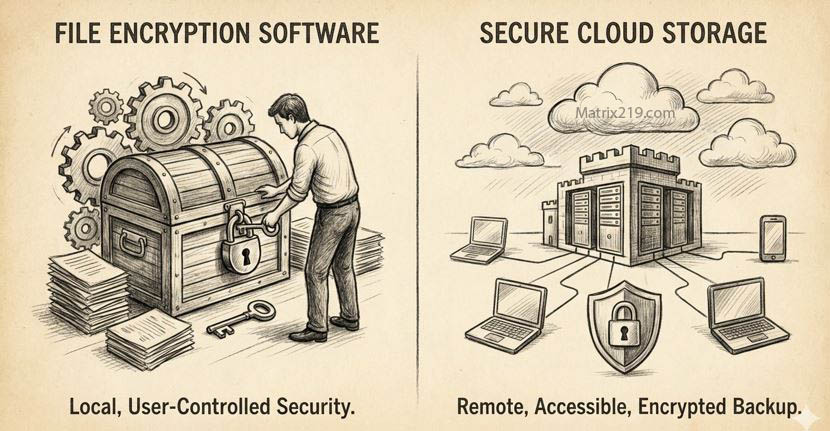
As cloud adoption grows, many users assume that storing files in “secure” cloud platforms automatically replaces the need for file encryption. In 2026, File Encryption Software vs Secure Cloud Storage is a high-intent comparison because individuals and businesses want clarity: should they encrypt files themselves, rely on cloud security, or combine both approaches?
This article explains the fundamental differences between file encryption software and secure cloud storage, focusing on who controls access, who controls the keys, and what happens when something goes wrong. Instead of treating these options as competitors, the goal is to help you understand when each one is sufficient, when it is not, and how they can work together without creating false confidence.
Quick Navigation
What File Encryption Software Actually Provides
File-Level, Location-Independent Protection
Encryption stays with the file regardless of where it is stored or shared.
User-Controlled Encryption Keys
Access depends on possession of the correct key, not account credentials.
Protection Against Storage and Account Breaches
Even if storage is compromised, encrypted files remain unreadable.
These characteristics are explained in Best File Encryption and Decryption Software in 2026 (Complete Guide).
What Secure Cloud Storage Actually Provides
Infrastructure and Account Security
Cloud providers protect servers, networks, and login systems.
Built-In Encryption at Rest and in Transit
Most providers encrypt data, but keys are usually provider-controlled.
Collaboration and Availability
Cloud storage prioritizes access, syncing, and real-time sharing.
Understanding these strengths helps avoid unrealistic expectations.
The Key Difference: Who Controls the Encryption Keys
Cloud Provider–Managed Keys
Providers can technically access data when required by policy or law.
User-Managed Keys
File encryption software ensures only the user can decrypt files.
Why Key Ownership Matters
Key control often determines legal exposure and breach impact.
This distinction is central to compliance discussions in File Encryption Compliance (GDPR, HIPAA Explained).
Security Comparison: Encryption vs Cloud Storage
Protection Scope
File encryption protects the file everywhere; cloud security protects the platform.
Breach Scenarios
Account compromise exposes cloud-stored files unless they are encrypted.
Insider and Legal Access
Cloud providers may access data under certain conditions.
These risks are often misunderstood and discussed in Is File Encryption Really Secure?
Usability and Workflow Trade-Offs
Cloud Storage Advantages
-
Easy sharing and collaboration
-
Automatic syncing
-
Minimal user effort
File Encryption Software Trade-Offs
-
Manual key management
-
Reduced real-time collaboration
-
Higher responsibility
Balancing usability and security is critical.
Performance and Scalability Considerations
File Encryption Software
Performance depends on file size and local hardware.
Cloud Storage
Performance depends on network speed and provider infrastructure.
Large Teams and Data Volumes
Cloud platforms scale more easily, but encryption adds complexity.
Scalability issues are discussed in File Encryption Software for Business.
Compliance and Legal Readiness
Cloud Storage Alone
May not meet requirements for user-controlled encryption keys.
File Encryption Software
Supports stronger compliance claims when keys are controlled internally.
Audit and Evidence
File encryption must be documented to support compliance.
Compliance implications are explained in Enterprise File Encryption Solutions Explained.
Common Misconceptions
“Secure Cloud Storage Replaces Encryption”
It does not. It protects accounts and infrastructure, not file ownership.
“Encryption Breaks Cloud Usability Completely”
It changes workflows, but does not eliminate cloud benefits.
“One Approach Is Always Better”
The right choice depends on risk and usage.
These misconceptions are detailed in Common File Encryption Mistakes to Avoid.
The Best Practice: Combining Both Approaches
Encrypt Before Uploading
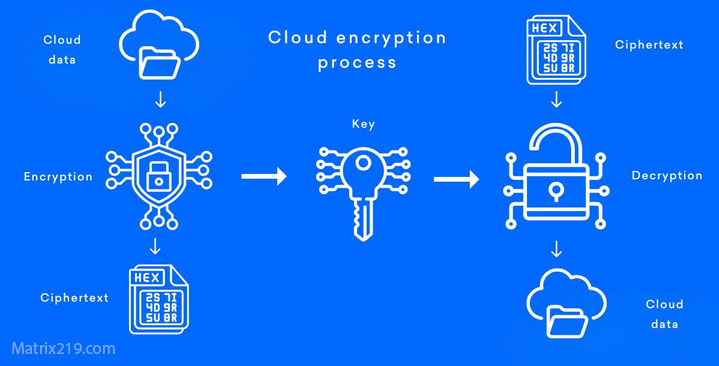
Apply client-side encryption, then store encrypted files in the cloud.
Use Cloud Storage for Availability, Not Trust
Treat the cloud as a storage layer, not a security boundary.
Control Keys Separately
Never store encryption keys in the same cloud account as encrypted files.
This layered approach is recommended in File Encryption for Cloud Storage.
File Encryption for Cloud Storage
When Cloud Storage Alone May Be Enough
Low-Risk or Public Files
Documents intended for sharing or collaboration.
Convenience-First Workflows
Teams that prioritize speed over strict control.
Short-Term Storage
Temporary files with limited sensitivity.
Understanding acceptable risk is essential.
When File Encryption Software Is Essential
Sensitive Personal Data
Identity, medical, and financial files require stronger protection.
Business and Client Data
Confidentiality obligations demand user-controlled encryption.
Cross-Border or Legal Exposure
Encryption reduces jurisdictional risk.
Standards and Evaluation Criteria
Security assessments often reference cryptographic and operational guidance aligned with NIST encryption standards to evaluate both file encryption practices and cloud security controls.
Frequently Asked Questions (FAQ)
Is cloud storage encryption enough by itself?
Not when users need full control over encryption keys.
Does file encryption prevent cloud collaboration?
It limits real-time features but preserves security.
Can encrypted files still be backed up in the cloud?
Yes. Encrypted files can be safely stored and synced.
Who should manage encryption keys?
The data owner—not the cloud provider—should control keys.
Should businesses combine both approaches?
Yes. Layered security provides the best balance of control and usability.