Compressed archives are one of the most common ways to package, transfer, and store multiple files together. In 2026, File Encryption for ZIP and Archive Files is a frequent search because archives often contain mixed data types—documents, images, videos, and backups—making a single mistake potentially expose everything at once. While many users rely on archive passwords, this approach is often misunderstood and incorrectly implemented.
This article explains how archive encryption actually works, why ZIP passwords are not always equivalent to real file encryption, and how to secure archives without creating long-term access or recovery problems. The focus is on behavior and risk, not tool lists, so you can choose the right protection method based on how archives are used in real workflows.
Quick Navigation
Why Archives Require Special Encryption Consideration
Archives Concentrate Risk
One archive often contains dozens or thousands of files protected by a single key.
Archives Are Commonly Shared
ZIP files are frequently emailed, uploaded, or transferred via external drives.
Long-Term Storage Is Common
Archives are often kept as backups, increasing key management risk over time.
This concentration of data changes how encryption mistakes affect outcomes.
ZIP Password Protection vs True Archive Encryption
Legacy ZIP Passwords
Older ZIP formats use weak encryption that can be cracked quickly.
Modern Archive Encryption
Some archive formats support strong encryption for the entire archive content.
Why “Password-Protected ZIP” Is Often Misleading
Not all password-protected archives provide meaningful security.
A foundational comparison is explained in Encryption vs Password Protection.
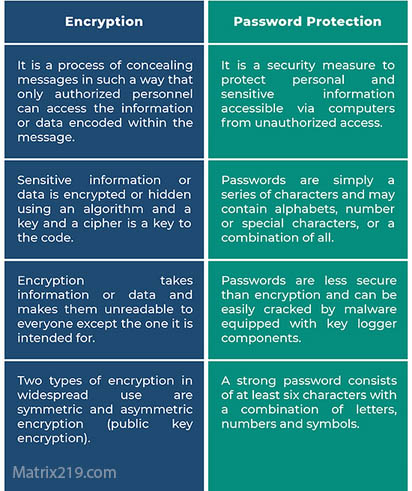
Encryption vs Password Protection
How Archive File Encryption Works
Encrypting the Entire Archive
Secure archive encryption transforms all compressed data into unreadable ciphertext.
Single Key, Multiple Files
One encryption key controls access to every file inside the archive.
Decryption Restores Original Structure
When decrypted, files are extracted exactly as they were packaged.
A step-by-step overview is covered in How File Encryption Works (Beginner Friendly).
Common Risks When Encrypting ZIP and Archive Files
Weak or Legacy Encryption Standards
Some tools default to outdated encryption methods.
Storing Keys With Archives
Keeping passwords or keys in the same folder defeats encryption entirely.
Large Blast Radius of Key Loss
Losing one key can mean losing access to all archived files.
These failures are frequently discussed in Common File Encryption Mistakes to Avoid.
Encrypting Archives for Personal Use
Protecting Backup Collections
Archives are commonly used for personal backups that need strong protection.
Sharing Multiple Files Securely
Encrypting an archive simplifies secure sharing.
Managing One-Time Transfers
Temporary archives benefit from strong encryption with short-lived keys.
Personal risk scenarios are discussed in Is File Encryption Really Secure?
Encrypting Archives for Professional and Business Use
Project and Case File Bundles
Legal, financial, and client project archives require consistent protection.
Audit and Evidence Packages
Archives used in audits or investigations must preserve integrity and confidentiality.
Controlled Access and Distribution
Business workflows often require time-limited or revocable access.
Professional handling is discussed in File Encryption Software for Business.
Archive Encryption and Cloud Storage
Encrypt Before Uploading Archives
Client-side encryption ensures cloud providers cannot access archive contents.
Avoid Cloud-Based Archive Processing
Some platforms scan or preview archive contents after upload.
Managing Access Across Devices
Keys must be securely available only to authorized systems.
Cloud-specific risks are explained in File Encryption for Cloud Storage.
Performance and Usability Considerations
Large Archive Sizes
Encryption time increases with archive size, requiring efficient tools.
Extraction vs On-Demand Access
Archives must be fully decrypted before file access.
Avoiding Duplicate Plaintext Copies
Improper workflows leave extracted files unencrypted.
Performance trade-offs are discussed in Best File Encryption and Decryption Software in 2026 (Complete Guide).
When Archive Encryption Is Not the Best Option
Mixed Sensitivity Files
Placing low-risk and high-risk files together increases exposure.
Long-Term Archives With Uncertain Key Storage
File-level encryption may offer safer long-term access.
Collaborative Environments
Single-key archives limit fine-grained access control.
Centralized alternatives are discussed in Centralized File Encryption Management Systems.
Standards and Best Practices for Archive Encryption
Reliable archive encryption relies on cryptographic methods aligned with NIST encryption standards rather than legacy ZIP password schemes.
Frequently Asked Questions (FAQ)
Is ZIP password protection secure?
Only when modern encryption is used; legacy ZIP passwords are weak.
Can encrypted archives be safely emailed?
Yes, if strong encryption is used and keys are shared separately.
What happens if I lose the archive password?
All files inside the archive may become permanently inaccessible.
Do encrypted archives change file contents?
No. Files are restored exactly after decryption.
Should archives be encrypted before cloud upload?
Yes. Client-side encryption provides the strongest protection.