The idea of installing a free antivirus for iPhone in 2026 sounds logical at first. Smartphones hold personal photos, banking apps, emails, and work accounts—so protecting them feels essential. Yet iOS is often described as a “closed and secure system,” leading to confusion about whether antivirus apps can even work on iPhones.
This confusion creates two extremes. Some users believe antivirus apps on iOS are useless scams. Others install multiple “security” apps expecting full malware scanning, only to get disappointed by limited features. The truth sits somewhere in the middle.
This article explains what iPhone security really looks like in 2026, what free antivirus apps on iOS can and cannot do, and whether installing one actually improves your safety—or just your peace of mind.
Quick Navigation
Why iPhones are considered highly secure
Apple designed iOS with strict security controls:
-
Strong app sandboxing
-
Mandatory App Store review process
-
Limited system-level access for apps
-
Rapid security updates across supported devices
These controls make classic malware infections extremely rare on iPhones.
For a full comparison with other platforms: best free antivirus in 2026
What iOS already protects you from
Out of the box, iOS protects against:
-
Traditional file-based malware
-
Unauthorized system modifications
-
Apps accessing other apps’ data
Because apps can’t scan system files or other apps, the attack surface is much smaller than on Android or Windows.
Where iPhone users are still vulnerable
Despite strong system security, iPhones are still exposed to:
-
Phishing emails and fake websites
-
Malicious links in SMS and messaging apps
-
Account takeover attacks
-
Data leaks through user-approved permissions
These attacks bypass system defenses by targeting the user, not the OS.
What “antivirus” apps actually do on iPhone
Due to iOS restrictions, free antivirus apps cannot:
-
Scan system files
-
Monitor other apps’ behavior
-
Remove malware in the traditional sense
Instead, they usually offer:
-
Phishing and malicious website detection
-
Safe browsing features
-
Wi-Fi network security checks
-
Breach alerts or privacy tools
They function more like security assistants than real antivirus engines.
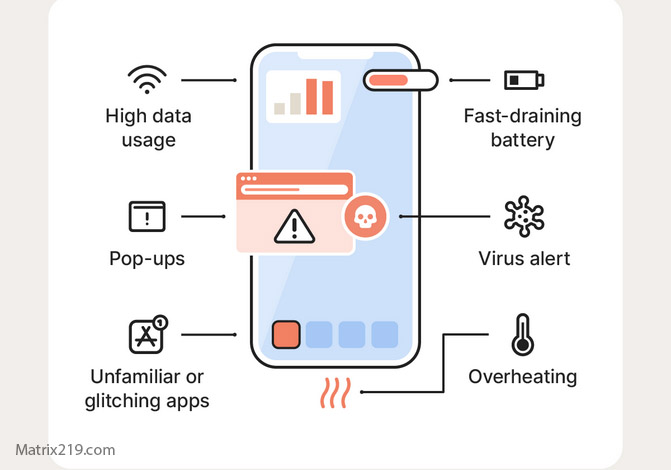
What antivirus apps actually do on iPhone
Are free antivirus apps on iOS misleading?
Some apps market themselves aggressively, which creates unrealistic expectations. However, that doesn’t automatically make them scams. The issue is naming, not functionality. On iOS, protection is preventive and awareness-based—not deep system scanning.
Understanding this difference prevents disappointment.
Performance and battery impact on iPhone
Because iOS limits background activity:
-
Most security apps have minimal battery impact
-
Heavy background scanning isn’t possible
-
Performance issues usually come from VPN-based features
If an app significantly drains battery, it’s often due to extra services—not antivirus functions.
Privacy considerations for iPhone users
iPhone users often care deeply about privacy. Free security apps may collect:
-
Browsing metadata for threat analysis
-
Network information during Wi-Fi checks
-
Anonymous usage statistics
Transparency matters more than feature lists.
For a deeper look: How Free Antivirus Makes Money
When free antivirus apps make sense on iPhone
Free security apps can be useful if:
-
You frequently click links from messages or emails
-
You connect to public Wi-Fi networks
-
You want alerts about data breaches or risky sites
In these cases, awareness-based protection adds value.
When antivirus apps are unnecessary on iOS
You may not need them if:
-
You rely only on Safari with built-in protections
-
You avoid unknown links and profiles
-
You keep iOS updated regularly
For cautious users, built-in iOS security already covers most risks.
Final verdict: myth or reality?
Free antivirus for iPhone in 2026 is part myth, part reality. It’s a myth if you expect traditional malware scanning. It’s a reality if you understand its role as a phishing, network, and privacy protection layer. The value depends entirely on expectations and usage habits.
For a complete comparison of free protection across all devices, revisit: best free antivirus in 2026
FAQ
Can iPhones get viruses?
Traditional viruses are extremely rare. Most threats involve phishing and account compromise.
Do antivirus apps really work on iOS?
They work within iOS limits, focusing on prevention and awareness—not deep scanning.
Is Apple’s built-in security enough?
For many users, yes. Extra tools mainly help with phishing and risky networks.
Can antivirus apps slow down an iPhone?
Usually no. Battery drain often comes from added features like VPNs.
Are free iOS antivirus apps safe?
Reputable ones are, but always check privacy policies and permissions.