Mac users often ask whether installing a free antivirus for Mac is actually worth it in 2026. Apple’s macOS has long been praised for strong built-in security, tight app controls, and a smaller malware ecosystem compared to Windows. That reputation leads many users to assume antivirus software is unnecessary—or even harmful.
The reality is more balanced. While macOS blocks many traditional threats, modern attacks rarely look like classic “viruses.” Phishing sites, malicious installers, fake updates, and browser-based scams now target user behavior rather than system weaknesses. In that context, the question isn’t whether Macs are secure—but whether additional protection adds practical value.
This article looks at what macOS already does well, where gaps still exist, and when free antivirus tools make sense for Mac users in 2026.
Quick Navigation
Why Macs are not immune to modern threats
macOS benefits from:
-
App sandboxing and notarization
-
Gatekeeper checks on downloaded software
-
Regular security updates
However, attackers adapt. Today’s Mac-focused threats commonly involve:
-
Fake installers and “cleaner” apps
-
Phishing pages targeting Apple IDs
-
Malicious browser extensions
-
Social engineering rather than exploits
Security now depends as much on user decisions as on the operating system itself.
For the full cross-platform context: best free antivirus in 2026
What macOS already protects you from
Out of the box, macOS handles:
-
Blocking unsigned or tampered apps
-
Preventing many system-level exploits
-
Isolating apps from critical system files
For cautious users who install software only from trusted sources, this baseline protection blocks a large portion of generic threats.
Where macOS protection falls short
macOS security is weaker against:
-
Convincing phishing websites
-
User-approved malicious installers
-
Adware and potentially unwanted programs
-
Browser-level attacks
Once a user grants permissions, built-in protections have limited visibility into intent.
What free antivirus tools add on macOS
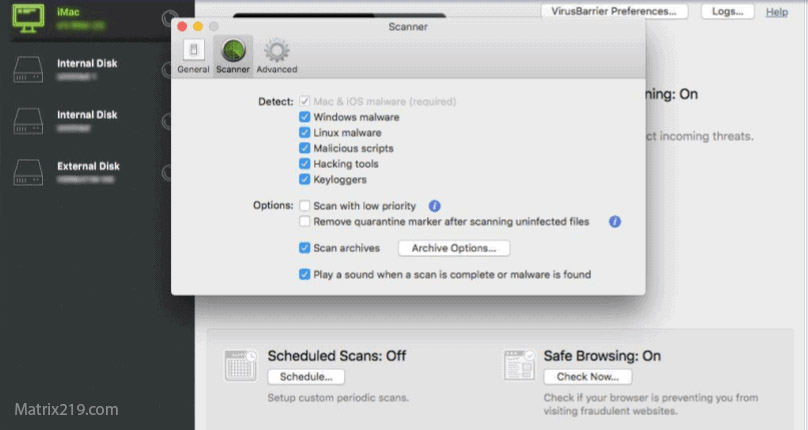
Free antivirus software for Mac typically focuses on:
-
Real-time detection of known Mac malware
-
Blocking malicious downloads
-
Identifying adware and unwanted apps
-
Warning about suspicious websites
These tools don’t replace macOS security—they act as an additional alert system.
What free antivirus tools add on macOS
Performance impact on modern Macs
Performance is a major concern for Mac users. In 2026:
-
Well-optimized free tools use minimal background resources
-
Cloud-assisted scanning reduces local load
-
Poorly designed tools can still cause slowdowns
On newer Apple Silicon Macs, lightweight antivirus tools are usually barely noticeable during normal use.
Privacy considerations for Mac users
Mac users often prioritize privacy. Free antivirus tools may collect:
-
Anonymous threat data
-
File behavior metadata
-
Basic usage statistics
Problems arise when policies are unclear or data is shared excessively. Transparency is essential.
For a detailed explanation: How Free Antivirus Makes Money
Browsing habits matter more than software
Most Mac infections start with:
-
Fake downloads
-
Pirated software
-
Misleading ads
Antivirus tools reduce risk, but safe browsing habits still matter more than any single app.
When free antivirus is worth installing on Mac
Free antivirus software can be useful if:
-
You download software from various sources
-
You manage multiple files or email attachments
-
Less-experienced users share the Mac
In these cases, extra alerts help catch mistakes early.
When it may be unnecessary
You may not need antivirus if:
-
You install apps only from the App Store
-
You avoid downloads and unknown links
-
You keep macOS fully updated
In such cases, built-in protections already cover most risks.
Final verdict
Is free antivirus for Mac worth it in 2026? For many users, it’s optional—but not useless. macOS provides strong baseline security, yet modern threats increasingly rely on deception rather than exploits. A lightweight, transparent free antivirus can add an extra safety layer without hurting performance, especially for users who go beyond strictly controlled app sources.
For a broader comparison across all operating systems and threat models, revisit: best free antivirus in 2026
FAQ
Do Macs really get malware?
Yes, though less frequently than Windows. Most threats involve adware, phishing, or fake installers.
Is macOS built-in security enough?
For cautious users, often yes. For broader usage patterns, extra protection can help.
Can free antivirus slow down a Mac?
Lightweight tools have minimal impact. Problems usually come from poorly optimized software.
Are Mac antivirus apps safe for privacy?
Reputable tools are transparent. Avoid apps with vague or aggressive data policies.
Should Apple Silicon Macs use antivirus?
They benefit from strong security, but user-driven threats still exist.