Linux users are often considered more security-aware, yet file encryption mistakes still happen frequently—especially when relying on assumptions rather than clear understanding. Free File Encryption Software for Linux is a popular topic in 2026 because Linux powers everything from personal laptops to servers, development machines, and cloud infrastructure. Users want strong file-level protection without sacrificing transparency, control, or system performance.
This article explains how free file encryption tools operate in Linux environments, what advantages they offer compared to other platforms, and where their limitations appear. Instead of listing tools, the focus is on security models, workflows, and real-world risks. By understanding how encryption fits into Linux usage patterns, you can decide when free tools are the right choice—and when they fall short.
Quick Navigation
Why File Encryption Is Especially Relevant on Linux
Linux Is Used Across Diverse Environments
From desktops to servers, Linux systems handle a wide range of sensitive data.
Files Often Move Between Systems
Linux users frequently transfer files across machines, containers, and cloud instances.
Device-Level Protection Is Not Always Present
Many Linux systems run without full-disk encryption by default.
This context is explained further in File Encryption vs Disk Encryption
How Free File Encryption Tools Fit Into Linux Workflows
Command-Line and Script-Friendly Design
Many Linux encryption tools are built for automation and scripting.
Minimal Dependency on Graphical Interfaces
Encryption often happens at the file system or shell level.
Greater User Responsibility
Linux tools provide flexibility but assume users understand key handling.
A foundational explanation of encryption behavior is covered in How File Encryption Works (Beginner Friendly).
Security Features Linux Users Should Expect
Use of Standard, Audited Algorithms
Free Linux tools typically rely on well-known cryptographic standards.
Full Local Control Over Keys
Keys are generated and managed locally, without vendor services.
Clear Separation Between Data and Keys
Good tools never store keys alongside encrypted files.
Algorithm fundamentals are explained in Common File Encryption Algorithms (AES, RSA, ChaCha20)
Common Categories of Free File Encryption Tools on Linux
File-Based Encryption Utilities
These encrypt individual files directly through command-line or simple interfaces.
Encrypted Containers and Volumes
Containers simplify management but concentrate risk around a single key.
System-Level Encryption Utilities
Some tools integrate deeply with Linux file systems, increasing power and complexity.
Understanding these categories helps avoid misuse and false confidence.
Advantages of Free Encryption Software on Linux
High Transparency
Open-source tools allow public inspection of encryption logic.
Strong Automation Capabilities
Encryption can be integrated into scripts, backups, and workflows.
Platform Independence
Encrypted files can often be shared across different operating systems.
Limitations and Risks Linux Users Must Manage
Steep Learning Curve
Mistakes in commands or scripts can permanently lock files.
Manual Key Backup Responsibility
Free tools rarely provide recovery mechanisms.
Risk of Silent Misconfiguration
Errors may not produce obvious warnings until data is inaccessible.
These issues are commonly overlooked and detailed in Common File Encryption Mistakes to Avoid.
Free File Encryption in Linux Server and Cloud Environments
Encrypting Files Before Transfer
Encryption should occur before files are uploaded or synced.
Avoiding Key Exposure in Scripts
Hardcoding keys or passwords introduces serious risk.
Shared Systems and Multi-User Access
Free tools lack fine-grained access control for teams.
Cloud-related risks are discussed in File Encryption for Cloud Storage.
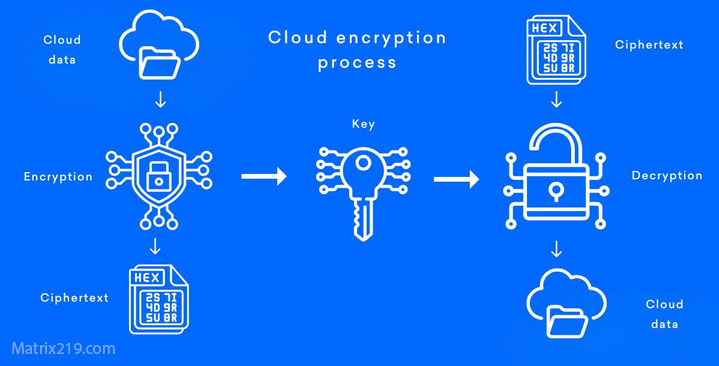
File Encryption for Cloud Storage
When Free Linux Encryption Tools Are a Good Fit
Personal Systems and Development Machines
Free tools are often sufficient for individual users.
Secure Backups and Archives
Command-line tools integrate well with backup workflows.
Learning and Testing Security Concepts
Linux environments are ideal for understanding encryption deeply.
A broader comparison is available in Best Free File Encryption Software in 2026.
When Linux Users Should Consider Paid or Managed Solutions
Business and Team Environments
Audit trails and access policies become necessary.
Compliance and Regulatory Requirements
Free tools rarely meet formal compliance standards.
Long-Term Data Retention
Key management risks increase over time.
Professional use cases are covered in File Encryption Software for Business.
Security Standards and Best Practices
Most reputable Linux encryption tools implement cryptography aligned with NIST encryption standards, ensuring accepted algorithms, key sizes, and usage models are applied correctly.
Frequently Asked Questions (FAQ)
Is free file encryption safe on Linux?
Yes, if reputable tools are used correctly and keys are managed carefully.
Do Linux systems encrypt files by default?
Not always. File-level encryption usually requires additional tools.
Can encrypted Linux files be opened on other systems?
Yes, if compatible encryption formats and tools are used.
What happens if an encryption key is lost?
In most cases, the encrypted data becomes permanently inaccessible.
Are free Linux encryption tools suitable for servers?
Only for limited scenarios. Business servers usually require managed solutions.