
Windows 11 introduced modern security features, tighter system integration, and improved hardware-level protection, but these improvements do not automatically secure files once they leave the device. Free File Encryption Software for Windows 11 is a common search in 2026 because users want file-level protection that goes beyond built-in system safeguards—without paying for enterprise tools.
This article explains how free file encryption tools fit into the Windows 11 security model, what advantages they offer, and where their limitations become visible. Instead of naming products, the focus is on compatibility, real-world behavior, and practical risks. By the end, you will understand when free encryption tools are a smart choice on Windows 11 and when they create blind spots that users often overlook.
Quick Navigation
Why Windows 11 Users Still Need File Encryption
Device Security Is Not File Security
Windows 11 protects the system, but files are exposed once they are shared, synced, or copied.
Increased File Mobility
Modern workflows rely heavily on cloud syncing, external drives, and collaboration tools.
Built-In Encryption Has Boundaries
Native protections focus on the device, not persistent file-level control.
This distinction is explained further in File Encryption vs Disk Encryption.
Compatibility Expectations on Windows 11
Support for Modern Hardware
Free tools must work reliably with TPM, Secure Boot, and modern CPU architectures.
Integration With Updated File Systems
Encryption tools should function correctly with current Windows file handling and permissions.
Stability on Frequent System Updates
Windows 11 updates more frequently, exposing poorly maintained tools.
A foundational overview of encryption behavior is covered in How File Encryption Works (Beginner Friendly).
Security Features That Matter on Windows 11
Strong Algorithms With Hardware Support
Modern systems benefit from tools that leverage hardware acceleration correctly.
Local Key Control
Keys must remain under user control and never be silently synced or uploaded.
Clear Decryption Behavior
Reliable tools document how and when decrypted data exists in memory or temporary files.
Algorithm fundamentals are explained in Common File Encryption Algorithms (AES, RSA, ChaCha20).
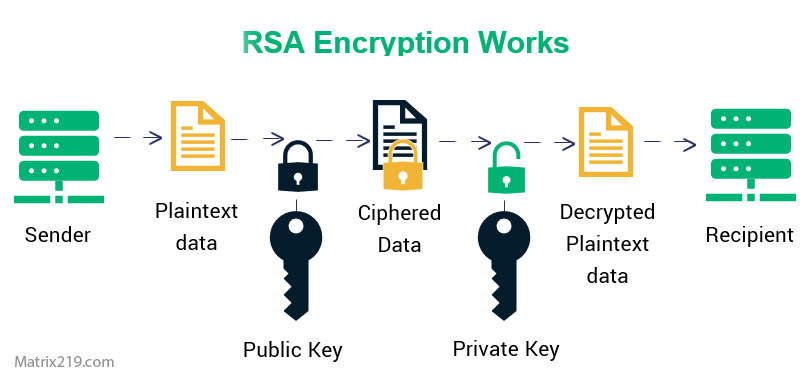
Common File Encryption Algorithms AES, RSA
Typical Free Encryption Tool Categories on Windows 11
File and Folder Encryption Utilities
These tools integrate directly with the Windows interface for quick protection.
Encrypted Containers
Containers group multiple files under one encrypted volume.
Portable Encryption Tools
Some free tools run without installation, increasing flexibility but also risk.
Understanding these models helps avoid misuse and misplaced trust.
Advantages of Free Encryption Tools on Windows 11
No Cost Barrier
Users can protect files without subscriptions or licenses.
Offline Operation
Most tools work without internet connectivity.
Flexibility Across Devices
Encrypted files can move between Windows 11 systems securely.
Limitations Unique to Windows 11 Environments
Rapid OS Evolution
Tools that lag behind updates may break silently or expose data.
No Native Recovery Integration
Free tools rarely integrate with Windows recovery or account systems.
Increased Impact of Key Loss
Without recovery features, encryption mistakes become irreversible.
These risks are often underestimated and discussed in Common File Encryption Mistakes to Avoid.
Using Free Encryption With Cloud Sync on Windows 11
Encrypt Before Syncing
Files should always be encrypted before cloud upload.
Sync Conflicts and Temporary Files
Some tools create temporary plaintext files during processing.
Cloud-related risks are explained in File Encryption for Cloud Storage.
When Free Windows 11 Encryption Tools Are Appropriate
Personal Files and Private Documents
Free tools are often sufficient for individual use.
Learning and Testing Encryption
They help users understand encryption behavior safely.
Short-Term Protection Needs
Temporary encryption scenarios fit free tools well.
A broader comparison is covered in Best Free File Encryption Software in 2026.
When Windows 11 Users Should Avoid Free Tools
Business and Multi-User Systems
Lack of access control increases risk.
Regulated or Legal Data
Compliance requirements exceed free tool capabilities.
Long-Term Encrypted Archives
Key management risks grow over time.
Professional requirements are discussed in File Encryption Software for Business.
Security Standards and Expectations
Most reputable Windows 11 encryption tools implement cryptography aligned with NIST encryption standards, ensuring accepted algorithms and key sizes are used correctly.
Frequently Asked Questions (FAQ)
Does Windows 11 already encrypt files?
No. It protects the device, not individual files outside it.
Are free tools compatible with Windows 11 updates?
Only if they are actively maintained.
Can encrypted files be moved between Windows 11 PCs?
Yes, as long as the encryption method and keys are supported.
Do free tools work with OneDrive?
Yes, but files must be encrypted before syncing.
Are free tools enough for sensitive work data?
Usually not. Business environments require stronger controls.