Many users reach a point where they must decide whether free file encryption tools are sufficient or if paid solutions are worth the investment. In 2026, Free vs Paid File Encryption Software is a high-intent comparison because encryption is no longer experimental—it is part of daily workflows for individuals, professionals, and businesses. The difference between free and paid tools is not just price; it is about control, scalability, recovery, and long-term risk.
This article breaks down the real-world differences between free and paid file encryption software. Instead of feature checklists, it focuses on security behavior, key management, operational reliability, and use-case fit. By the end, you will understand when free tools are a smart choice, when they become a liability, and why some environments cannot afford to rely on them.
Quick Navigation
What Free File Encryption Software Typically Offers
Strong Core Cryptography
Many free tools use the same proven algorithms as paid solutions.
Local, User-Controlled Encryption
Files are encrypted directly on the user’s device without external dependencies.
Minimal Setup and Flexibility
Free tools are easy to adopt for personal or short-term use.
These characteristics are explored further in Best Free File Encryption Software in 2026.
Limitations Inherent to Free Encryption Tools
Manual Key Management
Users are fully responsible for storing, backing up, and protecting keys.
No Centralized Oversight
Free tools cannot enforce policies across users or devices.
Limited Recovery Options
Lost keys often mean permanent data loss.
These limitations are frequently underestimated and discussed in What Happens If You Lose an Encryption Key?
What Paid File Encryption Software Adds
Centralized Key Management
Paid solutions often include secure key lifecycle control.
Access Control and Auditing
Organizations can track who accessed encrypted files and when.
Professional Support and Updates
Regular maintenance reduces long-term security risk.
These features are essential in business contexts outlined in File Encryption Software for Business.
Security Comparison: Free vs Paid
Algorithm Strength
Both can use strong encryption; security differences lie elsewhere.
Resistance to Human Error
Paid tools reduce mistakes through automation and enforcement.
Recovery and Continuity
Paid solutions often provide key escrow and recovery mechanisms.
Algorithm fundamentals are covered in Common File Encryption Algorithms (AES, RSA, ChaCha20).
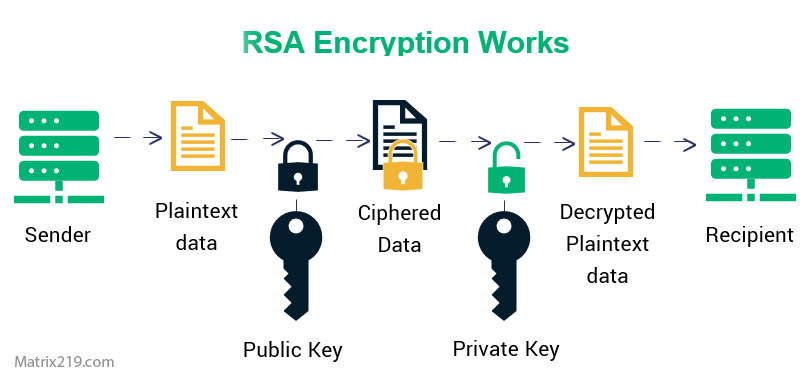
RSA and Elliptic Curve Cryptography
Usability and Workflow Differences
Individual Users
Free tools offer flexibility but require discipline.
Teams and Collaboration
Paid tools simplify sharing and revocation without exposing keys.
Long-Term Use
Paid solutions scale better as data volume and user count grow.
Workflow risks are discussed in Is File Encryption Really Secure?
Cost vs Risk Analysis
Direct Cost
Free tools save money upfront.
Indirect Cost
Data loss, downtime, or compliance failure can be far more expensive.
Total Cost of Ownership
Paid solutions often reduce long-term operational risk.
This trade-off is central to professional decision-making.
Compliance and Legal Readiness
Free Tools and Compliance
Free tools rarely provide audit logs or policy enforcement.
Paid Tools and Regulatory Support
Many paid solutions are designed with compliance in mind.
Key Custody Expectations
Regulators often focus on who controls encryption keys.
Compliance implications are explained in File Encryption Compliance (GDPR, HIPAA Explained).
When Free Encryption Software Is Enough
Personal and Low-Risk Data
Private documents and personal backups often fit free tools well.
Short-Term or One-Time Encryption
Temporary protection does not require heavy infrastructure.
Learning and Testing
Free tools help users understand encryption concepts safely.
When Paid Encryption Software Is the Better Choice
Business and Team Environments
Shared data requires centralized control and auditing.
Regulated or Sensitive Data
Compliance demands features beyond free tools.
Long-Term Data Retention
Recovery planning becomes essential over time.
Enterprise-level needs are detailed in Enterprise File Encryption Solutions Explained.
Common Decision Mistakes
Assuming Paid Means Automatically Secure
Poor configuration can undermine any tool.
Overestimating Free Tool Capabilities
Lack of recovery and oversight is often overlooked.
Ignoring Future Growth
What works today may fail as data and teams expand.
These pitfalls are discussed in Common File Encryption Mistakes to Avoid.
How to Choose Between Free and Paid Encryption
Assess Your Risk Profile
Identify what happens if data is exposed or lost.
Consider Who Needs Access
More users mean more complexity.
Plan for the Worst Case
Key loss, employee turnover, and audits should be anticipated.
A complete decision framework is provided in Best File Encryption and Decryption Software in 2026 (Complete Guide).
Standards and Evaluation Criteria
Both free and paid solutions are often evaluated against cryptographic guidance aligned with NIST encryption standards to ensure algorithms and key handling meet accepted security baselines.
Frequently Asked Questions (FAQ)
Is paid file encryption always better than free?
No. It is better suited for complex or regulated environments.
Can free encryption tools be used in small businesses?
Sometimes, but risks increase without centralized control.
Do paid tools eliminate the risk of key loss?
They reduce it, but planning is still required.
Are subscriptions necessary for encryption security?
Not always, but they often support updates and support.
Should encryption choices be reviewed regularly?
Yes, especially as data volume and risk change.