Many people use file encryption tools daily without truly understanding what happens behind the scenes. How File Encryption Works (Beginner Friendly) is a question that reflects a common need: users want protection, but they do not want complexity or blind trust in software they do not understand. In 2026, relying on encryption without basic knowledge can be risky, especially when files are shared across devices, uploaded to the cloud, or stored on external drives.
This article explains the file encryption process step by step, using clear language and real-world logic rather than technical jargon. You will learn what happens to a file when it is encrypted, how keys control access, why decryption is tightly linked to key management, and where most users make critical mistakes. This foundation is essential before choosing or trusting any file encryption software.
Quick Navigation
The Basic Idea Behind File Encryption
Turning Readable Data Into Unreadable Data
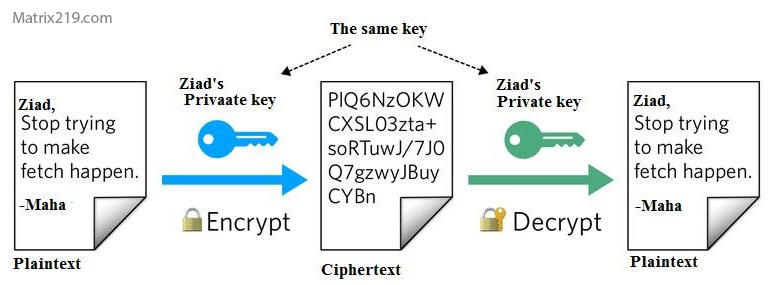
File encryption transforms a normal file into encrypted data that appears random. Without the correct key, the content cannot be understood or reconstructed.
Why Encryption Is More Than “Locking” a File
Encryption protects the file itself, not just access through an application. Even if someone copies the file, it remains unusable.
For a conceptual overview, see What Is File Encryption and Decryption?
Step-by-Step: What Happens When You Encrypt a File
Step 1: Selecting the File and Encryption Method
The software identifies the file and applies a chosen encryption algorithm based on user or default settings.
Step 2: Generating or Using an Encryption Key
A cryptographic key is created or reused. This key is the core secret that controls access.
Step 3: Encrypting the File Contents
The file’s data is mathematically transformed into ciphertext, replacing readable content entirely.
Step 4: Storing or Exporting the Encrypted File
The encrypted file is saved, shared, or moved while remaining protected.
Understanding Encryption Keys (Without the Math)
What an Encryption Key Really Is
A key is not a password stored inside the file. It is a cryptographic value required to reverse encryption.
Why Keys Are More Important Than Algorithms
Strong algorithms fail instantly if keys are weak, reused improperly, or stored insecurely.
Key risks and consequences are discussed in What Happens If You Lose an Encryption Key?
How File Decryption Works
Verifying Access Before Decryption
The software checks whether the provided key or credentials are valid.
Restoring the Original File
Only with the correct key does the software reconstruct the original data exactly as it was.
Why Decryption Is a Sensitive Moment
Poorly designed tools may expose temporary files or memory data during decryption.
How File Encryption Works
Symmetric vs Asymmetric Encryption in Simple Terms
Symmetric Encryption for Speed
One key encrypts and decrypts the file. It is fast and efficient for local files.
Asymmetric Encryption for Safe Sharing
Public and private keys allow secure exchange without revealing secrets directly.
Why Most Software Uses Both
Hybrid systems combine speed and secure key exchange.
A focused comparison is available in Symmetric vs Asymmetric File Encryption.
File Encryption vs Other Protection Methods
Encryption vs Password-Protected Files
Password protection often restricts access at the software level, not the file itself.
Encryption vs Disk-Level Protection
Disk encryption stops protecting data once files leave the device.
This distinction is explained in File Encryption vs Disk Encryption.
Common Beginner Mistakes in File Encryption
Assuming All “Encrypted” Files Are Secure
Some tools only obfuscate files without real encryption.
Storing Keys With Encrypted Files
Doing so removes most of the protection encryption provides.
Ignoring Backup and Recovery Planning
Encryption without key backups often leads to permanent data loss.
Real-world errors are covered in Common File Encryption Mistakes to Avoid.
How File Encryption Fits Into Real Life
Personal File Use
Beginners often need simple tools with minimal setup.
Sharing Files Securely
Encryption protects files during transfer, but key sharing must be handled separately.
Preparing for More Advanced Use
Understanding the basics helps users scale toward professional or business solutions.
For a full framework, see Best File Encryption and Decryption Software in 2026 (Complete Guide).
How Standards Influence File Encryption Software
Modern file encryption tools are typically built around publicly reviewed standards defined by NIST encryption standards to ensure algorithms are tested, reliable, and resistant to known attacks.
Frequently Asked Questions (FAQ)
Do I need technical knowledge to use file encryption?
No, but understanding the basics helps avoid serious mistakes.
Is encryption automatic once enabled?
Only for files you explicitly encrypt or configure the software to protect.
Can encrypted files be copied or shared?
Yes, and they remain encrypted until decrypted with the correct key.
Does encryption change the original file?
The encrypted version replaces or exists alongside the original, depending on settings.
Is file encryption safe for beginners?
Yes, if simple tools are used correctly and keys are managed responsibly.