How long does phone recovery take is one of the most practical—and misunderstood—questions after a hacking incident. People expect a single number, but recovery time depends on what was compromised, how fast you act, and whether access persists through accounts or backups. Some cases stabilize in hours; others take days or weeks to confirm trust.
This article sets realistic expectations. You’ll learn the typical timelines for each recovery phase, what speeds things up or slows them down, and how to know when recovery is actually complete—not just “quiet.”
Quick Navigation
What “Phone Recovery” Really Includes
Recovery is a process, not a switch.
Core phases of recovery
-
Containment: stopping live access and data leakage
-
Account security: email, Apple ID/Google, sessions
-
Device cleanup: manual removal or reset
-
Verification: monitoring for persistence
Each phase has its own timeline—and skipping one extends the total time.
For the full framework, review: If Your Phone Is Hacked: How to Know, What to Do, and How to Stay Safe
Typical Recovery Timelines by Scenario
Different compromises recover at different speeds.
Minor app-based compromise
12–48 hours
-
Isolate device
-
Secure accounts
-
Remove the app
-
Monitor briefly
Account-driven compromise
2–5 days
-
Secure email and cloud accounts
-
Revoke sessions everywhere
-
Verify no re-logins occur
Spyware or permission abuse
3–7 days
-
Manual permission audits
-
App removal
-
Monitoring window (48–72 hours)
Rooted or jailbroken devices
1–3 weeks (or replacement)
-
Full OS restore or device replacement
-
Extended verification required
If you’re unsure which category applies, see: If your phone is hacked how to know
The Fastest Way to Shorten Recovery Time
Sequence beats speed.
Actions that reduce total time
-
Securing email first from a clean device
-
Forcing sign-out on all sessions
-
Avoiding full backup restores
-
Using airplane mode only for short containment
A complete, ordered flow is here: If Your Phone Is Hacked: Step-by-Step Recovery Guide (Android & iPhone)
What Commonly Delays Recovery
Most delays are self-inflicted.
Recovery slowdowns to avoid
-
Resetting before accounts are secure
-
Reinstalling all apps at once
-
Trusting “no alerts” without monitoring
-
Continuing normal use too early
If you made one of these mistakes, pause and reassess before continuing.
Guidance on pitfalls: What not to do after phone hacking
Android vs iPhone: Timeline Differences
Platform behavior changes verification time.
Android recovery timing
-
Permission audits add time
-
Backups may silently restore apps
-
Root checks are critical
Related guidance: If your Android phone is hacked
iPhone recovery timing
-
Faster cleanup if Apple ID is secured
-
iCloud restores can delay verification
-
Profiles must be checked
Related guidance: If your iPhone is hacked
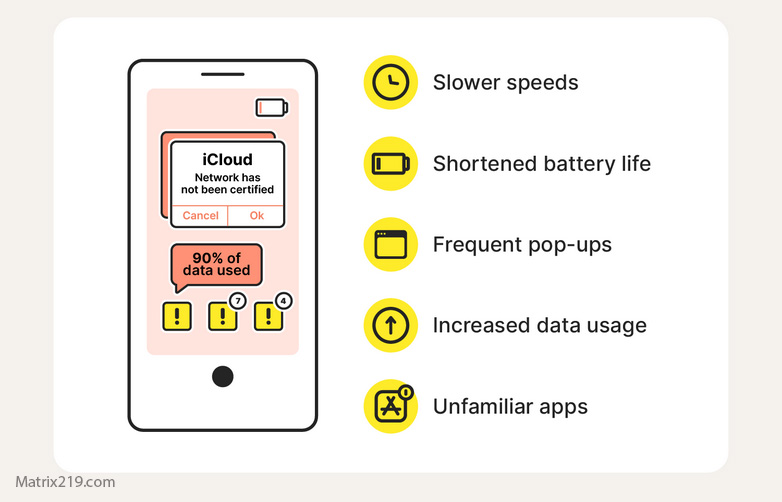
red flags hacked phone
The 72-Hour Verification Window
This window matters more than the cleanup itself.
What to monitor during 72 hours
-
Login alerts and security emails
-
Permissions staying disabled
-
No background data while idle
-
No linked devices reappearing
Most persistence attempts surface here. If nothing returns, confidence rises sharply.
When Recovery Is “Good Enough” to Resume Normal Use
Don’t rush this decision.
Safe to resume if:
-
Accounts remain stable
-
No alerts for at least 72 hours
-
Device behavior is normal
-
High-risk apps were reintroduced last
For high-risk apps, follow: Banking apps after phone hacking
When Recovery Keeps Dragging On
At some point, replacement saves time.
Consider replacement if:
-
Access returns repeatedly
-
Root/jailbreak is suspected
-
Work or financial risk is high
Replacement + hardened accounts is often faster than repeated cleanup.
Reset limits explained here: Factory reset: when it works & when it doesn’t
Security response studies note that verification time, not cleanup time, determines recovery success—because attackers who persist usually reappear within days, not months Mobile incident recovery timelines overview
Frequently Asked Questions
Can phone recovery really take weeks?
Yes. Deep compromises, rooted devices, or repeated account re-entry require extended verification or device replacement to restore confidence safely.
Why does recovery feel slower than expected?
Because most time is spent verifying absence of access. Silence over several days is what builds trust, not instant fixes.
Is it safe to use the phone during recovery?
Limited use is okay after containment, but avoid banking, crypto, and work apps until verification completes.
What’s the fastest possible safe recovery?
Account-first security, selective cleanup, no backup restores, and a full 72-hour monitoring window.
How do I know recovery is actually finished?
When accounts stay stable, permissions don’t return, and no alerts appear after the monitoring window.