Is fast battery drain a hacking sign? This is one of the most searched questions after people notice their phone dying faster than usual. Battery issues feel personal and alarming—especially when paired with stories about spyware and phone surveillance. But the truth is more nuanced: battery drain alone is not proof of hacking.
This article breaks down when fast battery drain is normal, when it becomes a real security signal, and how to evaluate it correctly without panic. You’ll learn how attackers actually impact battery life, which combinations of symptoms matter, and how to decide whether you need investigation or simple optimization.
Quick Navigation
Why Battery Drain Is Often Misinterpreted
Phones consume power for many legitimate reasons.
Common non-hacking causes of fast battery drain
-
OS updates and background optimization
-
Cloud sync, backups, and photo indexing
-
Aging batteries losing capacity
On their own, these issues are expected behavior, not compromise.
For broader context on real hacking indicators, see: If Your Phone Is Hacked: How to Know, What to Do, and How to Stay Safe
When Battery Drain Can Indicate Phone Compromise
Battery drain becomes suspicious when it’s part of a pattern, not a standalone issue.
Red-flag combinations to watch for
-
Battery drain plus unexplained background data usage
-
Battery drain plus phone overheating while idle
-
Battery drain plus unknown apps or permissions
These combinations suggest continuous background activity that deserves scrutiny.
If you’re trying to confirm whether symptoms add up to hacking, follow this detection guide: If your phone is hacked how to know
How Malware and Spyware Affect Battery Life
Not all malicious software behaves the same way.
Malware that drains battery noticeably
-
Spyware that records activity continuously
-
Apps exfiltrating data in real time
-
Malware maintaining constant network connections
Malware designed to stay hidden
-
Permission-based spyware
-
Low-frequency data transmission
-
Triggered activity only during use
The most dangerous threats may cause minimal battery impact, which is why drain alone is unreliable.
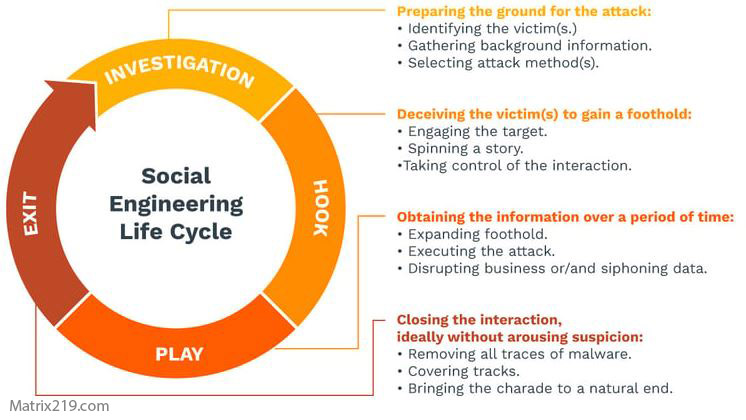
social engineering attack lifecycle
Android vs iPhone: Battery Drain Differences
Platform design affects how battery symptoms appear.
On Android devices
-
Permission abuse can cause constant background processes
-
Battery stats may show unknown apps
See: Signs your Android phone is hacked
On iPhones
-
Battery drain is more often tied to account sync or profiles
-
System limits hide most background activity
Related reading: Signs your iPhone is hacked
How to Check If Battery Drain Is a Security Issue
You don’t need advanced tools to do a first check.
Practical steps to evaluate battery drain
-
Review battery usage by app
-
Check background data usage
-
Restart and observe behavior in idle state
If drain disappears after basic checks, hacking is unlikely.
If problems persist alongside account alerts, move to recovery steps: If Your Phone Is Hacked: Step-by-Step Recovery Guide (Android & iPhone)
When Battery Drain Should Trigger Immediate Action
Treat battery drain as a security signal if:
-
It starts suddenly without usage changes
-
Unknown apps appear in usage reports
-
Accounts show unauthorized activity
At this stage, containment matters more than diagnosis.
Research on mobile malware behavior shows that many threats attempt to balance activity to avoid detection while still maintaining access, which is why battery impact alone is inconsistent across infections Mobile malware behavior and detection overview
Frequently Asked Questions
Can fast battery drain be the only sign of hacking?
No. On its own, it’s unreliable and often unrelated to security.
Does spyware always drain battery quickly?
No. Advanced spyware is designed to minimize resource use.
Is overheating more important than battery drain?
Yes—especially when the phone is idle.
Do battery health tools help with detection?
They help rule out hardware issues, not hacking.
Should I reset my phone just because of battery drain?
No. Confirm patterns before taking drastic action.