Mobile Privacy Tools are everywhere—VPNs, security apps, “spyware detectors,” permission managers, and privacy cleaners all promise protection. The problem is not the lack of tools, but unrealistic expectations about what they can actually do.
Some tools genuinely reduce surveillance risk. Others offer little benefit or even create new problems by adding complexity, false confidence, or unnecessary data access. Knowing which tools help—and which to avoid—prevents wasted effort and misplaced trust.
This article explains which mobile privacy tools are useful, where their limits are, and how to use them effectively as part of a broader strategy.
Why Tools Alone Don’t Solve Mobile Surveillance
Tools operate within system limits. They cannot override user-granted permissions, fix poor account security, or prevent physical access.
When tools are treated as substitutes for awareness, surveillance risks remain. When used intentionally, they support better habits and visibility.
Understanding this boundary prevents disappointment and overreliance.
VPNs: What They Help With (and What They Don’t)
VPNs encrypt network traffic and hide IP addresses from websites and local networks. This reduces exposure on public Wi-Fi and limits basic network monitoring.
However, VPNs do not block spyware, prevent app-level tracking, or stop account-based surveillance. They protect connections, not devices.
VPNs are useful—but only for specific threats.
Mobile Antivirus and Security Apps
Security apps help identify known malicious software and forgotten apps. On Android, they offer deeper visibility; on iOS, their role is more limited.
They do not reliably detect permission abuse, cloud surveillance, or new spyware variants. Treat them as supporting tools, not primary defenses.
Installing multiple security apps increases noise and reduces clarity.
Permission Managers and System Dashboards
Built-in permission dashboards are among the most effective privacy tools available. They show which apps access sensitive features and when.
Regular reviews of accessibility access, device admin privileges, notification access, microphone, camera, and location provide real insight into surveillance risk.
These tools already exist on the device and require no installation.
Network Monitoring and Firewall Apps
Some apps monitor outbound connections or restrict app network access. These can help identify unusual data activity or limit background transmission.
However, misconfiguration can break functionality or create confusion. These tools are best suited for advanced users who understand normal app behavior.
They are optional, not essential.
Spyware “Removal” and “Cleaner” Apps
Apps claiming instant spyware removal or deep cleaning should be approached with caution. Many rely on fear-based marketing and provide little real value.
Some request excessive permissions themselves, creating new privacy risks.
No app can magically remove all spyware without user involvement and system-level checks.
Password Managers and Account Security Tools
Password managers reduce one of the most common surveillance vectors: account compromise.
Using unique passwords and enabling multi-factor authentication protects cloud data even if the device is targeted.
Account security tools often provide more privacy benefit than device-focused apps.
Backup and Recovery Tools
Backup tools are double-edged. They protect data—but can also restore compromised configurations.
Selective backups and manual app restoration reduce surveillance persistence after resets.
Control matters more than automation here.
What to Avoid in Mobile Privacy Tools
Avoid tools that:
-
Promise total anonymity or full spyware immunity
-
Require excessive permissions without clear need
-
Use fear-based messaging or urgency
-
Offer vague explanations of how they work
Privacy tools should increase clarity, not anxiety.
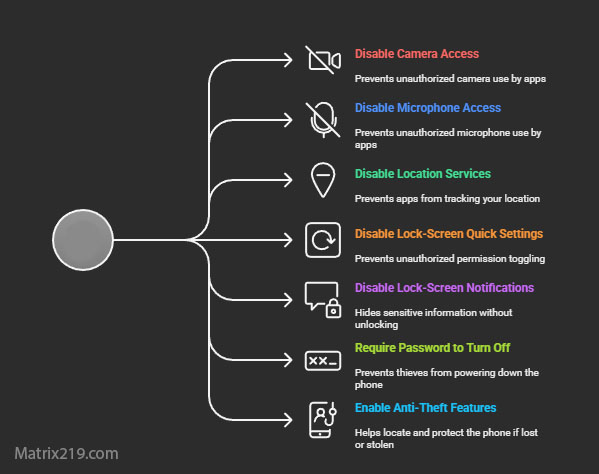
What to Avoid in Mobile Privacy Tools
How to Choose Tools Wisely
Choose tools that:
-
Solve a specific problem
-
Respect system boundaries
-
Require minimal permissions
-
Complement good habits
One or two well-chosen tools outperform cluttered setups.
Tools Support Strategy—They Don’t Replace It
The most effective mobile privacy setups rely on habits first and tools second.
Tools help enforce decisions users already understand. They do not make decisions on the user’s behalf.
For a complete strategy overview, see: Mobile Privacy & Spyware Detection: How to Protect Your Phone from Surveillance (2026)
FAQ
Do I need many privacy tools on my phone?
No. Fewer, well-chosen tools work better.
Is a VPN enough to protect my phone?
No. It only protects network traffic.
Are spyware remover apps trustworthy?
Many are not. Manual checks matter more.
What tool provides the most value?
Permission dashboards and account security tools.
Can tools replace good habits?
No. Habits are the foundation.