Phishing on mobile explained properly looks very different from phishing on desktop. Phones remove context, shrink URLs, auto-open links, and deliver verification codes on the same device being attacked. That combination makes mobile phishing far more effective, even for users who would never fall for the same trick on a computer.
This article explains how mobile phishing actually works in real life, why phones amplify its success, the most common mobile-specific tricks attackers use, and how to break the attack chain before it turns into full phone or account compromise.
Quick Navigation
Why Phishing Works Better on Phones
Phones change user behavior.
Mobile-specific factors attackers exploit
-
Shortened or hidden URLs
-
App-to-app link opening without browser context
-
Small screens that hide warning signs
-
Notifications creating urgency
-
One-tap access to email, SMS, and apps
These factors reduce verification and increase reaction speed.
For the wider attack landscape, review: How phones get hacked in real life
How phones get hacked in real life
The Most Common Types of Mobile Phishing
Not all phishing looks the same on phones.
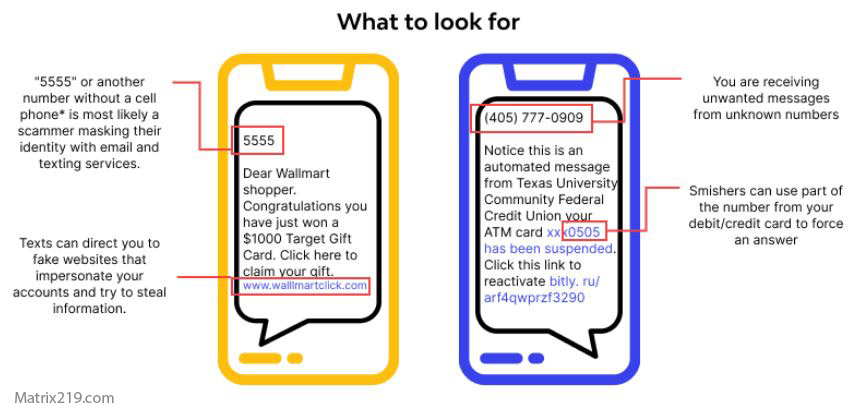
SMS phishing (Smishing)
-
Fake delivery, bank, or security alerts
-
Links that mimic real services
-
Requests for immediate action
Email phishing on mobile
-
Legitimate-looking sender names
-
“Verify now” or “Unusual login” prompts
-
Links opening inside in-app browsers
App-based phishing
-
Fake login screens inside malicious apps
-
Overlays that capture credentials
-
Apps asking you to “re-authenticate”
Each type relies on speed, not sophistication.
For real-world consequences, see: If Your Phone Is Hacked: How to Know, What to Do, and How to Stay Safe
How Mobile Phishing Turns Into Full Phone Compromise
Phishing is usually the first domino.
Typical escalation path
-
You enter credentials on a fake page
-
Attacker accesses email or cloud account
-
Password resets are triggered
-
Sessions persist across devices
-
Apps and backups restore access
This is why phishing often “comes back” even after cleanup.
For recovery sequencing, see: If Your Phone Is Hacked: Step-by-Step Recovery Guide (Android & iPhone)
Why Verification Codes Don’t Save You on Phones
Two-factor authentication is weaker on mobile.
The problem
-
Codes arrive on the same device
-
Notifications are readable by spyware
-
Phishing pages request codes in real time
Attackers don’t bypass 2FA—they relay it.
For persistence risks, review: How hackers hide on phones
Mobile Phishing Tricks People Miss
These are not obvious scams.
Subtle phishing techniques
-
Lookalike domains with slight spelling changes
-
Trusted brand names inside URLs
-
Links opened inside apps (not browsers)
-
Fake “security check” pop-ups
Phones hide these details better than desktops.
Android vs iPhone: Phishing Differences
Platforms shape attack style.
Android phishing patterns
-
Malicious apps with fake login overlays
-
Permission abuse after phishing success
Context: If your Android phone is hacked
iPhone phishing patterns
-
Apple ID lock or iCloud warnings
-
Configuration profile prompts after phishing
Context: If your iPhone is hacked
How to Break a Mobile Phishing Attack in Real Time
Speed matters—but awareness matters more.
If you suspect phishing
-
Do not enter credentials
-
Close the page or app immediately
-
Do not reuse the same link
-
Check the account directly via official app or site
If credentials were entered, act fast.
Immediate response guide: What to do immediately if your phone is hacked
Long-Term Protection Against Mobile Phishing
Prevention is behavioral, not technical.
Practical anti-phishing habits
-
Never trust urgency on mobile
-
Avoid logging in via links
-
Use password managers to detect fake domains
-
Separate email security from daily browsing
-
Review account login alerts regularly
These habits block most mobile phishing attacks.
Why Mobile Phishing Is Still Growing
The environment favors attackers.
Phones are personal, always-on, and trusted. Attackers exploit that intimacy. As long as verification, browsing, and messaging happen on the same device, mobile phishing will remain the most effective entry point into phone and account compromise.
Industry security reports consistently show that phishing remains the leading cause of mobile account takeovers, with mobile users far more likely to engage with malicious links than desktop users Mobile phishing effectiveness and escalation overview
Frequently Asked Questions
Is mobile phishing really worse than desktop phishing?
Yes. Smaller screens, hidden URLs, and app-based browsing reduce verification, making users more likely to enter credentials or codes without noticing red flags.
Can antivirus stop mobile phishing?
Not reliably. Phishing relies on fake pages and human interaction, not malware signatures. Awareness and habits matter more.
Are SMS messages more dangerous than email?
Often yes. SMS feels more urgent and trusted, and links are harder to verify compared to email on desktop.
Does two-factor authentication stop phishing?
It helps, but doesn’t eliminate risk on phones. Attackers often relay verification codes in real time.
What’s the safest way to log in on a phone?
Open the official app or type the site manually. Avoid logging in through links, especially from messages or notifications.