As file encryption becomes mainstream, fake and misleading “encryption” tools have multiplied rapidly. In 2026, Signs Your File Encryption Software Is Fake is a critical trust-building topic because many users believe their files are secure—when in reality, they are only obfuscated, hidden, or weakly locked. Fake encryption software creates false confidence, which is often more dangerous than having no encryption at all.
This article explains how to identify fake or misleading file encryption tools, why they exist, and what real encryption must always provide. The goal is not paranoia, but clarity. If a tool claims to encrypt your files, it should meet non-negotiable technical and behavioral standards. Anything less is a risk.
Quick Navigation
What Fake “Encryption” Software Really Is
Obfuscation Disguised as Encryption
Some tools simply rename, compress, or lightly scramble files.
Viewer or App Locking
Files are readable once opened in another program.
Security by Secrecy
No clear explanation of how encryption works or how keys are handled.
These tools rely on user ignorance, not cryptography.
Sign 1: No Clear Explanation of How Encryption Works
Why This Is a Red Flag
Real encryption can be explained at a conceptual level without revealing secrets.
What Fake Tools Do
They avoid describing algorithms, keys, or encryption scope.
What to Expect Instead
Clear explanation of file-level encryption behavior.
A legitimate baseline is explained in How File Encryption Works (Beginner Friendly).
Sign 2: Claims of “Unbreakable” or “Military-Grade” Security
Why This Is Misleading
Security is never absolute and never guaranteed.
What Fake Tools Say
Marketing buzzwords without technical substance.
What Real Tools Say
They explain limits, responsibilities, and risks.
This behavior violates responsible security communication.
Sign 3: No Mention of Encryption Keys
Why Keys Matter
Encryption without keys does not exist.
Fake Tool Behavior
Files “unlock” automatically without credentials.
Real Encryption Behavior
Access always requires a key, password, or credential.
Key importance is explained in What Happens If You Lose an Encryption Key?
Sign 4: Files Open Normally Without Decryption
Why This Is Critical
Encrypted files should be unreadable until decrypted.
What Fake Tools Do
They rely on app-level restrictions or file hiding.
How to Verify
Try opening the file with another program or on another device.
This mistake is common and dangerous.
Sign 5: No Discussion of Key Loss or Recovery
Why This Matters
Encryption is unforgiving by design.
Fake Tool Assumption
“You can always recover your files.”
Real Encryption Reality
Key loss often means permanent data loss.
This reality is explained in How to Recover Encrypted Files.
Sign 6: Encryption Breaks Instantly When You Change Devices
Why This Happens
Protection is tied to one app, not the file itself.
Why It’s Dangerous
Anyone with access to the file can bypass protection.
What Real Encryption Does
Protection stays with the file everywhere.
This distinction is covered in File Encryption Software vs Secure Cloud Storage.
Sign 7: No Independent Verification or Standards Reference
Why Standards Matter
They provide external validation.
Fake Tool Pattern
Vague claims, no technical documentation.
What Legitimate Tools Reference
Widely accepted cryptographic standards.
Serious tools align with NIST encryption standards for algorithms and key handling.
Sign 8: “Encrypts” Files but Leaves Metadata Visible
Why This Is a Red Flag
Metadata can reveal sensitive information.
What Fake Tools Miss
They protect content but not structure or metadata.
What Real Encryption Does
Everything becomes unreadable ciphertext.
This mistake appears often in Common File Encryption Mistakes to Avoid.
Sign 9: Promises Easy Decryption Without Keys
Why This Is Impossible
Strong encryption has no backdoors.
What Fake Tools Promise
Password reset, emergency unlock, or vendor recovery.
What Real Encryption Enforces
No key, no access.
This is a non-negotiable security property.
Sign 10: Tool Focuses on UI Tricks, Not Security Behavior
Why This Is Telling
Security happens at the data level, not the interface.
Fake Tool Behavior
Fancy animations, vague locks, unclear outcomes.
Real Tool Focus
Predictable behavior, clear access rules, documented limits.
Usability should not replace security substance.
How Fake Encryption Software Causes Real Harm
False Sense of Security
Users share or store files believing they are protected.
Increased Data Exposure
Attackers bypass weak protection easily.
Delayed Breach Discovery
Problems surface only after damage is done.
This harm is often worse than using no encryption.
How to Verify Real File Encryption
Check File Readability Outside the App
Encrypted files should look like random data.
Look for Key Management Explanation
Keys must exist, be protected, and be user-controlled.
Test Loss Scenarios
What happens if the app is removed or the device is lost?
Verification matters more than claims.
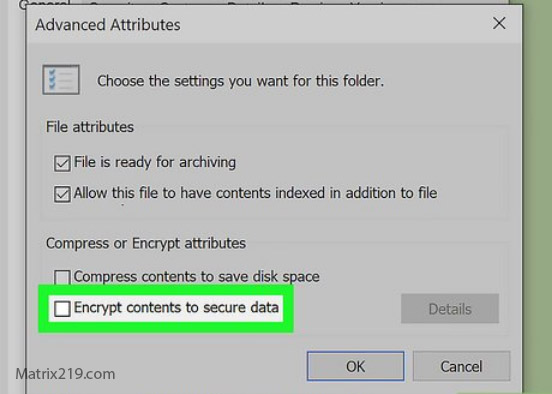
How to Verify Real File Encryption
What to Use Instead of Fake Encryption
Tools With Transparent Documentation
Clear explanations beat flashy promises.
Tools That Acknowledge Limits
Honesty is a security signal.
Tools That Integrate With Real Workflows
Security that survives sharing, storage, and backup.
A vetted decision framework is provided in Best File Encryption and Decryption Software in 2026 (Complete Guide).
Standards and Trust Reality
Security guidance aligned with NIST encryption standards assumes encryption is verifiable, key-based, and irreversible without authorization—anything else is not encryption.
Frequently Asked Questions (FAQ)
Can fake encryption tools really expose my data?
Yes. They often provide little or no real protection.
How can I tell if a file is truly encrypted?
It should be unreadable in any standard program.
Are free encryption tools more likely to be fake?
Not necessarily—many free tools are legitimate.
Can vendors recover encrypted files?
Not if encryption is real and keys are user-owned.
Is it safer to use no encryption than fake encryption?
Often yes. Fake encryption creates dangerous false confidence.