Knowing the signs your antivirus is fake or useless is critical in 2026—because the most dangerous security tools don’t look dangerous at all. Fake or ineffective antivirus software often presents itself as helpful, urgent, and reassuring, while quietly doing nothing (or worse, creating new risks).
Many users assume that having an antivirus equals being protected. That assumption is exactly what fake tools exploit. Some exist purely to scare users into upgrades. Others are outdated, abandoned, or technically incapable of stopping modern threats. In both cases, the result is false confidence.
This article walks you through clear, practical warning signs that your antivirus isn’t protecting you—and how to recognize the difference between real security and empty software.
For the full, trusted baseline of what real protection looks like, reference: best free antivirus in 2026
Quick Navigation
It shows infection warnings before scanning anything
A major red flag is an antivirus that:
-
Immediately claims your system is infected
-
Displays alarming messages without scanning
-
Uses countdowns or urgent language
Legitimate antivirus software does not diagnose threats without analysis. Fear-first messaging is a classic scam tactic.
It demands payment to “fix” problems it found instantly
Fake antivirus often:
-
Finds dozens of “critical threats” instantly
-
Blocks all actions until payment
-
Claims only the paid version can remove infections
Real antivirus allows you to verify, quarantine, or remove threats—especially if it claims to be free.
It has no clear vendor identity or reputation
Be cautious if:
-
The vendor name is unfamiliar
-
There’s no official website or documentation
-
Support pages are missing or generic
Security software requires trust. If you can’t easily identify who made it, you shouldn’t run it.
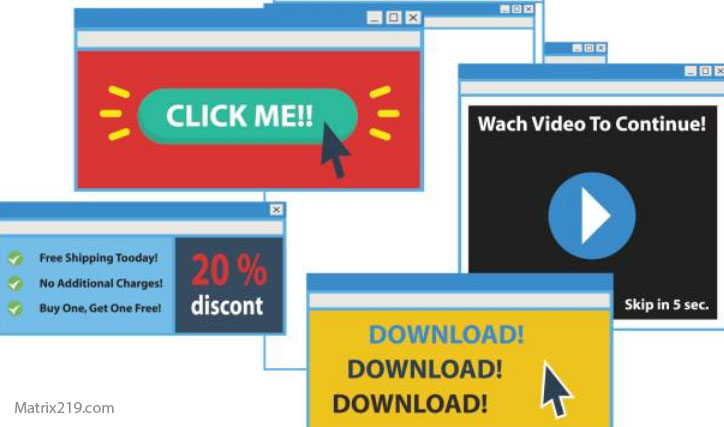
It installs itself via pop-ups or fake alerts
Legitimate antivirus software:
-
Is downloaded intentionally
-
Does not install itself through browser pop-ups
-
Does not pretend to be system warnings
If your “antivirus” appeared because a web page told you to install it immediately, it’s almost certainly fake.
It disables real system security features
A useless or malicious antivirus may:
-
Turn off built-in OS protection
-
Prevent updates to system security
-
Block other legitimate security tools
Real antivirus integrates with system security—it doesn’t sabotage it.
It consumes resources but never shows real results
Warning signs include:
-
High CPU or disk usage
-
No clear scan history or logs
-
No detailed detection explanations
Effective antivirus software shows what it scanned, what it found, and what actions were taken.
It hasn’t been updated in a long time
Outdated antivirus is often as bad as fake antivirus.
Red flags:
-
No visible update dates
-
Infrequent or manual updates
-
Incompatibility with current OS versions
Modern threats evolve daily. An antivirus that doesn’t update regularly is functionally useless.
It bundles unrelated or suspicious extras
Be cautious if the antivirus:
-
Installs browser toolbars
-
Adds “system optimizers”
-
Pushes unrelated apps
Security software should focus on protection—not clutter.
It’s impossible or difficult to uninstall
Fake or malicious antivirus may:
-
Resist uninstallation
-
Leave background services running
-
Reappear after removal
Legitimate antivirus always provides a clean, complete uninstall process.
It never detects anything—ever
An antivirus that:
-
Never blocks downloads
-
Never flags suspicious behavior
-
Never logs events
may not be protecting you at all. While quiet tools exist, total silence with zero visibility over long periods is suspicious—especially if you know you’ve encountered risky files.
It relies entirely on scare tactics, not education
Real antivirus software:
-
Explains risks calmly
-
Provides actionable information
-
Does not exaggerate consequences
Fake tools rely on emotional pressure, not clarity.
How to verify your antivirus is legitimate
To confirm legitimacy:
-
Check the vendor’s official site
-
Look for clear update logs
-
Review privacy and support pages
-
Search for independent mentions or documentation
If transparency is missing, trust should be too.
What to do if you suspect your antivirus is fake
If you see multiple warning signs:
-
Disconnect from the internet
-
Uninstall the suspicious software
-
Re-enable built-in OS protection
-
Install a reputable antivirus from an official source
Do not ignore your instincts—fake antivirus thrives on hesitation.
Final answer
So, what are the signs your antivirus is fake or useless in 2026?
Fear-based alerts, lack of transparency, outdated protection, aggressive payment demands, and system interference are the biggest indicators. Real antivirus software is calm, transparent, regularly updated, and focused on protection—not pressure.
If your antivirus creates anxiety instead of confidence, it’s time to replace it.
For the definitive, safe baseline and trusted structure, revisit: best free antivirus in 2026
FAQ
Can fake antivirus actually harm my system?
Yes. It can install malware, spy on activity, or disable real protection.
Is outdated antivirus better than none?
No. It can create false confidence and miss modern threats.
Are antivirus pop-ups always bad?
Not always—but scare tactics and forced payments are red flags.
How do fake antivirus tools spread?
Through pop-ups, fake scans, malicious ads, and misleading download sites.
What’s the safest way to get antivirus?
Download only from official vendor websites you can verify and research.