
What NOT to do after phone hacking is just as important as knowing the right steps. Many recoveries fail not because attackers are too skilled—but because users accidentally help them. Panic-driven actions like resetting too early, clicking “security” pop-ups, or changing passwords from the compromised phone often undo hours or days of recovery work.
This article highlights the most damaging mistakes people make after a phone compromise, explains why they backfire, and shows what to do instead. Avoiding these errors can be the difference between a clean recovery and repeated re-compromise.
Quick Navigation
Mistake 1: Resetting the Phone Too Early
This is the most common—and costly—error.
Why early resets backfire
-
Compromised email restores access
-
Infected backups reinstall risky apps
-
Account sessions remain active
Resetting feels decisive, but without securing accounts first, it often helps the attacker.
For the correct order, review: Change passwords first or reset phone
And for the full response framework: If Your Phone Is Hacked: How to Know, What to Do, and How to Stay Safe
Mistake 2: Changing Passwords on the Hacked Phone
This gives attackers a front-row seat.
Why this is dangerous
-
Keylogging or screen capture can steal new passwords
-
Active sessions remain logged in
-
Recovery channels can be altered again
Always use a clean, trusted device.
Correct sequencing is covered here: What to do immediately if your phone is hacked
Mistake 3: Clicking “Security Alerts” or Pop-Ups
Fear is a tool attackers exploit.
How fake alerts cause damage
-
They install adware or spyware
-
They request dangerous permissions
-
They redirect to phishing pages
If an alert demands urgent action, treat it as suspicious until verified.
Learn how to tell the difference here: Strange pop-ups malware or ads
Mistake 4: Installing Multiple Security Apps
More apps ≠ more security.
Why this creates problems
-
Conflicting permissions
-
Increased instability
-
False confidence without real coverage
One reputable tool plus manual checks is safer than app stacking.
If you’re relying on scans alone, read: Can antivirus detect phone hacking
Mistake 5: Ignoring SIM and Carrier Security
The SIM is often forgotten.
Risks of skipping SIM actions
-
SMS codes intercepted
-
SIM swap attacks
-
Account resets bypassing app security
SIM protection matters especially if you received unexplained verification codes.
Guidance here: Lock SIM & carrier actions after phone hacking
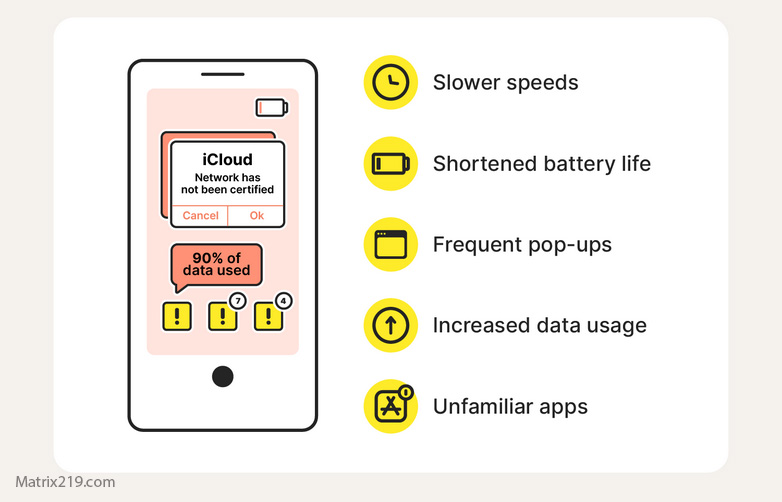
red flags hacked phone
Mistake 6: Restoring Everything From Old Backups
Backups can carry problems forward.
When backups cause re-compromise
-
Restoring apps blindly
-
Syncing old permissions
-
Reintroducing linked devices
Selective restore is safer than full restore.
Reset limitations explained here: Factory reset: when it works & when it doesn’t
Mistake 7: Assuming “No Symptoms” Means Safe
Silence is not proof.
Why attackers prefer quiet access
-
Stealthy data sync
-
Permission-based spying
-
Account-level persistence
If accounts remain compromised, lack of symptoms is meaningless.
Learn how attackers stay hidden: How hackers hide on phones
What to Do Instead of These Mistakes
Avoiding errors isn’t enough—you need structure.
Safer alternative approach
-
Isolate the phone
-
Secure email from a clean device
-
Lock down Apple ID / Google account
-
Revoke sessions and permissions
-
Then decide on cleanup or reset
If you’re unsure where you are in the process, start here: If Your Phone Is Hacked: Step-by-Step Recovery Guide (Android & iPhone)
Security response advisories consistently show that user mistakes—especially premature resets and phishing clicks—cause more recovery failures than advanced malware, which is why structured sequencing is critical Post-compromise user error analysis
Frequently Asked Questions
Is resetting ever a mistake?
Only when done before securing accounts.
Can fake alerts look completely real?
Yes. Many copy system UI perfectly.
Is doing nothing safer than doing the wrong thing?
Often, yes—until you have a clear plan.
Should I ask friends for quick advice?
Be cautious; generic advice often skips sequencing.
How do I know I’ve avoided the worst mistakes?
When accounts stay secure and access doesn’t return.