Many users notice performance drops after enabling encryption and immediately assume something is wrong. In 2026, Why File Encryption Slows Down Your Computer is a common question because encryption is increasingly used on everyday systems—not just high-end machines. While encryption can introduce overhead, slowdowns are often misunderstood, exaggerated, or caused by incorrect implementation rather than encryption itself.
This article explains when and why file encryption affects performance, what actually consumes system resources, and how to reduce slowdown without sacrificing security. The goal is to separate unavoidable technical limits from fixable mistakes, so encryption remains a protective layer—not a productivity killer.
Quick Navigation
What Encryption Actually Does to Your System
Encryption Adds Computational Work
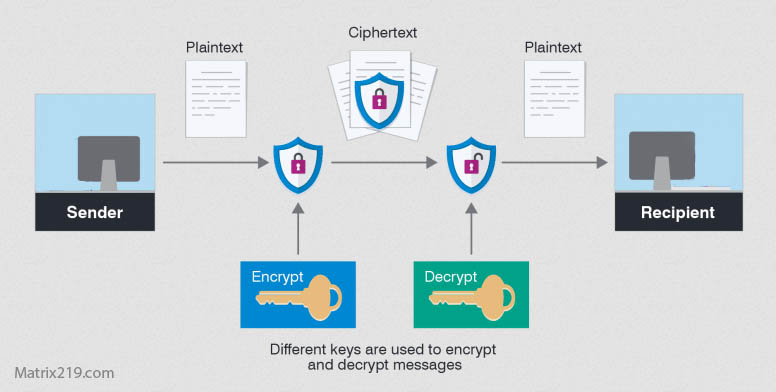
Files must be mathematically transformed when encrypted and decrypted.
Decryption Happens During Access
Any time a file is opened, the system must decrypt it first.
Encryption Is Not Always “On”
Performance impact depends on when encryption occurs—not just that it exists.
This behavior is often misunderstood by first-time users.
When File Encryption Causes Noticeable Slowdowns
Encrypting Large Files
Videos, archives, and backups require more processing time.
Frequent Open–Edit–Save Cycles
Repeated decryption and re-encryption amplify overhead.
Older or Low-Power Hardware
Systems without hardware acceleration feel the impact more.
These scenarios explain most real-world complaints.
CPU vs Disk: Where the Bottleneck Really Is
CPU-Bound Encryption
Older CPUs struggle with intensive cryptographic operations.
Disk-Bound Systems
Slow HDDs amplify the perceived delay during encrypted reads and writes.
Why SSDs Feel Faster With Encryption
Fast storage masks encryption overhead effectively.
Hardware context matters more than encryption choice alone.
File-Level Encryption vs Disk Encryption Performance
File-Level Encryption
-
Overhead occurs only when encrypted files are accessed
-
Better for selective protection
Disk Encryption
-
Constant, system-wide encryption and decryption
-
More noticeable on older systems
This distinction is explained further in File Encryption vs Disk Encryption.
Common Performance Myths About Encryption
“Encryption Is Always Slow”
False. Modern systems handle encryption efficiently.
“Encryption Runs All the Time”
False. Most tools encrypt only during access.
“Disabling Encryption Fixes Everything”
Often false. Underlying disk or CPU limits may be the real cause.
These myths cause users to disable security unnecessarily.
Why Some Encryption Tools Feel Slower Than Others
Background Scanning and Indexing
Some tools constantly monitor files, consuming resources.
Poor Temporary File Handling
Creating large plaintext temp files increases disk I/O.
Inefficient Implementations
Not all encryption software is optimized equally.
Tool behavior matters as much as encryption strength.
Why Some Encryption Tools Feel Slower Than Others
Encryption and Hardware Acceleration
Modern CPUs Support Crypto Acceleration
Many systems process encryption with minimal overhead.
Older Hardware Lacks These Features
Performance impact becomes more visible.
Why Lightweight Tools Matter
Efficient tools minimize overhead on weak systems.
This topic is expanded in Lightweight File Encryption Tools for Old PCs.
Encryption During Cloud Sync and Backups
Encrypting Before Syncing
Adds processing before upload—but increases security.
Sync Conflicts and Rewrites
Encrypted files may trigger full re-uploads.
Backup Encryption Overhead
Large encrypted backups take longer but remain protected.
Cloud workflows are discussed in File Encryption for Cloud Storage .
How to Reduce Encryption-Related Slowdowns
Encrypt Only High-Risk Files
Avoid encrypting everything by default.
Avoid Large Encrypted Containers
They cause full reprocessing for small changes.
Close Files When Not Needed
Reduce constant decrypt/re-encrypt cycles.
These practices prevent unnecessary performance loss.
When Encryption Is Not the Real Problem
Malware or Background Processes
Infected systems feel slow regardless of encryption.
Failing Storage Devices
Encryption exposes disk issues rather than causing them.
Poor System Configuration
Outdated drivers and file systems worsen performance.
Encryption often reveals weaknesses—it doesn’t create them.
Performance vs Security: The Real Trade-Off
Disabling Encryption Improves Speed—but Increases Risk
Speed gains often come at the cost of exposure.
Smart Encryption Minimizes Impact
Selective, file-level encryption offers balance.
Security Is Cheaper Than Recovery
Data loss or breach costs far exceed minor slowdowns.
This trade-off is discussed in Is File Encryption Really Secure?
Standards and Performance Expectations
Security designs aligned with NIST encryption standards assume encryption overhead is acceptable and manageable when implemented correctly.
Frequently Asked Questions (FAQ)
Does file encryption always slow down computers?
No. Impact depends on file size, frequency of access, and hardware.
Why does encryption feel slower on old PCs?
Older CPUs and HDDs amplify overhead.
Is SSD recommended when using encryption?
Yes. SSDs significantly reduce perceived slowdown.
Should I disable encryption for performance?
Only if files are low-risk and performance issues are confirmed.
Can encryption cause system crashes?
No. Crashes usually indicate hardware or software problems.