The complaint why free antivirus slows your PC is one of the most common frustrations users report in 2026. Many people install antivirus software expecting better security—only to find their system booting slower, apps lagging, or fans spinning louder than before. That experience leads some users to disable protection entirely, which creates a much bigger risk.
The truth is that free antivirus doesn’t have to slow your PC—but some tools do, and for very specific reasons. Performance issues are usually tied to how an antivirus is designed, configured, and monetized, not the simple fact that it’s free.
This article explains the real technical reasons behind antivirus slowdowns, how to identify whether your antivirus is the cause, and what you can do to fix the problem without sacrificing protection.
For the full performance-aware framework, start here: best free antivirus in 2026
Quick Navigation
How antivirus software affects system performance
Antivirus software works by:
-
Monitoring files as they’re opened or executed
-
Scanning downloads and installers
-
Analyzing running processes
Each of these actions uses CPU, memory, disk, or network resources. When designed efficiently, the impact is minimal. When designed poorly—or overloaded with extras—it becomes noticeable.
Real reasons free antivirus slows PCs
1. Constant background scanning
Some free antivirus tools:
-
Run continuous full scans
-
Re-scan unchanged files repeatedly
This causes:
-
Disk usage spikes
-
Slower app launches
-
Lag during multitasking
Modern tools should scan events, not everything all the time.
2. Heavy real-time monitoring
Real-time protection is essential—but when poorly optimized:
-
CPU usage spikes during file access
-
Games and creative apps stutter
-
Boot times increase
Well-designed antivirus uses selective scanning, not brute force.
3. Ad services and telemetry
Many free antivirus tools include:
-
Background ad services
-
Upgrade tracking
-
Analytics modules
These components:
-
Run constantly
-
Consume memory and network resources
-
Increase background activity even when idle
This is one of the biggest differences between lightweight and bloated tools.
For monetization insight: How Free Antivirus Makes Money
4. Low-end or older hardware
On older PCs:
-
HDDs amplify scan delays
-
Limited RAM increases swapping
-
Slower CPUs magnify inefficiencies
An antivirus that feels “fine” on a modern PC can cripple older systems.
For hardware-specific guidance: Best Free Antivirus for PC (Low-End Devices)
5. Poor default settings
Many users install antivirus and never adjust:
-
Scheduled full scans
-
Startup scan behavior
-
Notification frequency
Default settings are often designed for maximum coverage, not performance.
Signs your antivirus is slowing your PC
Common warning signs include:
-
Slow boot times after installation
-
High disk usage when opening files
-
Lag spikes during normal tasks
-
Antivirus processes dominating Task Manager
If these appear immediately after installation, the antivirus is likely the cause.
Free antivirus vs built-in protection performance
Built-in system security tools are:
-
Optimized for the OS
-
Tightly integrated with system processes
-
Designed to stay lightweight
Some free antivirus tools match this efficiency. Others don’t.
For a direct comparison: Free Antivirus vs Windows Defender in 2026
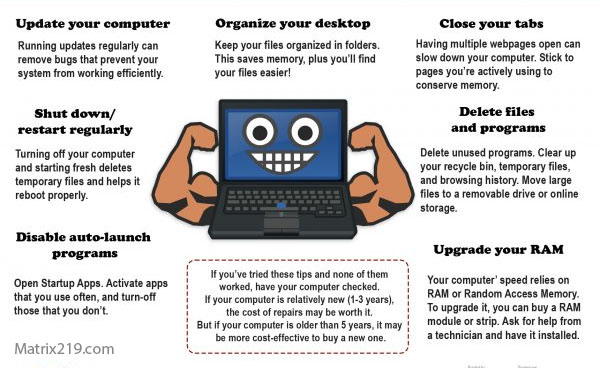
How to reduce antivirus-related slowdowns
You can often fix performance issues by:
-
Disabling unnecessary features
-
Rescheduling full scans to idle hours
-
Excluding trusted folders (games, work files)
-
Turning off non-security extras
Configuration matters as much as product choice.
When free antivirus is not the right fit
Free antivirus may not be ideal if:
-
Your PC is very old or resource-limited
-
The tool relies heavily on ads
-
You can’t control scan behavior
In these cases, a lighter free option—or built-in protection—may perform better.
When free antivirus should NOT slow your PC
A well-designed free antivirus should:
-
Use near-zero CPU when idle
-
Avoid constant disk scanning
-
Pause activity during high system load
If it doesn’t, the problem is the software—not your PC.
why free antivirus slows your pc
Final answer
So, why does free antivirus slow your PC?
Because some tools trade performance for ads, poor optimization, or aggressive scanning. Free antivirus itself isn’t the issue—bad design and default settings are. When you choose a lightweight tool and configure it properly, free protection can stay quiet and fast.
For a complete performance-first comparison and safe picks, revisit: best free antivirus in 2026
FAQ
Does all free antivirus slow down PCs?
No. Lightweight, well-designed tools have minimal impact.
Is paid antivirus always faster?
Not necessarily. Some paid suites are heavier than free alternatives.
Can I disable scans to improve speed?
Yes, but keep real-time protection enabled.
Are ads the main performance killer?
Often yes. Background ad services consume resources constantly.
Is Windows Defender lighter than free antivirus?
In many cases, yes—but it depends on the specific free tool.