
Free encryption tools are widely used, yet many users remain uncertain about whether they can truly be trusted. Are Free File Encryption Tools Safe? is a question driven by real concerns in 2026: increasing data breaches, abandoned software projects, and misleading security claims. While some free tools offer strong protection, others create a false sense of safety that can be more dangerous than having no encryption at all.
This article takes a realistic, risk-based look at free file encryption tools. You will learn what makes a free tool genuinely secure, where the most common dangers appear, and how to evaluate safety without relying on marketing promises. The goal is not to discourage free solutions, but to help you use them responsibly—understanding exactly what they protect and what they do not.
Quick Navigation
What “Safe” Means in File Encryption
Cryptographic Safety vs Practical Safety
A tool may use strong algorithms but still be unsafe due to poor implementation or key handling.
Safety Depends on Usage
Encryption tools do not fail randomly; they fail when used incorrectly or trusted blindly.
A foundational explanation of encryption behavior is covered in How File Encryption Works (Beginner Friendly).
When Free File Encryption Tools Are Safe to Use
Use of Standard, Audited Algorithms
Safe tools rely on publicly reviewed encryption standards rather than proprietary methods.
Local Key Ownership
Keys are generated and stored locally, not uploaded to external servers.
Transparent Design and Documentation
Clear explanations indicate responsible security practices.
Algorithm fundamentals are explained in Common File Encryption Algorithms (AES, RSA, ChaCha20).
Common Risks Associated With Free Encryption Tools
Abandoned or Poorly Maintained Software
Unpatched vulnerabilities can silently compromise encrypted data.
Fake or Misleading Encryption Claims
Some tools only obfuscate files instead of encrypting them properly.
Weak Default Settings
Insecure defaults undermine even strong encryption algorithms.
These red flags are discussed in Signs Your File Encryption Software Is Fake
Open Source vs Proprietary Free Tools
Transparency Advantages of Open Source
Public review helps identify flaws and improves trust.
Risks of Blind Trust in Closed Tools
Without visibility, users rely entirely on vendor claims.
Open Source Is Not Automatically Safe
Security still depends on maintenance and correct usage.
This distinction fits into the broader context of Best Free File Encryption Software in 2026.
Key Management: The Biggest Safety Factor
Why Key Loss Is a Real Threat
Most free tools offer no recovery options if keys are lost.
Poor Key Storage Practices
Storing keys alongside encrypted files defeats encryption entirely.
Planning for Secure Key Backup
Safe usage requires disciplined key handling from the start.
Key-related failures are detailed in What Happens If You Lose an Encryption Key?
Free Encryption Tools in Cloud and Sharing Scenarios
Encrypting Before Uploading
Files must be encrypted locally before interacting with cloud services.
Key Exchange Risks
Sharing keys insecurely exposes encrypted files.
Cloud-specific risks are discussed in File Encryption for Cloud Storage.
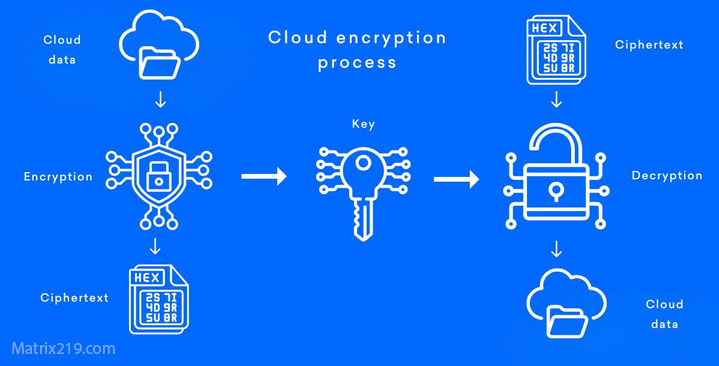
File Encryption for Cloud Storage
Performance and Usability Risks
Why Users Disable Encryption
Slow performance leads users to weaken or bypass protection.
Trade-Offs Between Simplicity and Control
Free tools often require more manual configuration.
Performance-related misconceptions appear in Is File Encryption Really Secure?
When Free File Encryption Tools Are Not Safe Enough
Business and Team Environments
Lack of auditing and access control increases exposure.
Regulated or Legal Data
Compliance requirements exceed what free tools can provide.
Long-Term Data Storage
Key management risk grows over time.
Professional requirements are covered in File Encryption Software for Business.
How to Evaluate Safety Before Using a Free Tool
Check Maintenance Activity
Recent updates matter more than feature count.
Read Documentation Carefully
Vague descriptions are a warning sign.
Avoid Security “Guarantees”
Real encryption tools describe limitations clearly.
A full evaluation framework is provided in Best File Encryption and Decryption Software in 2026 (Complete Guide).
Standards and Trust Signals
Most reputable free encryption tools implement cryptography aligned with NIST encryption standards, ensuring accepted algorithms and key sizes are used correctly.
Frequently Asked Questions (FAQ)
Are free file encryption tools inherently unsafe?
No. Some are very secure, others are not—it depends on design and usage.
Can free tools protect sensitive personal data?
Yes, if used correctly and keys are managed carefully.
Should free encryption be trusted for business data?
Usually not. Businesses need management and recovery features.
Is open-source encryption always safer?
Transparency helps, but maintenance and correct use still matter.
How can users avoid fake encryption tools?
By checking documentation, updates, and independent reviews.