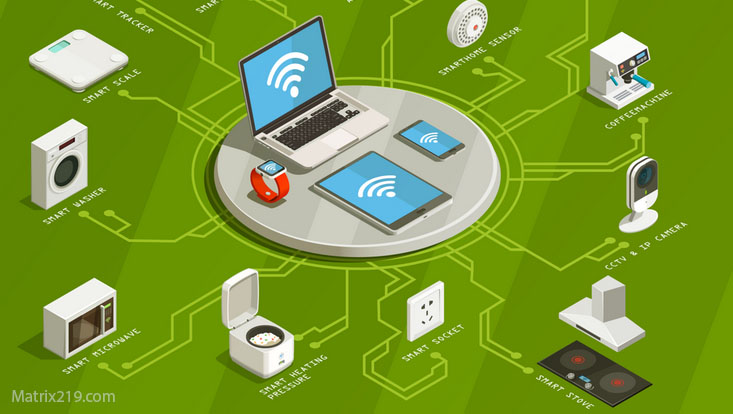
Smart devices and privacy have become increasingly connected as homes fill with internet-connected TVs, speakers, cameras, thermostats, appliances, sensors, and other devices.
These products can make everyday tasks easier, but they can also collect information about how devices are used, when they are active, and how people interact with them. The privacy impact depends heavily on the type of device, the data it collects, how the manufacturer processes that data, and which services or accounts are connected to it.
Unlike phones or computers, many smart home devices operate in the background and may continue communicating with online services without requiring constant interaction from the user. This can make their data collection less visible.
This guide explains what smart devices can collect, how that information may leave the home, what risks deserve attention, and what users can realistically control.
Quick Navigation
What Counts as a Smart Device?
A smart device is generally a physical product that uses computing, sensors, connectivity, or software to provide features beyond a traditional offline device.
Common examples include:
- Smart TVs
- Voice assistants and smart speakers
- Security and doorbell cameras
- Smart thermostats
- Connected lighting systems
- Smart locks
- Connected appliances
- Wearable devices
- Home automation hubs
Some devices work primarily through local networks, while others depend heavily on cloud services. Many use a combination of local processing and remote services This distinction matters because where processing occurs can affect what information leaves the home.
For a broader look at online data collection, see Digital Privacy and Online Tracking.
What Data Can Smart Devices Collect?
The information collected by a smart device depends on its sensors, software, connected services, and intended purpose.
Depending on the device, collected information can include:
- Device status and diagnostic information
- Usage and interaction events
- Voice recordings or voice-command data
- Video or images from cameras
- Location information
- Temperature and environmental measurements
- Device identifiers
- Network and connectivity information
- Account and configuration information
Not every smart device collects all of these categories. A connected light bulb and a security camera have very different privacy profiles The important question is not simply whether a device collects data, but what it collects, why it needs the data, where the data is processed, and how long it is retained.
How Smart Devices Collect Data
Smart devices can collect information through sensors, user interactions, application activity, device logs, and network communications A smart thermostat may process temperature and usage information. A smart TV may collect information related to viewing or interaction. A security camera can process video and audio. A smart speaker can process voice commands after detecting its activation mechanism.
Some devices also generate technical telemetry. This may include information used for diagnostics, reliability, software updates, performance monitoring, or security Telemetry is therefore not automatically a privacy violation. Its significance depends on the type of information collected and how the manufacturer uses it.
Smart Devices and Cloud Services
Many connected devices use remote services for features such as remote access, synchronization, voice processing, notifications, storage, automation, or software management When a feature depends on a remote service, some information may need to leave the local network and reach the provider’s infrastructure.
However, cloud dependence varies significantly between products. Some smart-home platforms perform important processing locally or use end-to-end encryption for specific categories of data For example, Apple states that data associated with its Home platform is encrypted and that certain HomeKit communication is end-to-end encrypted. This demonstrates why privacy claims should be evaluated on a product-by-product basis rather than assuming that every IoT device handles data in the same way.
Voice Assistants and Always-On Microphones
Voice assistants create a unique privacy concern because microphones may need to remain ready to detect an activation phrase or another activation mechanism This does not mean that every conversation in a room is necessarily recorded and sent to a manufacturer. The technical behavior depends on the specific device and its configuration.
The Federal Trade Commission explains that some voice assistants listen for wake words and that a device may sometimes activate when it misinterprets a sound as the wake word. It also notes that voice recordings may be sent to the manufacturer’s servers when the assistant is used.
For practical guidance on securing voice assistants and managing recordings, see the FTC’s guidance on voice assistants and privacy.
Users should review voice-assistant settings, connected accounts, stored recordings, and physical microphone controls when available.
Smart TVs and Viewing Data
Smart TVs can collect information related to device operation, application usage, viewing behavior, and interactions, depending on the manufacturer and enabled features This can become particularly important because televisions are used for long periods and can provide detailed information about viewing habits.
The FTC has previously taken enforcement action involving a smart-TV manufacturer that collected viewing histories without adequate disclosure and consent. The case illustrates why smart-TV privacy settings and data-collection practices deserve attention.
The FTC recommends reviewing a smart TV’s tracking settings and removing applications that are no longer needed. FTC guidance for securing internet-connected devices at home
Security Cameras and Home Monitoring
Security cameras can provide valuable protection, but they also create one of the most sensitive forms of household data collection Video recordings can reveal who enters a home, when people arrive or leave, and what happens inside or around the property Cloud-connected cameras may also provide remote viewing and storage, which introduces additional account and network-security considerations.
Users should therefore secure camera accounts, use strong authentication, keep firmware updated, review access logs when available, and disable remote features that are not necessary The FTC specifically recommends reviewing access logs on IP cameras for unfamiliar addresses or unusual access times.
Smart Devices Can Reveal Household Patterns
Individual data points may appear harmless, but repeated measurements can reveal patterns For example, connected locks, lights, thermostats, cameras, and other devices may generate information that indirectly reveals when people are home, when they leave, how rooms are used, or how household routines change This is one reason smart-home privacy is not only about individual pieces of data. The combination of multiple devices can create a much more detailed picture of household activity.
Account Linking and Smart Home Data
Many smart devices are connected to user accounts through mobile applications or cloud platforms This can make remote access and synchronization convenient, but it can also associate information generated inside the home with an account used on other devices or services The extent of this connection depends on the platform and its data practices. Users should review which accounts are connected to their smart-home devices and which third-party services have been authorized.
- This is closely related to Account-Based Tracking, where account identifiers can provide continuity across sessions and devices.
Third-Party Integrations in Smart Homes
Smart-home platforms often connect with third-party services. Examples include voice assistants, automation platforms, security services, streaming services, and other applications Each integration can introduce another organization, account, or technical system into the data flow This does not mean that every integration is unsafe. It means users should understand what information is shared and why the integration is enabled Removing an unnecessary integration can reduce the number of services involved in handling smart-home data.
Security vs Privacy in Smart Homes
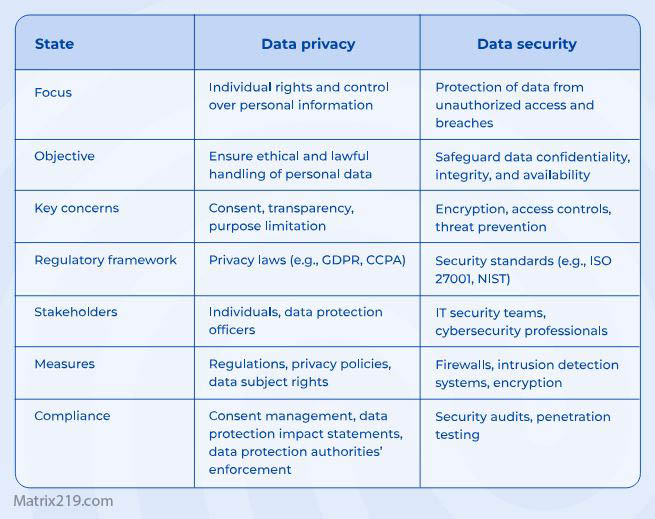
Security and privacy are related but different goals A security camera may improve physical security while simultaneously increasing the amount of sensitive information stored in the home or by a service provider A smart lock can make access easier to manage while creating logs about lock activity. A smart thermostat can improve energy efficiency while generating information about temperature patterns and usage The goal is not to avoid every connected security feature. Instead, users should understand the information created by each feature and configure the system according to their actual needs.
- For a broader comparison of the two concepts, see Privacy vs Security.
Privacy vs Security
How to Reduce Smart Home Privacy Risks
Smart-home privacy does not require disconnecting every device. A more realistic approach is to reduce unnecessary data collection and secure the systems that remain connected.
- Review the privacy settings of every smart device.
- Disable features that you do not use.
- Remove unused applications and connected services.
- Use strong, unique passwords for smart-home accounts.
- Enable multi-factor authentication when available.
- Keep device firmware and companion applications updated.
- Secure the home router and Wi-Fi network.
- Review which devices and people have access to the smart-home system.
- Limit remote access when it is not necessary.
- Review stored recordings and delete data when the service allows it.
The FTC recommends starting with the router, keeping devices updated, disabling features that are not needed, and disconnecting older devices that are no longer used.
For broader tracking-reduction strategies, see How to Stop Online Tracking.
How to Think About Smart Home Privacy
The most useful approach is to evaluate every connected device according to four questions:
- What information does the device collect?
- Why does it need that information?
- Where is the information processed or stored?
- Who can access it?
These questions are more useful than assuming that smart devices are either completely safe or inherently invasive A device with strong local processing and clear privacy controls may have a very different privacy profile from another device that depends heavily on cloud processing and extensive data collection.
FAQ
Do smart devices collect data when they are idle?
Some devices can generate telemetry, maintain network connections, perform updates, or monitor for specific events while they are not being actively used. However, this varies significantly by device and manufacturer. Idle does not automatically mean that a device is continuously recording or collecting all surrounding activity.
Can smart TVs track viewing habits?
Some smart TVs and their connected services can collect information related to viewing behavior or application usage. The exact data collected depends on the manufacturer, model, software, and privacy settings.
Are voice assistants always listening?
Voice assistants may continuously monitor locally for an activation mechanism such as a wake word, but that is different from continuously sending everything they hear to a remote server. Some devices can also activate unintentionally when they misinterpret a sound as the wake word.
Can smart-home data be deleted?
Sometimes. Many manufacturers provide controls for deleting recordings, activity history, or account data, but retention policies and deletion options vary between services. Users should check the specific manufacturer’s privacy and account settings.
Are smart homes bad for privacy?
Not necessarily. Smart-home technology can provide useful features while still allowing reasonable privacy controls. The privacy impact depends on the devices used, the information collected, the connected services, and how the system is configured.
How can I make my smart home more private?
Start by identifying what each device collects, disabling unnecessary features, securing accounts and the home network, keeping firmware updated, reviewing connected services, and deleting stored data when appropriate. A smaller and better-controlled device ecosystem is generally easier to manage than one filled with unnecessary connected products.