How Websites Track You is easier to understand once you realize that modern websites rarely depend on a single tracking technology. A page can use cookies, browser storage, JavaScript, analytics tools, advertising scripts, tracking pixels, URL parameters, and other techniques to understand how visitors interact with it.
Some tracking is necessary for websites to remember logins, maintain sessions, prevent fraud, measure performance, or provide basic functionality. Other tracking is used for analytics, advertising, personalization, attribution, and building behavioral profiles, The important point is that website tracking has evolved beyond the traditional cookie. Modern browsers increasingly restrict some tracking methods, while websites and third-party services continue to use additional techniques to measure and correlate activity.
This article explains how websites track users, which technologies are involved, how different tracking layers work together, and what users can realistically do to reduce unnecessary tracking.
Quick Navigation
Why Websites Track Users
Website tracking is not limited to advertising, Website owners may collect information to understand traffic, measure page performance, diagnose errors, prevent abuse, detect fraudulent activity, remember preferences, and improve the user experience.
Analytics systems can show which pages receive visits, how users move through a website, and which features receive the most interaction. Advertising systems may use additional signals to measure campaigns and understand audience behavior, The privacy implications depend on what is collected, whether the information is linked to an identifiable user, how long it is retained, and whether it is shared with other organizations.
- For a broader introduction to the tracking ecosystem, see Digital Privacy and Online Tracking.
Cookies: The Classic Website Tracking Technology
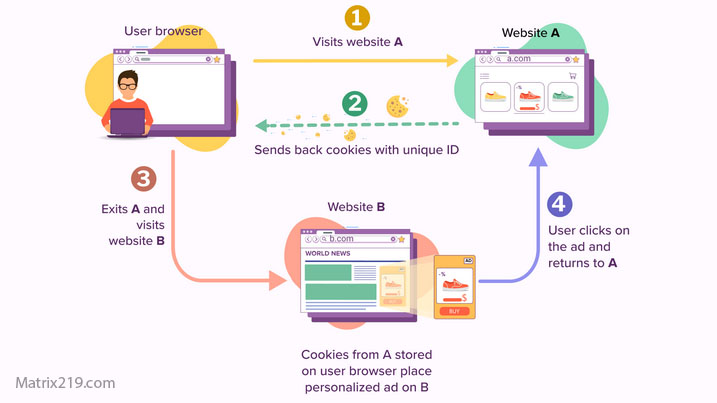
Cookies are small pieces of data that websites can ask browsers to store. They are commonly used to maintain sessions, remember preferences, support authentication, and recognize returning browsers, Cookies can also be used for tracking. When the same third-party service appears across multiple websites, its ability to recognize the same browser can contribute to cross-site profiling.
MDN explains that cookies can be used to recognize a browser or user across requests, while third-party cookies can allow embedded services to observe activity across different websites, Not every cookie is a tracking cookie. A website may need a cookie simply to keep you logged in or remember an option you selected.
First-Party vs Third-Party Tracking
One of the most important distinctions in website tracking is whether the data is collected by the website you are directly visiting or by another service embedded into that website. First-party tracking occurs when the website itself collects information about your interaction with its service.
Third-party tracking occurs when an external company provides content, analytics, advertising, social widgets, fonts, videos, or other resources that communicate with its own servers. A single webpage can therefore involve multiple organizations even though the user sees only one website address in the browser, This is one reason privacy cannot always be evaluated simply by asking whether you trust the website you are visiting.
JavaScript, Scripts, and Tracking Tags
Modern websites rely heavily on JavaScript. Scripts can make pages interactive, load additional resources, measure events, and communicate information back to servers. Tracking scripts and tags can record events such as page views, button interactions, conversions, and other forms of engagement.
The UK’s Information Commissioner’s Office identifies scripts and tags as part of the broader category of storage and access technologies and notes that they may work together with cookies, local storage, and fingerprinting techniques, This means that blocking cookies alone does not necessarily stop every form of website measurement.
Tracking Pixels and Invisible Requests
Tracking pixels are another way websites and online services can generate data about user activity, A tracking pixel is typically a very small resource requested from a remote server. Although the technique is commonly associated with email, similar mechanisms can also be used in web environments, When the browser requests the resource, the receiving server can record information associated with that request, depending on the implementation.
Tracking pixels are particularly useful because they can operate without presenting an obvious tracking interface to the visitor, The ICO includes tracking pixels among the technologies that can communicate between a user’s device and a server.
Browser Storage Beyond Cookies
Modern browsers provide websites with several storage mechanisms besides traditional cookies, These include localStorage, sessionStorage, IndexedDB, caches, and other browser-managed storage technologies.
These technologies are not automatically tracking mechanisms. Many exist for legitimate application functionality and performance, However, browser storage can become part of a tracking system when websites or embedded services use stored information to recognize returning visitors or connect activity over time, MDN notes that modern web applications can use Web Storage and IndexedDB in addition to cookies, while browser privacy systems increasingly place restrictions on how third-party content can access stored state.
Browser Fingerprinting
Browser fingerprinting works differently from traditional cookie-based tracking. Instead of relying on a stored identifier, a website can collect multiple characteristics exposed by the browser and operating system and combine them into a fingerprint.
Possible signals include browser version, language preferences, time zone, display characteristics, installed fonts, supported technologies, and other technical properties, MDN describes fingerprinting as the combination of distinguishing browser and operating-system characteristics to identify a particular browser or user Because a fingerprint can be generated from information available during page interaction, simply deleting cookies does not necessarily eliminate fingerprint-based identification.
- For a deeper explanation, see Browser Fingerprinting Explained.
URL Parameters and Link Tracking
Tracking can also happen through the URLs users click Marketing links often contain additional parameters that identify a campaign, source, advertisement, or sometimes a particular user or session, These parameters allow websites to determine where traffic originated and whether a visitor arrived through a specific campaign or referral.
MDN refers to this technique as link decoration and explains that URL parameters can reveal information about the origin of a visit or marketing campaign, This means that tracking does not always require storing something permanently on the device.
Redirect Tracking
Some tracking systems use redirects to associate activity with a tracking service, A user may click a link and briefly pass through another domain before reaching the final destination. The intermediate service can potentially use this interaction to record information about the visit.
MDN describes redirect tracking as a technique that can allow a tracker to operate as a first-party resource during part of the navigation process, Modern browsers have introduced protections against some forms of redirect tracking, but the broader technique demonstrates why blocking one specific tracking technology does not automatically solve the entire problem.
Session Replay and Behavioral Tracking
Some websites use analytics or session-replay systems to understand how visitors interact with pages, Depending on the implementation, these systems can record events such as scrolling, clicks, navigation patterns, and interactions with page elements.
Session replay can be useful for debugging usability problems, but it creates additional privacy considerations when sensitive information is accidentally captured or transmitted, For users, the important distinction is between the website’s visible content and the additional analytics infrastructure operating behind it.
Account-Based Website Tracking
Logging into a website changes the tracking equation significantly, Once activity is associated with an account, the website may no longer need to rely exclusively on anonymous browser identifiers. Actions can be connected directly to the account’s history.
If the same company operates multiple services, it may also be able to connect activity between those services depending on its architecture, policies, and applicable laws, Account-based identification is also one of the main mechanisms behind cross-device tracking.
- For more information, see Cross-Device Tracking Explained.
How Third-Party Trackers Build Profiles
Third-party tracking becomes more powerful when the same service appears across many websites, Imagine visiting a news website that contains an advertising platform, then visiting an online store that uses the same platform, and later opening another site containing the same analytics or advertising infrastructure.
If the third party can recognize the same browser or otherwise correlate the activity, those interactions can become part of a larger behavioral profile, This is one reason third-party tracking has historically been an important privacy concern.
Modern browsers increasingly restrict third-party cookies and other forms of cross-site state. Firefox, Safari, and other browsers have introduced different anti-tracking mechanisms, although their implementations and exceptions vary.
What Happens When Third-Party Cookies Are Blocked?
Blocking third-party cookies can reduce one major tracking mechanism, but it does not mean that websites suddenly lose every ability to measure activity. First-party analytics can still operate. Users can still log into accounts. Websites can still receive ordinary network requests. Fingerprinting and other techniques may still exist, subject to browser protections.
This is why privacy protection is better understood as reducing the number of available tracking signals rather than expecting one setting to make tracking disappear. Browsers are also developing new privacy mechanisms that partition or restrict access to state in third-party contexts. MDN documents state partitioning as one approach intended to reduce cross-site tracking.
How Websites Combine Multiple Tracking Signals
The most important concept to understand is that tracking technologies rarely operate in isolation. A website may combine account information, cookies, browser storage, IP-related information, analytics events, URL parameters, and technical browser characteristics.
Each signal may be weak by itself. Combined over time, however, these signals can provide a much stronger picture of a user’s activity. This layered approach explains why clearing cookies may have only a limited effect and why changing one browser setting does not necessarily remove every form of identification.
What Website Tracking Can Reveal
Depending on the website and tracking systems involved, collected information may reveal much more than a simple page visit.
- Pages and content viewed.
- Approximate visit times.
- Interactions with website features.
- Traffic sources and referral information.
- Device and browser characteristics.
- Preferences and interests inferred from behavior.
- Interactions with advertisements.
- Account activity when logged in.
Over time, repeated observations can create behavioral profiles that are considerably more informative than any single browsing event.
Why Website Tracking Is Difficult to Avoid
Website tracking is difficult to eliminate because modern websites depend on many interconnected technologies. Blocking cookies may affect one layer while leaving scripts, account identification, first-party analytics, fingerprinting, or other signals available.
At the same time, aggressive blocking can break legitimate website functionality. Some users therefore face a practical trade-off between privacy and convenience, The goal should not be unrealistic total invisibility. A more useful goal is reducing unnecessary tracking while keeping the websites and services you actually need.
How to Reduce Website Tracking
Users can reduce tracking without completely disconnecting from the web.
- Use a browser with strong built-in tracking protection.
- Limit third-party cookies and unnecessary site permissions.
- Review cookie and privacy settings instead of accepting every option automatically.
- Use separate browser profiles for different activities when practical.
- Limit unnecessary logins when browsing unrelated websites.
- Clear unnecessary site data periodically.
- Use tracker-blocking features where appropriate.
- Be cautious about links containing unnecessary tracking parameters.
- Review browser privacy settings after major updates.
Modern browsers already implement several anti-tracking mechanisms. MDN notes that browsers can block or restrict third-party cookies, partition storage, strip certain tracking parameters, and implement redirect-tracking protections.
- For broader privacy habits, see Online Privacy for Beginners.
Do Privacy Browsers Stop Website Tracking?
Privacy-focused browsers can significantly reduce certain forms of tracking, but no browser should be treated as a guarantee of complete anonymity. Different browsers use different approaches. Some block known trackers, some partition storage, some limit fingerprinting signals, and others provide stronger default controls around third-party content, Protection also depends on how the user interacts with websites. Logging into an account, voluntarily providing personal information, or allowing a website to store data can still establish an identifiable relationship.
- For a realistic discussion of anonymity, see Can You Be Anonymous Online?.
Does Private Browsing Stop Website Tracking?
Private or incognito browsing is useful for limiting certain locally stored browsing information, but it should not be confused with anonymity. Websites can still receive network requests, account information, and other signals during a private browsing session, Private browsing is therefore better understood as a tool for reducing local traces rather than a complete anti-tracking system.
- For a deeper explanation of realistic anonymity, see Can You Be Anonymous Online?.
Website Tracking and Consent
Privacy laws in many jurisdictions regulate certain forms of cookies and other technologies that store or access information on a user’s device However, legal requirements vary by location, technology, purpose, and implementation, The ICO’s current guidance covers cookies as well as tracking pixels, link decoration, device fingerprinting, web storage, and scripts or tags, showing how modern tracking regulation has expanded beyond traditional cookies.
This is also why a consent banner should not be interpreted as proof that a website has stopped all tracking. Consent mechanisms address specific processing and technology requirements; they do not eliminate the technical existence of every possible tracking method.
- For a deeper explanation of consent interfaces, see Consent Pop-Ups and Privacy.
Website Tracking vs Complete Anonymity
Reducing tracking is not the same as becoming anonymous. A user can block many trackers and still be identifiable through an account, voluntarily provided information, network signals, or other forms of correlation.
Likewise, a website may collect useful analytics without knowing the user’s real-world identity, Understanding this distinction helps avoid both extremes: assuming that every website knows everything about you, or assuming that one privacy setting makes you completely invisible.
FAQ
How do websites track users without an account?
They can use technologies such as cookies, browser storage, third-party resources, URL parameters, scripts, and fingerprinting. The exact methods vary between websites.
Can clearing cookies stop website tracking?
It removes some stored identifiers, but it does not necessarily stop fingerprinting, account-based tracking, first-party analytics, or other techniques.
Are all website trackers dangerous?
No. Some tracking supports essential functionality, security, analytics, or performance measurement. Privacy concerns increase when collection is excessive, unexpected, or shared broadly.
Does blocking third-party cookies stop tracking?
It can reduce some cross-site tracking, but other tracking mechanisms may remain available.
Can websites track users through browser fingerprinting?
Yes. Fingerprinting can combine browser and device characteristics to distinguish users without relying exclusively on cookies.
Does private browsing make me anonymous?
No. Private browsing mainly limits certain local browsing traces and does not prevent websites or online services from receiving information during the session.
Can a VPN stop website tracking?
A VPN can change the network path and the public IP address visible to websites, but it does not automatically stop cookies, account-based tracking, fingerprinting, or other browser-level techniques.
Is website tracking legal?
It depends on the technology, purpose, jurisdiction, and how the tracking is implemented. Privacy and electronic-communications laws in many regions impose transparency, consent, or other requirements.