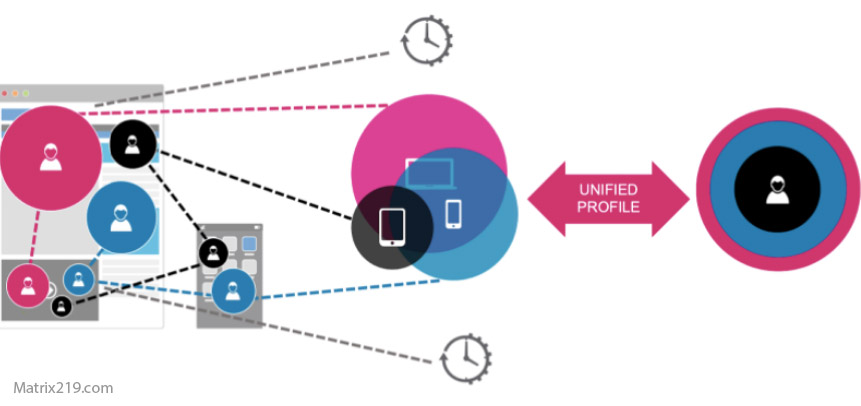
Cross-Device Tracking Explained is important because online activity no longer stays confined to a single browser or device. Phones, laptops, tablets, smart TVs, and other connected devices can be linked to the same person, account, household, or advertising profile Sometimes this connection is obvious because a user signs into the same account on multiple devices. In other cases, companies may use combinations of technical and behavioral signals to infer that different devices belong to the same user or household.
This article explains how cross-device tracking works, the main methods used to connect devices, why the practice is difficult to avoid completely, and what users can realistically do to reduce exposure.
Quick Navigation
What Cross-Device Tracking Means
Cross-device tracking is the practice of linking activity from multiple internet-connected devices to the same user, account, household, or profile The purpose is continuity. A platform may want to recognize that activity on a phone and activity on a laptop belong to the same person, allowing it to maintain a more complete picture of behavior.
The Federal Trade Commission describes cross-device tracking as connecting consumer activity across smartphones, tablets, desktop computers, and other connected devices. FTC guidance on cross-device tracking also explains that companies may use these techniques for advertising, account functionality, fraud prevention, and other purposes.
- Cross-device tracking is one part of the broader tracking ecosystem discussed in Digital Privacy and Online Tracking: How You’re Tracked Online and How to Protect Yourself.
Deterministic Cross-Device Tracking
Deterministic tracking is the most direct way to connect multiple devices When a user signs into the same account on a phone, laptop, tablet, or another device, the service already has a strong identifier that connects the activity. The account becomes the link between otherwise separate browsing environments This method does not depend entirely on cookies or browser fingerprints. Even if a user changes browsers or clears local browsing data, activity performed while logged into the same account can remain associated with that account.
- This is why Account-Based Tracking is one of the strongest forms of persistent online identification.
Probabilistic Cross-Device Tracking
Not every device is connected through an explicit account login. Probabilistic tracking attempts to determine whether different devices are likely to belong to the same person or household by comparing multiple signals.
Potential signals can include device characteristics, operating system information, IP addresses, usage timing, browsing behavior, location patterns, and other technical or behavioral information No single signal necessarily proves that two devices belong to the same person. Instead, multiple signals can be combined to produce a probability that the devices are related.
Fingerprinting can contribute to this process because technical characteristics may help distinguish one device or browsing environment from another. The distinction between browser and device-level fingerprinting is explained in Device Fingerprinting vs Browser Fingerprinting.
How Accounts Connect Phones and Laptops
Account synchronization makes cross-device tracking particularly straightforward When the same account is used across multiple devices, services can associate searches, purchases, preferences, saved content, viewing activity, and other interactions with the same account profile This can also provide legitimate benefits. Users can continue reading content on another device, access synchronized settings, recover accounts, or receive security alerts when an unfamiliar device attempts to sign in.
The privacy issue begins when the same identity is also used to create a broader behavioral profile across unrelated activities or services.
How Device Signals Help Link Different Devices
Technical characteristics can provide additional information when direct account-based identification is unavailable Depending on the environment, these signals may include operating system information, browser characteristics, device configuration, IP-related information, and other observable properties The combination of multiple signals can help a tracking system distinguish one device from another and estimate relationships between devices.
However, this process is not necessarily perfect. Probabilistic matching can produce false associations, especially when different people share networks, devices, or similar configurations Modern privacy controls and operating-system restrictions can also limit access to certain identifiers and signals.
Cross-Device Tracking Through Apps
Mobile applications introduce another tracking environment that is separate from ordinary browser activity Apps may collect information about usage, device characteristics, account activity, advertising identifiers, and other permitted signals. When the same service operates across multiple apps and devices, these signals can help create a connected profile Cross-app activity can therefore complement browser-based tracking rather than replacing it.
- For a deeper explanation of application-level tracking, see How Apps Track You.
The Role of IP Addresses and Shared Networks
Network information can provide another correlation signal Devices that repeatedly connect through the same home or workplace network may appear related. An IP address can therefore contribute to device correlation, although an IP address by itself usually cannot prove that two devices belong to the same individual Shared networks create an important limitation. Families, offices, schools, hotels, and public networks may contain many unrelated users behind the same network connection For that reason, network information becomes more useful when combined with other identifiers or behavioral signals.
- These combinations are part of the broader mechanisms discussed in How Websites Track You.
Cross-Device Tracking and Advertising
Advertising systems have a strong incentive to connect activity across devices because a fragmented view of a user provides less information than a unified profile For example, a person may research a product on a laptop and later see related advertising on a smartphone. That does not necessarily mean the phone itself was identified through a single technical fingerprint. The connection could come from a shared account, advertising ecosystem, device graph, or a combination of signals.
The FTC has specifically discussed cross-device tracking in the context of online advertising and explains that companies may attempt to connect activity across multiple devices to understand consumer behavior more completely. FTC Cross-Device Tracking Report
Why Cross-Device Tracking Is Difficult to Avoid
Complete avoidance is difficult because many of the mechanisms involved are also useful features Logging into an account provides synchronization. Cloud services provide continuity between devices. Security systems use device recognition to identify unusual login attempts. Applications use identifiers and analytics to measure performance and prevent fraud Privacy therefore involves trade-offs rather than a simple choice between tracking and no tracking The practical objective is to reduce unnecessary correlation while keeping the services and security features that are actually useful.
Does Private Browsing Stop Cross-Device Tracking?
Private browsing does not automatically prevent cross-device tracking Private browsing can reduce certain forms of local browser storage, but it does not make the user anonymous to websites or services If the same account is used inside a private browsing session, the activity can still be associated with that account. Other signals may also remain available depending on the website, browser, network, and device Private browsing should therefore be viewed as a local privacy feature rather than a complete cross-device tracking defense.
Can a VPN Stop Cross-Device Tracking?
A VPN can change the network path and hide the user’s public IP address from websites that would otherwise see it directly. This may reduce the usefulness of IP-based correlation However, a VPN does not prevent account-based tracking, browser fingerprinting, app-level tracking, or other forms of identity correlation, A VPN should therefore be considered one privacy layer rather than a complete solution.
How to Reduce Cross-Device Tracking
Reducing cross-device tracking is primarily about limiting unnecessary connections between devices, accounts, and services.
- Use separate browser profiles for different activities.
- Avoid logging into unnecessary services while browsing casually.
- Review account synchronization settings.
- Limit unnecessary third-party applications.
- Review advertising and tracking permissions on mobile devices.
- Keep browsers and operating systems updated.
- Reduce unnecessary account creation and universal sign-ins.
- Review which services are connected to the same primary account.
These measures do not guarantee anonymity. Their purpose is to reduce the amount of information that can be combined into a single behavioral profile.
- For a broader strategy covering multiple tracking layers, see How to Stop Online Tracking.
Cross-Device Tracking vs Cross-Site Tracking
Cross-site tracking and cross-device tracking are related but different, Cross-site tracking connects activity across different websites or services. Cross-device tracking connects activity across different devices.
In practice, the two can reinforce each other. A company may observe activity across multiple websites and then associate that activity with a user who also accesses the same ecosystem from another device This creates a much broader profile than tracking either a single website or a single device in isolation.
What Users Should Realistically Expect
Cross-device tracking cannot always be eliminated without giving up useful online services, The realistic goal is to reduce unnecessary tracking and understand which connections are responsible for linking activity.
Account logins, synchronization, application ecosystems, network information, and technical signals can all contribute to cross-device identification. No single privacy setting controls all of them, Understanding the different layers makes privacy decisions more practical and prevents false confidence in individual tools.
FAQ
Does using multiple devices increase tracking?
Using multiple devices can provide more activity and technical signals that a service may associate with the same user, especially when the devices share accounts or services. The number of devices alone does not prove that additional tracking will occur.
Does private browsing stop cross-device tracking?
No. Private browsing mainly limits certain local browser data. Account logins and other tracking signals can still connect activity across devices.
Is cross-device tracking always accurate?
No. Deterministic tracking through authenticated accounts can be highly reliable, while probabilistic matching is based on inference and can produce incorrect associations.
Can a VPN prevent cross-device tracking?
No. A VPN can reduce the usefulness of IP-based correlation, but it does not prevent account-based tracking, application tracking, or other identification methods.
Can clearing cookies stop cross-device tracking?
No. Clearing cookies can remove some browser identifiers, but cross-device tracking may rely on accounts, applications, device signals, or other mechanisms.
Is cross-device tracking legal?
Its legality depends on the jurisdiction, the technology used, the purpose of processing, and applicable transparency and consent requirements. Privacy regulations in some jurisdictions specifically address tracking technologies and device linking.