How to Stop Online Tracking is one of the most common privacy questions on the modern internet. People often search for a single setting, browser, VPN, or extension that will make tracking disappear. Unfortunately, online tracking does not work through one technology, so there is no single switch that stops everything.
Websites, applications, advertising systems, and online platforms can use multiple layers to recognize users and collect information. Cookies, browser storage, fingerprinting, account activity, device identifiers, network information, and behavioral signals can all contribute to tracking, The good news is that complete prevention is not required to make a meaningful difference. Reducing unnecessary tracking is possible by combining sensible browser settings, account controls, application permissions, device-level privacy measures, and better browsing habits, This guide explains how to stop online tracking as realistically as possible, which techniques are worth using, what each privacy tool can actually protect against, and where its limitations begin.
Quick Navigation
What Online Tracking Actually Means
Online tracking is the process of collecting and analyzing information about your activity across websites, applications, devices, and online services. Tracking can include information about the pages you visit, searches you perform, links you click, advertisements you interact with, devices you use, and the accounts you sign into.
Some tracking is necessary for basic functionality, security, analytics, or fraud prevention. Other forms are primarily used for advertising, personalization, profiling, or data aggregation. The first step toward reducing tracking is therefore understanding which tracking mechanisms are actually being used.
- For a complete overview of the tracking ecosystem, see Digital Privacy and Online Tracking: How You’re Tracked Online and How to Protect Yourself.
Start With Browser Privacy Settings
Your browser is one of the most important places to start because websites can use it to store identifiers, load third-party resources, and collect technical information about your environment, Review the browser’s privacy settings and enable protections against unnecessary cross-site tracking where available.
Useful browser-level changes include:
- Blocking or limiting third-party cookies.
- Restricting cross-site tracking.
- Reviewing site permissions.
- Removing unnecessary browser extensions.
- Limiting unnecessary location access.
- Reviewing notification permissions.
- Clearing stored website data when appropriate.
These settings will not make you completely anonymous, but they can reduce several common tracking mechanisms.
- To understand the technologies behind these techniques, read How Websites Track You.
Use a Privacy-Focused Browser
Privacy-focused browsers can reduce tracking by blocking or restricting certain third-party technologies and by changing how websites are allowed to collect information. The important point is not to assume that a privacy-focused browser makes tracking impossible. Browser fingerprinting, account-based identification, and information that you voluntarily provide can still connect activity to you. The best approach is to treat the browser as one layer of protection rather than the entire privacy strategy.
Reduce Browser Fingerprinting
Browser fingerprinting creates a recognizable profile from technical characteristics exposed by your browser and device. Possible signals include screen characteristics, operating system information, browser configuration, language settings, time zone, and other technical properties. Because fingerprinting does not necessarily depend on cookies, clearing browser data alone may not stop it. Some privacy-focused browsers attempt to make users less distinguishable by reducing the uniqueness of the information exposed to websites. However, aggressive anti-fingerprinting measures can sometimes interfere with website functionality.
- Learn more about this tracking method in Browser Fingerprinting Explained.
Limit Account-Based Tracking
One of the strongest ways online services connect activity to a person is through accounts, When you remain logged into the same account across multiple websites, browsers, or devices, activity can be associated with an existing identity even if cookies are deleted. To reduce unnecessary account-based tracking:
- Do not stay logged into every service unnecessarily.
- Separate work, personal, and casual browsing where practical.
- Use different browser profiles for different activities.
- Review account privacy and personalization settings.
- Remove old accounts that you no longer use.
- Review third-party applications connected to your accounts.
For a deeper explanation of this tracking layer, see Account-Based Tracking.
Separate Browsing Contexts
Using one browser profile for everything makes it easier to connect different types of activity. A practical approach is to separate browsing contexts. For example, one browser profile can be used for accounts and work, while another can be used for general research and casual browsing.
This does not create perfect anonymity, but it can reduce accidental correlation between different browsing activities. The important factor is consistency. Separating profiles only helps when the user actually maintains the separation.
Review App Permissions
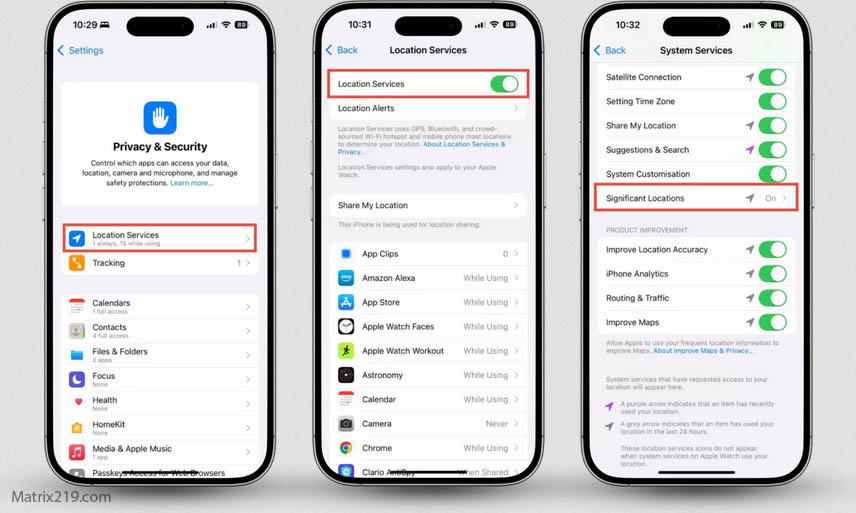
Web tracking is only one part of the problem. Mobile applications can collect information through permissions, device identifiers, background activity, and embedded third-party software.
Review permissions for applications that can access:
- Location.
- Contacts.
- Camera.
- Microphone.
- Photos and files.
- Bluetooth and nearby devices.
- Motion and fitness information.
Do not assume that every permission requested by an application is necessary for its core functionality, Removing unnecessary permissions can reduce the amount of information an application can access.
For a deeper explanation of application-level tracking, see How Apps Track You.
Limit Background App Activity
Some applications continue performing background activity even when you are not actively using them. Depending on the operating system and application, background activity may support synchronization, notifications, analytics, location-based features, or other functions. Review which applications are allowed to operate in the background and disable unnecessary access when your device provides that option. This is particularly useful for applications that you rarely use but do not want to uninstall completely.
Reduce Device-Level Tracking
Modern smartphones and other devices can expose identifiers and system-level information that may contribute to recognition, Review advertising and privacy settings provided by your operating system. Where available, limit personalized advertising and reset advertising identifiers when appropriate. Keep in mind that resetting an advertising identifier does not necessarily erase information already associated with an account or other identifiers. Device fingerprinting can also operate through combinations of hardware, software, and behavioral signals.
- For the difference between browser-level and device-level identification, read Device Fingerprinting vs Browser Fingerprinting.
Be Careful With Third-Party Trackers
Many websites include services provided by external companies. These can include analytics platforms, advertising systems, embedded media, social widgets, and other third-party technologies. Third-party tracking matters because the company operating the website may not be the only organization receiving information about your visit. Blocking unnecessary third-party tracking can therefore reduce exposure across multiple websites.
- Understanding who participates in the data ecosystem is important. See Who Collects Your Data Online.
Use a Content and Tracker Blocker
Content blockers can prevent many known advertising and tracking resources from loading. They can be especially useful against third-party advertising scripts, tracking domains, and other unwanted page elements. However, blockers are not universal privacy solutions, They may not stop:
- Account-based tracking.
- Information you voluntarily submit.
- Some forms of fingerprinting.
- First-party analytics.
- Tracking performed inside applications.
Use blockers as one layer of protection rather than expecting them to eliminate every form of tracking.
Understand What a VPN Can and Cannot Do
VPNs are often marketed as complete privacy solutions, but their protection is more specific A VPN can hide your IP address from the websites you visit and encrypt traffic between your device and the VPN provider. This can reduce exposure of your network location to the destination website.
However, a VPN does not automatically stop cookies, browser fingerprinting, account tracking, or information you voluntarily provide. If you log into the same account while using a VPN, the service can still know that the activity belongs to that account, In other words, a VPN changes one important tracking signal without eliminating the entire tracking system.
Do Not Rely on Incognito Mode
Private or incognito browsing is useful for limiting certain types of local browser storage, but it should not be confused with anonymity. Websites can still observe activity during a private session. Account logins can still associate activity with an identity, and network-level systems can still observe connections. Incognito mode is therefore useful for specific privacy situations, but it is not a complete anti-tracking solution.
- For a broader explanation of realistic anonymity, see Can You Be Anonymous Online?.
Control Email Tracking
Email is another tracking surface that is easy to overlook Marketing emails and newsletters can contain tracking pixels that report when remote content is loaded. Links can also pass through tracking systems before reaching their destination.
One simple way to reduce pixel-based tracking is to disable automatic loading of remote images when your email application allows it. Be especially cautious with unexpected marketing messages and links.
- For a detailed explanation of these techniques, see Email Tracking Explained.
Be Selective About Free Services
Free does not automatically mean unsafe for privacy, but some services rely heavily on advertising and data collection to support their business model. Before creating another account or installing another application, consider what information the service collects and whether the functionality is worth the data exposure. Where practical, choose services with transparent privacy practices and meaningful user controls. Data brokers can also aggregate information from many different sources, making the overall ecosystem larger than any single service.
Review Consent Pop-Ups Carefully
Consent pop-ups can provide choices about cookies and other forms of data processing, but accepting every option automatically can increase unnecessary exposure.
When possible:
- Reject non-essential tracking.
- Review customization options.
- Do not assume that consent means complete privacy.
- Pay attention to third-party processing.
- Revisit preferences when important changes occur.
Consent controls permission, but it does not necessarily eliminate every technical method of identification, See Consent Pop-Ups and Privacy for a deeper explanation.
Reduce Cross-Device Tracking
Using multiple devices creates more opportunities for activity to become connected. A phone, laptop, tablet, and smart TV may all be associated with the same account ecosystem. Shared accounts, synchronization, and behavioral signals can make these connections stronger, To reduce unnecessary cross-device correlation:
- Review account synchronization settings.
- Remove devices you no longer use.
- Review which applications have access to your accounts.
- Separate browsing profiles where practical.
- Limit unnecessary universal logins.
For more detail, see Cross-Device Tracking Explained.
Delete Unused Accounts and Services
Old accounts can remain a source of unnecessary personal data long after you stop using them. Periodically review the services you have registered for and remove accounts that are no longer necessary, Deleting an account does not guarantee that every historical copy of information disappears immediately. Third parties, backups, legal retention requirements, and previously shared information can complicate complete removal.
- For a realistic explanation of the process, see Removing Your Data Online.
Reduce Your Digital Footprint
One of the most effective long-term privacy strategies is simply creating less data in the first place. Before providing personal information to an online service, ask whether the information is actually necessary, A smaller digital footprint gives tracking systems fewer data points to collect and combine. This can include reducing unnecessary account creation, limiting public profiles, avoiding unnecessary permissions, and deleting services you no longer need.
Protect Your Accounts
Privacy and account security overlap in important ways. If an account is compromised, information that was previously private may become accessible to another person or service. Use unique passwords for important accounts and enable multi-factor authentication when available. Also review active sessions and connected devices periodically so that old or unknown access can be removed.
Keep Your Devices and Browsers Updated
Privacy protection is not only about blocking trackers. Security vulnerabilities can also expose personal information. Keep your operating system, browser, applications, and security software updated. Updates can include fixes for vulnerabilities that could otherwise allow unauthorized access to information or device functionality.
Do Not Overdo Privacy Settings
It is possible to make privacy settings so restrictive that normal websites and applications stop working correctly. Blocking every script, disabling every browser feature, or refusing every permission can create unnecessary friction without providing proportional benefits. A better strategy is to focus on high-value protections first:
- Secure important accounts.
- Reduce unnecessary permissions.
- Block common third-party tracking.
- Limit unnecessary account correlation.
- Reduce excessive data sharing.
- Review settings periodically.
This approach provides meaningful privacy improvements without turning everyday browsing into a constant technical battle.
What Privacy Tools Cannot Stop
Understanding limitations is just as important as choosing privacy tools. No single browser, VPN, blocker, or setting can prevent every possible tracking mechanism. For example, a tracker blocker may prevent a known third-party script from loading, while an account can still identify you after login. Similarly, a VPN can hide your IP address while browser fingerprinting or account activity continues to provide other signals. The strongest practical approach is therefore layered privacy.
A Practical Anti-Tracking Setup
For most everyday users, a reasonable privacy setup does not need to be complicated.
- Use a modern browser with strong privacy controls.
- Block unnecessary third-party trackers.
- Limit third-party cookies.
- Review browser permissions.
- Use separate browser profiles when useful.
- Review application permissions.
- Limit unnecessary background app activity.
- Use a VPN when its network privacy benefits are relevant.
- Disable automatic remote image loading in email when appropriate.
- Review account personalization and advertising settings.
- Delete unused accounts and applications.
- Keep devices and software updated.
This layered approach is more realistic than searching for a single tool that promises complete anonymity.
How to Stop Online Tracking on Smartphones
Smartphones deserve special attention because they combine browsers, applications, location services, advertising identifiers, accounts, sensors, and network connectivity in one device. Start by reviewing application permissions and removing access that is not necessary. Then review location settings, advertising personalization, background activity, connected accounts, and applications that you no longer use. Do not assume that deleting an application automatically removes all information previously collected by its developer or third-party partners.
How to Stop Online Tracking on a Computer
On computers, start with the browser because it is one of the largest sources of web tracking. Review cookies, site permissions, extensions, stored website data, and privacy settings. Use a reputable content blocker and avoid installing large numbers of unnecessary extensions because browser extensions themselves can introduce additional privacy and security risks. Separate browsing profiles can also help keep work, personal accounts, and casual browsing activities from becoming unnecessarily connected.
How Often Should You Review Your Privacy Settings?
Privacy should not be treated as a one-time configuration. Applications change their permissions, browsers introduce new features, websites update their tracking systems, and operating systems modify privacy controls. A practical approach is to review important privacy settings every few months and whenever you install a major new application, change devices, or create important new accounts. Small periodic reviews are easier to maintain than trying to rebuild your privacy setup after years of uncontrolled data collection.
Privacy Is About Risk Reduction
The realistic goal of online privacy is not to become completely invisible. Instead, the goal is to reduce unnecessary data collection, make tracking less precise where possible, and maintain greater control over important personal information.
Some tracking will remain unavoidable when using modern online services. That does not mean every tracking mechanism should be accepted without question. Understanding where your data goes allows you to decide which services deserve access to it and which privacy trade-offs are not worth accepting.
FAQ
Can online tracking be completely stopped?
No. Complete prevention is extremely difficult while using modern websites, applications, and online services. However, tracking can often be reduced significantly.
What is the most effective way to stop online tracking?
There is no single most effective tool. A combination of browser protections, tracker blocking, account controls, app permission management, and careful data sharing provides stronger protection.
Does a VPN stop online tracking?
No. A VPN can hide your IP address from destination websites, but it does not automatically prevent cookies, fingerprinting, account-based tracking, or other identification methods.
Does incognito mode stop tracking?
No. Incognito mode mainly limits local browsing data. Websites and online services can still observe activity during the session.
Do ad blockers stop all trackers?
No. Ad blockers and content blockers can block many known tracking resources, but they cannot prevent every form of account-based, first-party, behavioral, or fingerprint-based tracking.
Does deleting cookies stop tracking?
Deleting cookies removes some browser-stored identifiers, but other tracking mechanisms can continue to operate.
Can changing browsers stop tracking?
Changing browsers can alter some browser-level signals, but it does not necessarily prevent account-based, device-level, network-level, or cross-device tracking.
Should I disable all app permissions?
No. Some permissions are required for applications to provide their intended functionality. The better approach is to remove permissions that are unnecessary for the features you actually use.
Does deleting an app remove my data?
Not necessarily. Uninstalling an application can stop direct collection from that installation, but information previously collected may remain with the developer or third parties.
Is a privacy-focused browser enough?
No. A privacy-focused browser can reduce several forms of web tracking, but account activity, application tracking, device signals, and information you voluntarily provide can still identify or profile you.
How can I reduce tracking without making the internet difficult to use?
Focus on high-impact changes first: secure your accounts, limit unnecessary permissions, block common third-party trackers, reduce unnecessary logins, and review privacy settings periodically.
Is online privacy still possible in 2026?
Yes. Complete anonymity is difficult, but meaningful privacy is still possible. The practical goal is to reduce unnecessary exposure and maintain greater control over your digital footprint.