Online privacy myths spread faster than accurate information, especially when privacy tools are presented as complete solutions. Many users believe that a single browser setting, app, or service can fully protect their digital privacy, only to discover later that tracking and data collection can still occur.
These myths can create a false sense of security. When people rely on incomplete protection, they may expose more data than they realize. Understanding what privacy tools actually do—and what they do not do—is essential for making realistic decisions about online privacy.
This article examines the most common online privacy myths, explains why they are misleading, and clarifies which practical measures can actually reduce tracking and unnecessary data exposure.
Quick Navigation
Myth 1: Incognito Mode Makes You Anonymous
Incognito or private browsing modes are mainly designed to limit what your browser saves locally during a private session. Depending on the browser, this can include browsing history, cookies, and other session data after the private window is closed.
However, private browsing does not make you anonymous online. Websites, network administrators, internet service providers, and other parties may still be able to observe or collect information about your activity. Private browsing also does not prevent websites from identifying you through information you provide or through other tracking mechanisms.
For a broader explanation of how online activity can be tracked, see Digital Privacy and Online Tracking.
Myth 2: Clearing Cookies Stops All Tracking
Clearing cookies removes certain stored identifiers and session data from your browser, but it does not eliminate every form of online tracking.
Websites and services can use other signals and identifiers, including browser or device characteristics, account information, and other forms of tracking technology. When you sign in to an account, for example, clearing browser cookies does not remove the information associated with that account.
Cookies are only one part of a much larger tracking ecosystem. You can learn more about how websites collect information in How Websites Track You.
Myth 3: VPNs Provide Complete Privacy
A VPN can improve privacy by routing your internet traffic through a VPN server and helping protect the connection between your device and that server. It can also make your public IP address appear to websites as the address of the VPN server rather than your own connection.
However, a VPN does not provide complete online anonymity or stop every form of tracking. Browser fingerprinting, account-based tracking, cookies, app-level data collection, and information that you voluntarily provide can still be used to identify or profile you.
A VPN should therefore be treated as one layer of a broader privacy strategy rather than a complete privacy solution.
Myth 4: Free Privacy Tools Are Always Safe
The fact that a privacy tool is free does not automatically make it unsafe, just as a paid tool is not automatically trustworthy.
The important questions are how the service operates, what information it collects, what permissions it requires, whether it shares data with third parties, and how clearly it explains its privacy practices.
Understanding who collects data and why is an important part of evaluating privacy tools. See Who Collects Your Data Online for a broader look at the organizations and services involved in online data collection.
Myth 5: Privacy Settings Eliminate Tracking
Privacy settings can reduce data collection and limit certain forms of tracking, but they rarely eliminate tracking completely.
Different browsers, operating systems, websites, and apps provide different privacy controls. Some settings may limit cookies or permissions, while others can restrict advertising or cross-site tracking. However, privacy settings cannot control every way in which information may be collected or associated with an account.
Effective privacy protection therefore requires a combination of appropriate settings, careful account and permission management, privacy-aware tools, and informed browsing habits.
For practical steps to reduce tracking exposure, see How to Stop Online Tracking.
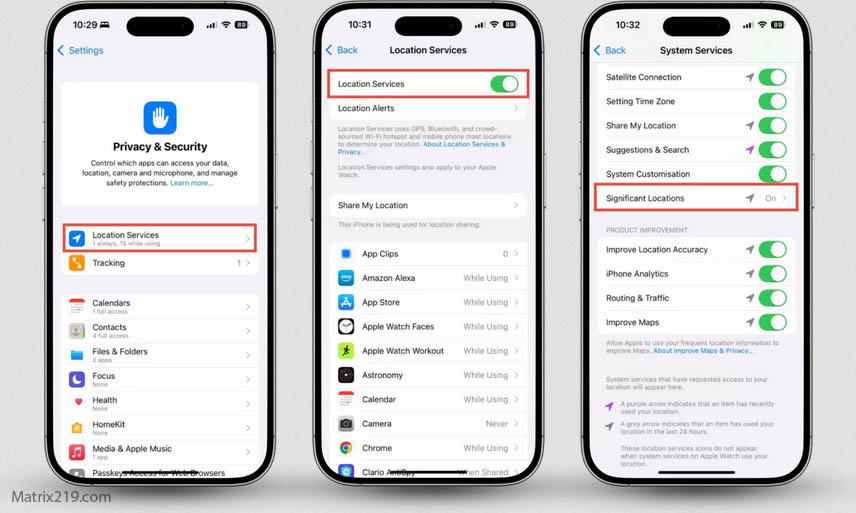
How to Stop Online Tracking
What Actually Helps Protect Online Privacy
There is no single tool that can completely protect your privacy online. A more realistic approach is to reduce unnecessary data exposure across several layers.
Useful measures can include choosing privacy-aware browser settings, limiting unnecessary account connections, reviewing app permissions, reducing unnecessary data sharing, and using privacy tools for specific risks rather than expecting one tool to solve everything.
It is also important to understand that different technologies create different privacy risks. Apps, for example, may collect information through permissions, identifiers, analytics systems, and other tracking mechanisms. Learn more in How Apps Track You.
Why Privacy Myths Persist
Privacy myths persist because simple solutions are easier to understand and market than the more complicated reality of online tracking.
Statements such as “use incognito mode,” “clear your cookies,” or “use a VPN” sound like complete solutions because they focus on one specific privacy problem. In reality, online privacy involves multiple layers, including browsers, websites, apps, accounts, advertising systems, network providers, and the information users choose to share.
Understanding these limitations helps users replace unrealistic expectations with practical privacy habits that reduce unnecessary exposure over time.
FAQ
Is there any way to be completely anonymous online?
Complete anonymity is extremely difficult to achieve in everyday online activity. Websites, services, networks, and accounts can still expose or associate information with your activity. A more realistic goal is to reduce unnecessary data exposure and limit the tracking methods that you can control.
Are paid privacy tools always better than free ones?
No. Price alone does not determine whether a privacy tool is trustworthy or effective. Evaluate how the service handles data, what information it collects, what permissions it requires, and how transparent its privacy practices are.
Does private browsing protect against online tracking?
Private browsing mainly limits the browsing information saved locally on your device. It does not make you anonymous or prevent websites, network providers, employers, or other parties from observing or collecting information about your activity.
Can privacy myths actually increase tracking risk?
Yes. Believing that a single privacy feature provides complete protection can create a false sense of security. Users may then share more information or ignore other important tracking and data-collection risks.
Do VPNs stop all forms of online tracking?
No. A VPN can help protect your network connection and mask your public IP address from websites, but it does not prevent browser fingerprinting, account-based tracking, cookies, or app-level data collection.
What is the most realistic approach to online privacy today?
A layered approach is more realistic than relying on a single tool. Use appropriate privacy settings, review app permissions, limit unnecessary account and data sharing, choose trustworthy privacy tools, and understand the different ways websites and services can collect information.