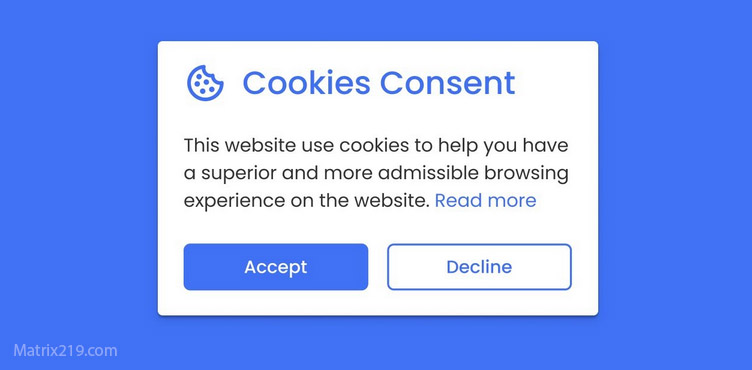
Consent pop-ups and privacy are closely connected, but clicking a button on a cookie banner does not always mean what users assume. A choice such as “Accept All” may allow non-essential cookies or other tracking technologies to operate, depending on the website, the purposes involved, and the rules that apply, At the same time, rejecting optional cookies does not automatically make a user anonymous. Other forms of tracking, account-based identification, and device-level techniques may still exist.
This guide explains how consent pop-ups work, what different choices can mean, where common misunderstandings come from, and how to make more informed privacy decisions when browsing online.
Quick Navigation
Why Consent Pop-Ups Exist
Consent pop-ups are commonly used when websites want permission to store information on a device or access information already stored there, particularly when the technology is not considered strictly necessary for the service, The exact legal requirements vary by jurisdiction and by the type of data processing or tracking technology involved. Consent is therefore not simply a universal “privacy switch.”
For example, the European Data Protection Board explains that technically necessary cookies can fall under different rules from cookies that require consent. The distinction depends on what the technology does and why it is being used.
- To understand the tracking systems that sit behind many of these requests, see Digital Privacy and Online Tracking.
What “Accept All” Can Mean
“Accept All” usually means that the user is agreeing to a predefined group of optional cookies or other tracking technologies presented by the website Depending on the site, these may include analytics, advertising, personalization, measurement, or third-party services However, “Accept All” does not have one universal technical meaning. The categories, purposes, vendors, and duration of processing depend on how the consent system is configured, This is why users should look at the purposes and categories shown in the banner or settings panel instead of assuming that every website uses the same tracking configuration.
- Third-party services can play a significant role in this process, as explained in Third-Party Trackers Explained.
What “Reject All” Usually Does
When a website provides a genuine “Reject All” option, it generally allows users to refuse the categories of non-essential tracking or storage covered by that consent request It does not necessarily disable every cookie or every form of data processing. Technologies that are strictly necessary for a service may still operate under applicable rules For example, a website may still need certain cookies to maintain a login session, protect an account, or keep a shopping basket working The important distinction is between refusing optional tracking and expecting the entire website to stop processing information.
Custom Settings vs Accept or Reject All
Some consent banners provide a detailed settings panel where users can choose individual purposes or categories This can provide more control, but the usefulness depends heavily on how the interface is designed. A long list of vendors or technical categories can make it difficult for ordinary users to understand what each choice actually changes, Good consent design should make the available choices understandable rather than forcing users to decode technical terminology before they can make a decision.
- For a broader explanation of how cookies and website tracking fit together, see How Websites Track You.
Consent Does Not Mean Complete Privacy
One of the most important misconceptions is that rejecting cookies makes a user completely private Consent controls specific processing activities. It does not automatically remove every possible way that a website, app, or service can recognize a user.
Depending on the technology and legal context, websites may use other mechanisms such as authenticated accounts, server-side information, or device and browser characteristics, Device fingerprinting is one example of a tracking technique that is not simply equivalent to placing a traditional cookie. Modern regulatory guidance increasingly treats fingerprinting and similar technologies as part of the wider storage and access technology landscape.
- You can learn more about this mechanism in Browser Fingerprinting Explained.
Why Consent Banners Can Feel Misleading
Consent interfaces can become difficult to understand when the visual design strongly emphasizes one option while making another option harder to find For example, a large “Accept All” button combined with a small text link leading to several additional screens can make acceptance considerably easier than refusal This type of design has received attention from European data protection authorities. The EDPB Cookie Banner Taskforce identified practices involving unclear rejection options, preselected choices, and designs that push users toward consent as problematic in the context of valid consent.
The issue is not simply whether a banner exists. The way choices are presented can affect whether users are actually able to make a free and informed decision.
Can Consent Be Forced?
Consent is not automatically valid simply because a user clicked a button Under the GDPR framework, consent must meet conditions including being freely given, specific, informed, and unambiguous. The circumstances surrounding the choice therefore matter The EDPB has also stated that making access to a service conditional on consent can create problems where the user does not have a genuine choice For this reason, a consent banner should not be treated as proof that every form of data collection taking place on a website is automatically lawful.
What Happens After You Reject Tracking?
Rejecting optional tracking should normally prevent the technologies covered by that consent request from being used where consent is required and has not been provided However, the exact result depends on the website and the technologies it uses.
Some services may still use necessary cookies, process information under another lawful basis where applicable, or operate functionality that does not depend on the rejected technology This is why “I rejected cookies” and “the website cannot collect any information about me” are not equivalent statements.
How to Make Better Choices on Consent Banners
- Read the first layer before clicking automatically.
- Look for a clear way to reject non-essential tracking.
- Use custom settings when you want more granular control.
- Pay attention to advertising, analytics, and personalization categories.
- Review whether third-party vendors are involved.
- Do not assume that rejecting cookies provides complete anonymity.
- Revisit consent settings when a website provides an easy way to change your choices.
The goal is not to reject everything blindly. It is to understand what you are being asked to authorize and decide whether the associated trade-off is worthwhile.
Consent Pop-Ups and Dark Patterns
A dark pattern is a user-interface design that can steer people toward a particular decision rather than presenting choices neutrally In the context of consent banners, examples can include visually dominant acceptance buttons, hidden rejection options, confusing wording, or unnecessarily complicated paths for changing a decision These design choices matter because privacy decisions are meaningful only when users can understand and exercise their choices without unreasonable friction.
Consent vs Privacy: The Key Difference
Consent is about authorization for specific processing activities. Privacy is much broader A user may refuse optional cookies and still use a service that collects information necessary to provide an account or requested functionality. Conversely, accepting a particular category of cookies does not necessarily mean the user has given unlimited permission for every possible use of their personal information, Understanding this distinction prevents both false confidence and unnecessary fear.
How Consent Fits Into the Broader Tracking System
Consent banners are only one layer of the modern privacy landscape Websites and online services can combine cookies, analytics systems, advertising technologies, account information, device signals, and other mechanisms to understand user activity.
That means privacy protection should not depend on one pop-up or one browser setting.
- A broader approach to reducing unnecessary tracking is explained in How to Stop Online Tracking.
What Users Should Realistically Expect
Consent pop-ups can give users meaningful control, but only when the choices are understandable and the underlying system respects those choices Rejecting optional tracking is useful, but it should not be confused with complete anonymity. Likewise, accepting cookies does not necessarily mean that a user has agreed to every possible form of data processing, The most practical approach is to understand what each choice covers, reject unnecessary tracking when appropriate, and use additional privacy measures when the situation requires them.
Official Privacy Guidance
- For current regulatory information, see the ICO guidance on storage and access technologies, which covers cookies, tracking pixels, device fingerprinting, and similar technologies.
- You can also review the EDPB Cookie Banner Taskforce report, which discusses consent-banner practices and common problems with how choices are presented.
FAQ
Do consent pop-ups stop tracking?
Not necessarily. They are intended to manage specific consent-based processing activities, but rejecting optional tracking does not automatically prevent every form of data collection or identification.
Is “Accept All” always bad for privacy?
Not necessarily. It may allow additional analytics, advertising, personalization, or third-party technologies depending on the website. The important question is what the specific consent actually covers.
Does “Reject All” make me anonymous?
No. Rejecting optional cookies can reduce certain forms of tracking, but account-based identification, necessary technologies, and other tracking mechanisms may still exist.
Why is the reject button sometimes harder to find?
Some consent interfaces are designed in ways that make acceptance more prominent or refusal less convenient. European data protection authorities have specifically examined these types of consent-banner practices.
Are necessary cookies affected by “Reject All”?
Not necessarily. Some cookies and similar technologies may be necessary for requested functionality or security and can be subject to different rules from optional tracking technologies.
Should I always use custom cookie settings?
Not always. Custom settings can provide more control, but they can also be time-consuming. If a clear “Reject All” option is available for non-essential tracking, it may be the simpler choice for users who want to minimize optional tracking.