Third-party trackers are external technologies and services that can collect information about visitors when they are embedded in or connected to a website or app. They may be used for analytics, advertising, personalization, social features, fraud prevention, or other purposes.
The important distinction is that not every third-party service is a tracker. A website may load external content for legitimate functionality without creating a cross-site tracking profile. Tracking becomes a privacy concern when technologies are used to recognize users, observe behavior, or combine information across different sites or services.
This guide explains how third-party tracking works, what information these technologies can collect, why cross-site tracking has become harder but not impossible, and what users can realistically do to reduce their exposure.
Quick Navigation
What Are Third-Party Trackers?
A third-party tracker is a technology or service controlled by an organization other than the website a user is currently visiting, where the technology is used to collect information about the user’s activity.
Third-party tracking can involve advertising networks, analytics providers, social media platforms, embedded services, tracking pixels, scripts, tags, cookies, and other technologies.
The Information Commissioner’s Office identifies cookies, tracking pixels, link decoration, web storage, fingerprinting, scripts, and tags among the technologies that can store or access information on a user’s device. It also explains that websites commonly incorporate technologies from third-party providers. ICO guidance on storage and access technologies
For a broader explanation of online tracking, see Digital Privacy and Online Tracking.
How Third-Party Trackers Get Onto Websites
Websites can integrate third-party services in several ways. Common examples include JavaScript tags, analytics scripts, advertising systems, embedded videos, social media components, maps, chat tools, and other external resources.
When a page loads an external resource, the browser may communicate with the third-party server. Depending on the technology and configuration, that request can provide information about the visit or allow the third party to deliver functionality to the page.
The presence of an external resource does not automatically mean that the resource is tracking the user. The purpose and behavior of the technology matter.
The ICO specifically notes that scripts and tags can be used to collect additional information about visitors and that organizations commonly use third-party providers when operating online services.
What Information Can Third-Party Trackers Collect?
The information available to a third-party technology depends on how it is implemented, the browser’s privacy controls, the permissions involved, and the data sent by the website.
Potentially relevant information can include:
- The page or content being accessed
- Time and date of a request
- IP address or network information available to the server
- Browser and operating-system information
- Device characteristics
- Interaction events
- Advertising or campaign identifiers
- Information contained in tracking parameters
- Identifiers stored in cookies or other browser storage
Not every tracker receives every type of information. The actual data flow depends on the implementation.
For a deeper technical explanation of how websites collect information, see How Websites Track You.
How Third-Party Tracking Can Work Across Websites
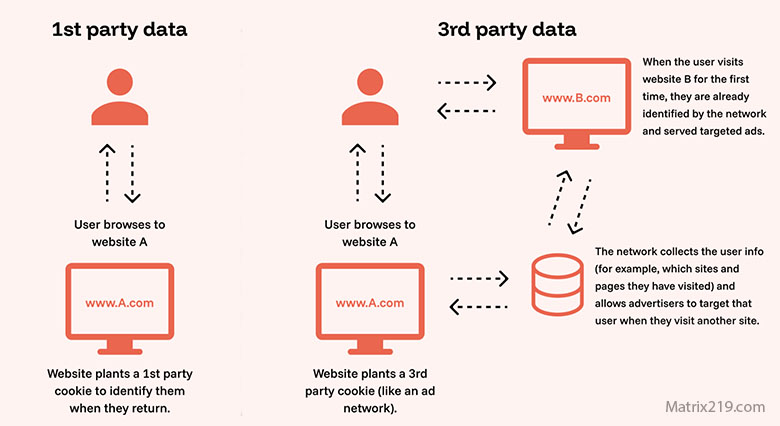
Cross-site tracking becomes possible when the same third-party service can recognize or associate activity across multiple websites.
Historically, third-party cookies were one important mechanism for this. A third-party resource embedded on multiple websites could potentially access a shared identifier and use it to connect visits.
Modern browsers increasingly restrict this behavior. Mozilla’s current documentation explains that browsers use different mechanisms to block or partition third-party cookies and other forms of cross-site storage. MDN: Third-party cookies
As a result, modern tracking systems cannot be understood simply as “third-party cookies following you around.” Tracking technologies and browser behavior have both evolved.
Social Media Trackers Outside Social Platforms
Social media platforms can provide website components such as sharing tools, embedded posts, login systems, advertising tags, and other integrations.
Depending on how these components are implemented, they may communicate with the social platform when the page loads or when a user interacts with the component.
The privacy impact therefore depends on the specific integration. A social sharing button, an embedded post, and an advertising pixel do not necessarily behave in exactly the same way.
The ICO provides an example in which a social media platform’s JavaScript code is added to a website to collect visitor information and identify visitors who are also members of that platform.
Social Media Trackers Outside Social Platforms
Why Third-Party Tracking Can Be Persistent
Third-party tracking can be persistent because websites may use several technologies at the same time. Blocking or limiting one identifier does not necessarily disable every other collection mechanism.
For example, a service may combine cookies with scripts, URL parameters, account information, server-side processing, or other identifiers. Some tracking techniques can also operate without relying on traditional third-party cookies.
Browser privacy protections have made some forms of cross-site tracking more difficult. However, the broader tracking ecosystem has continued to evolve alongside those restrictions.
Understanding the organizations involved in data collection provides useful context, as explained in Who Collects Your Data Online.
Third-Party Trackers and Browser Fingerprinting
Fingerprinting is another technique that can contribute to online tracking. Instead of depending entirely on a stored cookie, a service can analyze characteristics of a browser or device to help distinguish one environment from another.
Potential characteristics can include browser configuration, operating-system information, screen properties, and other technical signals.
Fingerprinting is not equivalent to third-party tracking, but it can be used as part of a broader tracking system, particularly when combined with other identifiers.
For a dedicated explanation of this technique, see Browser Fingerprinting Explained.
First-Party vs Third-Party Tracking
The distinction between first-party and third-party tracking is useful, but it should not be treated as a simple division between “safe” and “unsafe.”
First-party technologies are generally associated with the website the user is visiting, while third-party technologies originate from a different domain or service. However, first-party and third-party technologies can both collect information about users.
The ICO notes that the first-party and third-party labels do not by themselves determine the privacy implications. The purpose of the technology and who is responsible for the storage or access are more important considerations.
A first-party analytics system can still collect detailed information, while a third-party service may provide legitimate functionality without being used for tracking.
Are Third-Party Trackers Still Effective With Modern Browsers?
Some traditional forms of third-party tracking have become less effective because browsers now restrict or partition third-party storage in different ways.
For example, Firefox provides tracking protection and state partitioning, while other browsers use their own approaches to limiting cross-site identifiers.
This does not mean that all third-party tracking has disappeared. Modern tracking can use different technologies and may also rely on first-party systems, account identifiers, server-side processing, or other signals.
The result is a more complicated privacy landscape rather than the complete disappearance of tracking.
How Third-Party Tracking Affects Privacy
The privacy impact depends on what information is collected, why it is collected, how long it is retained, whether it is combined with other information, and who receives it.
A single analytics event may reveal relatively little by itself. Repeated events collected across many visits can become much more informative when they are connected to an identifier or account.
The potential concern is therefore not simply that a request was made to another server. It is the larger picture created when information is repeatedly collected, associated, and analyzed.
How to Reduce Exposure to Third-Party Trackers
Users cannot realistically eliminate every third-party request from the modern web without breaking some websites and services. A more practical goal is to reduce unnecessary tracking while preserving normal functionality.
- Use browsers with built-in tracking protection.
- Review browser privacy and cookie settings.
- Use reputable content or tracker-blocking extensions when appropriate.
- Limit unnecessary third-party scripts and embedded services.
- Review permissions and privacy settings for apps and connected services.
- Consider separating logged-in and general browsing contexts.
- Review account personalization and advertising controls.
- Be cautious about accepting unnecessary tracking technologies.
For a broader practical strategy, see How to Stop Online Tracking.
Why Blocking One Tracker Does Not Stop All Tracking
Online tracking is not controlled by one universal system. A page can contain multiple external services, and different services can use different technologies.
Blocking third-party cookies may reduce one tracking method while leaving other mechanisms available. Likewise, blocking a particular advertising domain does not necessarily block analytics, social integrations, or first-party collection.
This is why privacy protection works best as a layered approach rather than a search for one tool that promises complete anonymity.
FAQ
Do third-party trackers always know who I am?
No. A tracker may initially see technical or behavioral information without knowing the user’s real-world identity. However, identifiers, account information, or data obtained from other sources can sometimes make activity easier to associate with a particular user.
Are all third-party website components trackers?
No. Websites use third-party services for many legitimate purposes, including hosting content, payments, maps, video, security, customer support, and other functionality. A third-party service becomes a tracking concern when it is used to collect or associate information about users for tracking or profiling purposes.
Can third-party trackers work without cookies?
Yes. Tracking can involve scripts, pixels, URL parameters, fingerprinting, first-party identifiers, account information, server-side systems, and other techniques. Cookies are only one part of the broader tracking ecosystem.
Do ad blockers stop all third-party tracking?
No. They can significantly reduce exposure to known advertising and tracking resources, but no single blocking tool guarantees that every form of tracking will be prevented.
Are first-party trackers safer than third-party trackers?
Not automatically. First-party and third-party describe different technical relationships. The more important questions are what information is collected, why it is collected, how it is used, and whether it is shared with other parties.
Can third-party tracking be completely eliminated?
Not while maintaining unrestricted access to every modern website and online service. Users can reduce exposure substantially through browser privacy controls, tracker blocking, careful account use, and selective permissions, but complete anonymity is a different and much harder goal.