Can Antivirus Apps Detect Mobile Spyware is a common question driven by fear, marketing claims, and mixed user experiences. Many antivirus apps promise full protection, yet users still report spyware surviving scans or operating unnoticed.
The reality sits between extremes. Antivirus tools can help—but only within specific limits. Understanding what they can and cannot do is essential to avoid false confidence and ineffective protection.
This article explains how mobile antivirus apps work, where they succeed, where they fail, and how to use them as part of a realistic spyware detection strategy.
How Mobile Antivirus Apps Work
Mobile antivirus apps primarily rely on signature-based detection. They compare installed apps and files against known malware databases.
Some also use heuristic analysis to flag suspicious behavior patterns, such as excessive permission use or abnormal background activity.
These methods are effective against known threats, especially consumer-grade spyware that has been previously identified.
What Antivirus Apps Detect Well
Antivirus apps perform best at detecting:
-
Known stalker ware and commercial spyware variants
-
Malicious apps with recognizable code signatures
-
Trojans embedded in fake utilities or cracked apps
They also help surface potentially unwanted apps that users may have forgotten or ignored.
For users who install apps frequently, antivirus tools add a useful visibility layer.
Where Antivirus Apps Fall Short
Antivirus apps struggle with:
-
New or modified spyware variants
-
Apps abusing legitimate permissions without malicious code
-
System-level monitoring using profiles or admin access
-
Account-based surveillance that does not involve local malware
Spyware that operates “within the rules” often bypasses antivirus detection entirely.
This is why spyware detection cannot rely on scans alone.
Antivirus Apps vs Permission Abuse
Many spyware tools do not contain classic malware code. Instead, they exploit permissions such as accessibility access, device admin, and notification access.
Antivirus apps may flag the app as “safe” while the permission configuration remains dangerous.
This gap explains why users feel protected while surveillance continues.
Understanding permission abuse is critical, as explained in: Spyware Permissions Explained
iPhone Antivirus Limitations
On iPhones, antivirus apps have limited visibility by design. They cannot scan system processes or other apps in depth.
Most iOS security apps focus on network monitoring, phishing detection, and account safety—not spyware removal.
As a result, antivirus protection on iOS is fundamentally different from Android and should not be compared directly.
Android Antivirus Capabilities
Android antivirus apps have greater system access and can perform deeper scans. This makes them more useful for detecting stalkerware and sideloaded spyware.
However, deeper access does not equal guaranteed detection. Permission misuse and user-approved installs still bypass many checks.
Android users benefit more from antivirus—but only when combined with manual audits.
False Sense of Security Risk
The biggest danger of antivirus apps is psychological. Users may assume they are fully protected and stop reviewing permissions, apps, and settings.
Spyware thrives in environments where users stop questioning access and trust single tools blindly.
Antivirus apps should support awareness—not replace it.
How to Use Antivirus Apps Correctly
Antivirus tools work best when used as:
-
A periodic scanning aid
-
A visibility tool for forgotten apps
-
A secondary confirmation layer
They should not be treated as spyware-proof shields.
Combining antivirus scans with structured checks delivers better results.
For a step-by-step detection process, see: How to Check Your Phone for Spyware
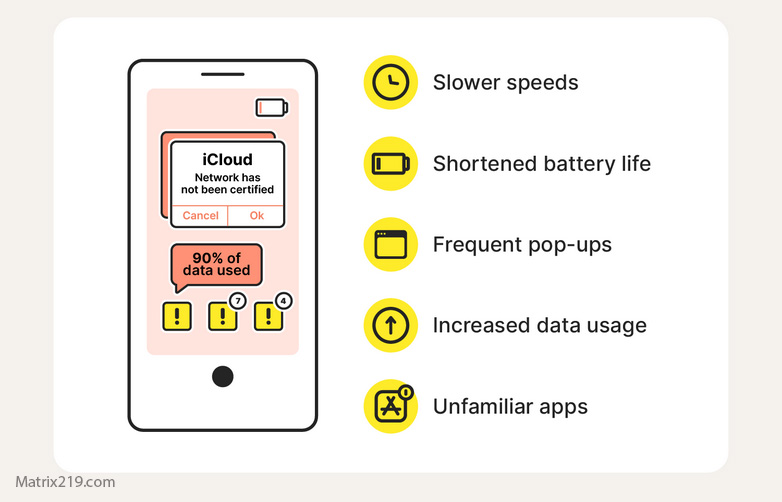
How to Check Your Phone for Spyware
When Antivirus Detection Is Not Enough
If signs of surveillance persist despite clean scans, the issue may involve:
-
Permission abuse
-
Account compromise
-
Configuration profiles
-
Physical access installation
These scenarios require manual investigation and behavioral changes rather than more scanning.
Understanding spyware installation paths helps clarify this, as explained in: How Mobile Spyware Gets Installed
FAQ
Do antivirus apps detect all mobile spyware?
No. They detect known threats, not all surveillance methods.
Are paid antivirus apps better than free ones?
Sometimes, but detection limits still apply.
Should I install multiple antivirus apps?
No. This creates conflicts and confusion.
Is antivirus useless on phones?
No, but it is limited and must be used correctly.
What matters more than antivirus?
Permissions, access control, and user awareness.