Mac users often assume that built-in security features are enough to protect their files, but this assumption breaks down once files are shared, synced, or stored outside the device. Free File Encryption Software for Mac is a common search in 2026 because users want persistent file-level protection without relying solely on system-wide safeguards or paid tools.
This article explains how free file encryption tools fit into the macOS ecosystem, what security guarantees they can realistically provide, and where their limitations appear. Rather than focusing on product names, the emphasis here is on behavior, compatibility, and risk awareness. By understanding how free encryption works on macOS, you can decide when it is sufficient—and when it becomes a weak link in your security setup.
Quick Navigation
Why Mac Users Still Need File-Level Encryption
Device Protection Does Not Travel With Files
macOS protects the device, but files lose that protection once they are copied or shared.
Cloud and Cross-Device Workflows
Mac users frequently sync files across multiple devices and platforms, increasing exposure.
Shared Environments and External Storage
Files moved to external drives or shared folders require independent protection.
This distinction is explained further in File Encryption vs Disk Encryption.
How Free Encryption Tools Integrate With macOS
Compatibility With Modern macOS Versions
Free tools must work reliably with recent macOS releases and system permissions.
File System and Permission Handling
Encryption software should respect macOS sandboxing and access controls.
Stability Across System Updates
macOS updates can break poorly maintained encryption tools without warning.
A foundational overview of encryption behavior is covered in How File Encryption Works (Beginner Friendly).
Security Features That Matter on Mac
Use of Standard Encryption Algorithms
Reliable tools rely on publicly reviewed algorithms rather than proprietary methods.
Local Key Ownership
Keys should be generated and stored locally, not synced or uploaded by default.
Predictable Decryption Behavior
Users should know exactly when files are decrypted and where plaintext may exist temporarily.
Algorithm fundamentals are explained in Common File Encryption Algorithms (AES, RSA, ChaCha20).
Common Types of Free File Encryption Tools on macOS
File and Folder Encryption Utilities
These tools encrypt individual files or folders directly.
Encrypted Containers and Volumes
Containers group files under one encryption boundary, simplifying management.
Portable and Cross-Platform Tools
Some free tools support macOS alongside other operating systems.
Understanding these categories helps users choose tools that match their workflow.
Advantages of Free Encryption Software on Mac
No Additional Cost
Free tools provide file-level protection without subscriptions.
Offline Encryption Support
Most free tools work entirely offline.
Cross-Platform File Sharing
Encrypted files can be shared securely with non-Mac systems.
Limitations Mac Users Should Consider
Limited Recovery Options
Free tools rarely offer key recovery or escrow features.
Manual Key Management
Users are fully responsible for key storage and backups.
Maintenance and Longevity Risks
Some free macOS tools are abandoned or updated infrequently.
These issues are commonly overlooked and discussed in Common File Encryption Mistakes to Avoid.
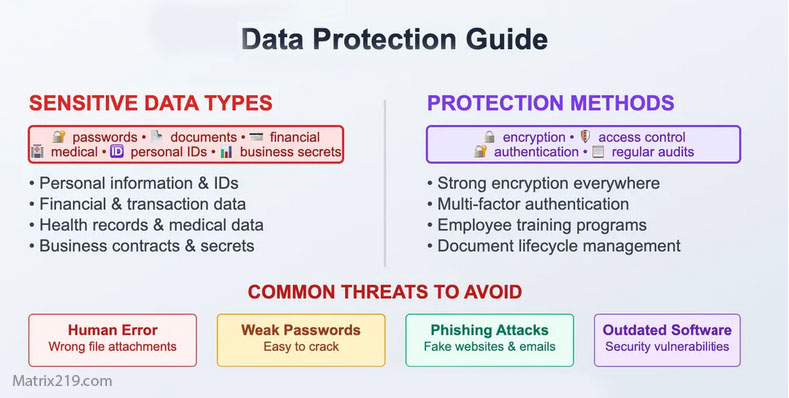
Common File Encryption Mistakes to Avoid
Using Free Encryption With iCloud and macOS Syncing
Encrypt Before Syncing
Files should always be encrypted locally before being uploaded to cloud services.
Temporary Files and Caching
Some tools may expose plaintext during processing or previews.
Cloud-related risks are explored in File Encryption for Cloud Storage.
When Free Encryption Tools Are a Good Fit on Mac
Personal Documents and Private Files
Free tools are often sufficient for individual use.
Learning and Testing Encryption Workflows
They help users understand encryption behavior safely.
Short-Term Protection Needs
Temporary encryption scenarios align well with free tools.
A broader comparison is available in Best Free File Encryption Software in 2026.
When Mac Users Should Avoid Free Tools
Business or Team-Based Use
Lack of access control and auditing increases risk.
Regulated or Legal Data
Compliance requirements usually exceed free tool capabilities.
Long-Term Encrypted Archives
Managing keys over long periods increases operational risk.
Professional requirements are covered in File Encryption Software for Business.
Security Standards and Expectations
Most reputable macOS encryption tools implement cryptography aligned with NIST encryption standards, ensuring accepted algorithms and key sizes are used appropriately.
Frequently Asked Questions (FAQ)
Does macOS already encrypt files?
macOS encrypts the device, but not individual files once they leave it.
Are free encryption tools compatible with new macOS updates?
Only if they are actively maintained.
Can encrypted files be shared with Windows users?
Yes, if compatible encryption formats are used.
What happens if I lose my encryption key?
In most cases, the encrypted file becomes permanently inaccessible.
Are free tools enough for professional work?
Usually not. Professional environments need stronger controls.