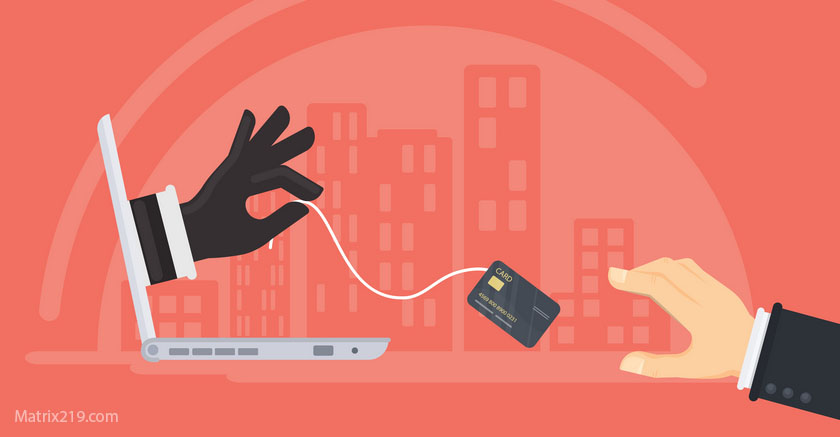
Tech Support Scams exploit fear and authority by pretending to fix problems that do not exist. In 2026, these scams are more convincing than ever, using professional language, real brand names, and believable technical explanations to push victims into granting access or making payments.
These scams succeed not because users are careless, but because the situations feel urgent and technical. When something appears “wrong” with a device or account, many people defer judgment to supposed experts.
This article explains how tech support scams operate, how fake warnings manipulate users, and how to shut them down before real damage occurs.
How Tech Support Scams Usually Start
Most tech support scams begin with an unsolicited alert.
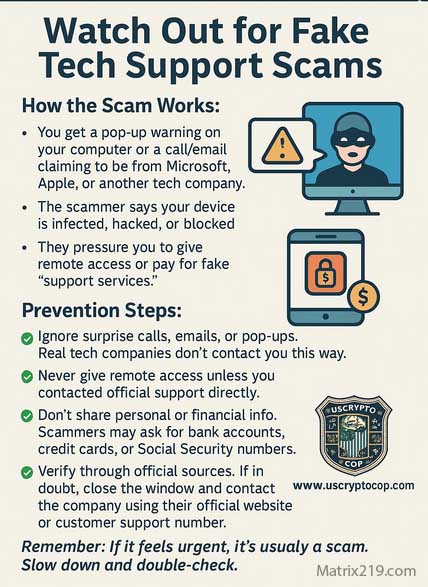
This may be a pop-up warning, phone call, email, or browser notification claiming malware infection, account compromise, or system failure. The message often uses alarming language and countdown-style urgency.
Fear replaces analysis.
Fake Pop-Ups and Browser Warnings
One of the most common entry points is a fake browser alert.
These pop-ups imitate operating system messages or antivirus warnings, claiming immediate danger. They often lock the screen or play warning sounds to prevent users from closing the page calmly.
The goal is not diagnosis—it is panic.
Cold Calls and Fake Help Desks
Some scams rely on phone calls from “support agents” claiming to represent major tech companies.
Callers sound professional, reference common issues, and guide victims through steps that appear legitimate. In reality, they are steering victims toward granting remote access.
Legitimacy is performed, not proven.
Remote Access as the Real Objective
Tech support scammers ultimately want control.
They ask victims to install remote access tools, share verification codes, or change security settings. Once access is granted, scammers can steal data, install malware, or initiate financial fraud.
The “fix” is the exploit.
Fake Diagnoses and Manufactured Evidence
To justify their claims, scammers fabricate evidence.
They may show fake system logs, harmless error messages, or normal background processes framed as threats. Victims unfamiliar with technical details trust the explanation.
Technical complexity becomes a weapon.
Payment Requests and Escalation
After establishing credibility, scammers demand payment.
They may request credit cards, gift cards, wire transfers, or crypto for “repairs,” “licenses,” or “extended protection.” Payment urgency increases once trust is established.
Real companies do not demand emergency payments this way.
Why Tech Support Scams Feel Convincing
These scams succeed because they mirror real support experiences.
Long wait times, scripted responses, and complex explanations are normal in legitimate support interactions. Scammers exploit this familiarity to blend in.
Normal friction becomes camouflage.
How to Shut Down Tech Support Scams Safely
The safest response is non-engagement.
Close the browser tab, hang up the call, and do not click links or install software. Restarting the device often clears fake alerts.
Verification should always happen independently through official websites or known contact methods.
How to Shut Down Tech Support Scams Safely
What To Do If You Gave Access or Paid
If access or payment occurred:
-
Disconnect the device from the internet
-
Remove remote access software
-
Change passwords from a trusted device
-
Contact financial institutions immediately
Early action limits damage.
Preventing Future Tech Support Scams
Effective prevention includes:
-
Blocking browser notifications from unknown sites
-
Using pop-up blockers
-
Educating users that real companies do not initiate support this way
-
Slowing down when technical fear appears
Calm beats competence in these scenarios.
Tech Support Scams in the Bigger Fraud Picture
Tech support scams often lead to account takeover, malware installation, or follow-up fraud.
Recognizing them early protects against cascading attacks.
For the complete fraud framework this article supports, see: Online Scams & Digital Fraud: How to Spot, Avoid, and Recover (2026 Guide)
FAQ
Do real companies ever show pop-up virus warnings?
No. Legitimate companies do not use browser pop-ups this way.
Can scammers really sound professional?
Yes. Many are trained and scripted.
Is remote access always dangerous?
Yes, when initiated by unsolicited support.
Why do scammers ask for gift cards?
They are hard to trace and reverse.
Should I report tech support scams?
Yes. Reporting helps disrupt campaigns.