Windows remains the most widely used desktop operating system, which also makes it a primary target for data theft, malware, and unauthorized access. As a result, many users actively search for Free File Encryption Software for Windows to protect personal documents, work files, and backups without paying for subscriptions. In 2026, this demand is driven not only by cost concerns, but by the need for tools that integrate smoothly with modern Windows systems while remaining transparent and reliable.
This article explains what Windows users should realistically expect from free file encryption tools, which security features matter most on this platform, and where common limitations appear. Rather than listing products, the focus is on evaluation criteria, real-world usage, and risk awareness—so you can decide whether a free Windows-based solution is sufficient for your files or merely a temporary compromise.
Quick Navigation
Why Windows Users Need File-Level Encryption
Windows Is a High-Value Target
Its popularity makes it a frequent focus of malware, ransomware, and credential theft.
Device Encryption Is Not Always Enough
Built-in protection secures the device, but not files once they are copied, shared, or uploaded.
File Mobility Increases Risk
Windows users frequently move files between USB drives, email, and cloud services.
A broader context is explained in File Encryption vs Disk Encryption.
What to Expect From Free Encryption Tools on Windows
Compatibility With Modern Windows Versions
Tools should work reliably on current Windows builds without legacy dependencies.
Local Encryption and Decryption
Encryption should occur entirely on the local system, without cloud-based key storage.
Simple File and Folder Support
Free tools usually focus on encrypting files or folders rather than full management systems.
A foundation for how these tools operate is covered in How File Encryption Works (Beginner Friendly).
Core Security Features That Matter on Windows
Strong Standard Algorithms
Free Windows tools should rely on trusted algorithms rather than proprietary methods.
User-Controlled Keys and Passwords
Keys must remain under user control, not embedded in the software or vendor services.
No Forced Online Accounts
Local file encryption should not require registration or online activation.
Algorithm basics are explained in Common File Encryption Algorithms (AES, RSA, ChaCha20).
Typical Types of Free Windows File Encryption Software
File and Folder Encryption Utilities
These tools encrypt selected files directly through the Windows interface.
Encrypted Containers and Archives
Some tools create encrypted volumes that act like virtual drives.
Command-Line Encryption Tools
Preferred by advanced users who value automation and scripting.
Understanding these approaches helps avoid misuse and false assumptions.
Advantages of Using Free Encryption Tools on Windows
Zero Cost for Personal Protection
Free tools remove financial barriers for individual users.
Offline Operation
Most free tools work without internet access, reducing exposure.
Flexibility and Portability
Encrypted files can be moved between Windows systems securely.
Limitations Windows Users Should Be Aware Of
No Centralized Oversight
Free tools lack auditing, logging, and access policies.
Higher Risk of Key Loss
Without recovery features, losing keys often means losing data permanently.
Inconsistent Maintenance
Some Windows tools are updated irregularly, increasing long-term risk.
These issues are commonly overlooked and detailed in Common File Encryption Mistakes to Avoid.
Free File Encryption and Windows Cloud Usage
Encrypt Before Using Cloud Services
Files should be encrypted locally before being synced or uploaded.
Cloud Services Cannot Recover Keys
If keys are lost, cloud providers cannot help restore access.
Cloud-related risks are discussed in File Encryption for Cloud Storage.
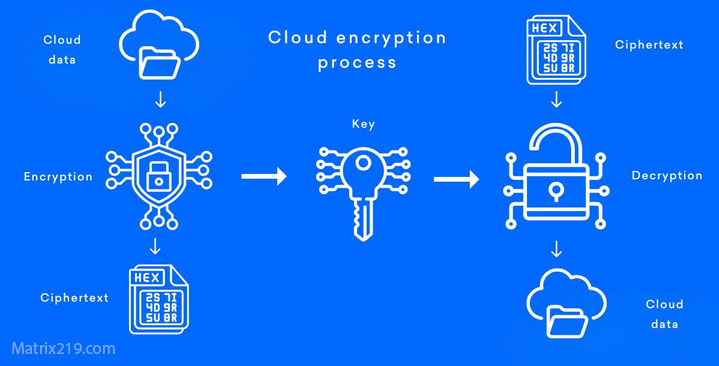
File Encryption for Cloud Storage
When Free Windows Encryption Tools Are a Good Fit
Personal Documents and Local Backups
Free tools are often sufficient for individual, low-risk data.
Temporary or Short-Term Use
They can work well when encryption needs are limited in scope.
Learning and Testing
Free tools help users understand encryption before committing to paid solutions.
A broader decision framework is outlined in Best Free File Encryption Software in 2026.
When Windows Users Should Consider Paid Solutions
Business or Team Environments
Multiple users and shared files require access control and logging.
Regulatory or Legal Requirements
Compliance often exceeds what free tools can provide.
Long-Term Data Retention
Managing encrypted archives over years increases operational risk.
Professional use cases are covered in File Encryption Software for Business.
Standards and Security Expectations
Most reliable Windows encryption tools implement cryptography aligned with NIST encryption standards, ensuring accepted key sizes and proven algorithms are used.
Frequently Asked Questions (FAQ)
Is free file encryption safe on Windows?
It can be, if the tool is reputable, updated, and used correctly.
Does Windows already encrypt files by default?
Not at the file level. Additional tools are required for persistent file protection.
Can encrypted files be shared between Windows PCs?
Yes, as long as the receiving system supports the same encryption method and keys.
What happens if I forget the encryption password?
In most cases, access to the encrypted file is permanently lost.
Are free tools enough for sensitive business data?
Usually not. Business environments need stronger controls and recovery options.